The 10 Best Restaurant Payroll Software to Simplify Pay, Tips, and Compliance
Payroll in restaurants comes with unique challenges. Between hourly staff, tipped employees, and multiple locations, small mistakes can quickly lead to late paychecks, tax issues, or frustrated employees. That’s why reliable restaurant payroll software is essential.
This guide will walk you through what to look for in a system designed for restaurants, including handling and tracking tips, managing multiple locations, and staying compliant with tax rules. By the end, you’ll have practical tips to choose a payroll solution that works for your team.
The best restaurant payroll software of 2026
| Platform | Best for | Key features | Pricing |
| Paylocity | Simplifying HCM for restaurants |
|
Custom |
| Gusto | Independent restaurants |
|
|
| Homebase | Hourly teams |
|
|
| 7shifts | Tip pooling |
|
|
| Toast | Native Toast POS integration |
|
|
| Square Payroll | Affordable flat pricing |
|
|
| Restaurant365 | Payroll reporting |
|
Custom |
| ADP RUN | Small restaurants |
|
Custom |
| Push Operations | Automating seasonal staff pay |
|
Custom |
| Quickbooks Payroll | QuickBooks accounting integration |
|
|
1. Paylocity

Best for: Simplifying HCM for restaurants
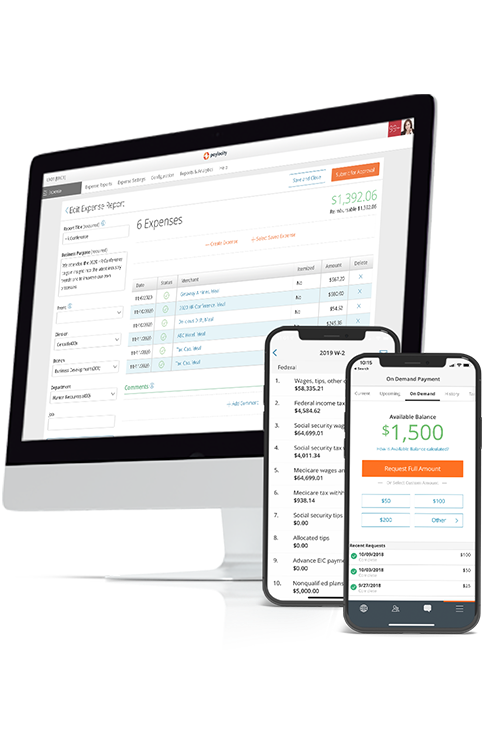
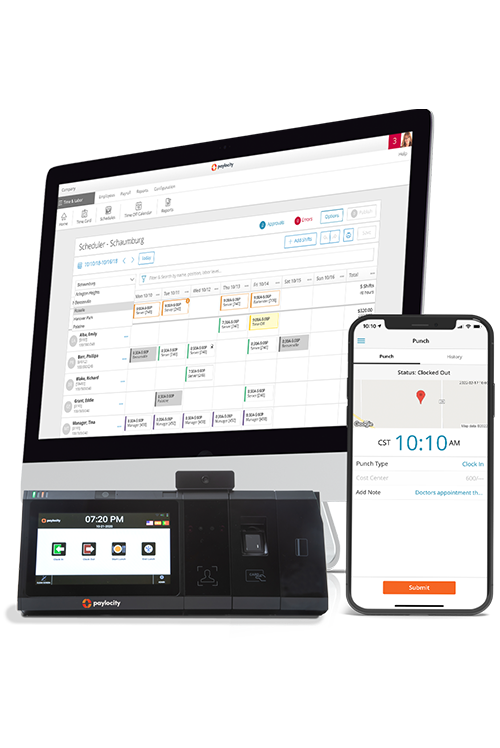
Paylocity provides a mobile-first payroll and HR ecosystem built for fast-paced restaurant operations. It replaces manual paperwork with an employee-friendly mobile app rated 4.8 stars, making it easier for staff to clock in, manage schedules, and access pay information without manager follow-ups.
The platform handles shift scheduling, reducing errors caused by disconnected tools. This integration lets managers handle onboarding, time tracking, and payroll directly from the floor instead of being tied to the back office.
Each Paylocity partnership includes a tailored implementation plan supported by a U.S.-based team with hospitality experience. These specialists understand front- and back-of-house workflows and help restaurants stay compliant with wage, tip, and labor regulations from day one.
Key features:
- Direct deposit: Delivers secure, automated electronic payments directly to employee bank accounts to eliminate the logistics of paper checks.
- Mobile app: View pay stubs, access earned wages early, track approvals, and redeem Reward Bucks for cash or gift cards, all from the phone.
- Dedicated tax support: As an IRS-registered reporting agent, handles all federal, state, and local filings while assuming liability for accuracy in the event of a Paylocity error.
- Payroll auditing and error reporting: Catches inaccuracies instantly with a Readiness Dashboard and over 40 automated audits that flag issues before you process.
- In-depth payroll reports: Access over 200 customizable templates to gain real-time visibility into labor costs, turnover, and FICA tip credits.
Pricing: Custom
?ts=1767882597017&$ProductTIleImage$&dpr=off)
2. Gusto

Best for: Best for independent restaurants
Gusto offers a restaurant payroll system designed to handle common industry requirements like tipped wages, tip credits, overtime rules, and multiple pay rates per employee.
It includes built-in support for federal, state, and local tax calculations and filings, along with compliance considerations tied to FICA and FLSA. The platform combines payroll with integrated time tracking that supports different roles, schedules, and locations, and it connects with tools such as 7Shifts and Upserve.
Despite some good features, Gusto users report slow login times that can disrupt workflow, occasional extra steps when editing hours, and that estimated pay isn’t visible until after payday.G2 - Gusto
Key features:
- Automated payroll and tax filing: Gusto automatically calculates, pays, and files all local, state, and federal payroll taxes with every run.
- Flexible payroll runs: Operators can execute unlimited payroll cycles, including bonuses and off-cycle payments, at no extra cost.
- Support for multiple payment types: The platform handles varied pay rates for staff working multiple roles and supports direct deposit, checks, or prepaid debit cards.
Pricing:Gusto - Pricing
- Simple: $49/mo
- Plus: $80/mo
- Premium: $180/mo
3. Homebase

Best for: Best for hourly teams
Homebase provides scheduling, time tracking, and restaurant payroll in a single system. It automatically pulls in hours, tips, breaks, and overtime from time clocks and schedules, then calculates wages, taxes, and PTO in line with labor laws and FLSA rules.
The platform supports full-service payroll with tax filing and payments, direct deposit, W-2s and 1099s, wage garnishments, and unlimited payroll runs.
Some Homebase users report occasional login delays, including slower-than-expected face recognition. Some also experience challenges with customer support, particularly when resolving payroll issues, and note that corrective processes can be slow or confusing.G2 - Homebase
Key features:
- Geofence-enabled time tracking tied to payroll: Homebase’s time clocks can verify where employees clock in/out (within a defined radius), helping reduce time theft and ensuring the hours that feed into payroll are accurate.
- Multi-location and multi-rate payroll: Centralizes payroll for businesses with multiple sites under one FEIN, automatically applying different pay rates when employees switch between roles like serving and hosting.
- Automatic tip import and distribution: Pulls tips directly from your POS (e.g., Square, Clover, Toast) and allocates them across your team based on hours worked, eliminating manual tip math and helping with accurate tip reporting on W-2s.
Pricing:Homebase - Pricing
- Core: $49/mo
- Grow: $99/mo
- Scale: $129/mo
4. 7shifts

Best for: Tip pooling
7shifts offers a restaurant payroll module to centralize hourly employee data. The system is designed to bridge the gap between scheduled shifts and final paychecks by pulling hours directly from its own time-tracking tool or a connected POS system. It serves as a middle-ground solution for managers who prefer to handle scheduling and payroll in a single dashboard, reducing manual data transfers.
7shifts users note limited support during onboarding and difficulty quickly accessing certain features, such as payroll, with some actions requiring scheduled demos rather than online self-service.G2 - 7shifts
Key features:
- Multi-EIN payroll support and same-day wire option: For businesses with multiple legal entities, 7shifts can manage payroll by EIN under a single account, with an in-product same-day wire transfer option.
- Built-in restaurant compliance calculations: The platform includes calculators for tip credits and minimum wage top-ups, along with prompts for break attestation to assist with basic labor law documentation.
- Direct Payroll Integrations: 7shifts maintains API connections with several third-party POS systems and external payroll processors to facilitate the export of verified timesheet data.
Pricing:7shifts - Pricing
- Free plan
- Essentials: $39.99/mo
- Pro: $79.99/mo
- Premium: $134.99/mo
5. Toast

Best for: Native Toast POS integration
Toast is designed to function as an extension of the Toast POS ecosystem, specifically for restaurants already utilizing their hardware. Its payroll software for restaurants automates data flow from the front-of-house to the back office, syncing employee timecards and tip information directly into the payroll system to reduce manual entry.
While effective for operators within the Toast environment, it is structured primarily as an add-on service to support shift-based labor management and restaurant-specific tax compliance.
Some consumers report mixed experiences with the platform, particularly around customer service. Reviewers note challenges with support responsiveness and issue resolution, concerns about hardware costs and update communication, and limitations in adapting the system to unique business needs.Trustpilot - Toast
Key features:
- Toast PayOut for instant wages: Employees can access up to 100% of their earned tips and a portion of their wages immediately after a shift via the Toast Pay Card.
- Automated tip sync: Tip data recorded at the POS — including credit card tips and pooled amounts — syncs instantly with the payroll module.
- POS-linked labor compliance: The system uses integrated time-clock data to monitor restaurant-specific labor laws, such as overtime thresholds and break requirements, directly from the terminal.
Pricing:Toast - Pricing
- Starter Kit: Free
- Point of Sale: $69.99/mo
- Build Your Own: Custom
6. Square Payroll

Best for: Affordable flat pricing
Square Payroll is a full-service payroll solution that automates the basics of paying your team and managing taxes, with support for hourly and salaried employees as well as contractors. It integrates with Square POS and the Square Team app so you can import timecards and tips directly into payroll, run unlimited payrolls, and choose how to pay (direct deposit, check, or Cash App).
Square also supports flexible pay schedules and can run payroll in multiple U.S. states without extra fees, which can simplify operations for restaurants already using the Square ecosystem.
Some users note that the platform’s time-tracking and payroll features may be less intuitive for salaried staff, seasonal workers, or non-standard pay schedules, and certain industry-specific filings (like IRS 943 for farms) aren’t supported.G2 - Square Payroll
Key features:
- Contractor-only plan: Square lets you run payroll for contractors only, with no monthly base charge, so you only pay per contractor.
- Payments via Cash App: Employees who link a Cash App account can receive their direct deposits up to two days earlier than with traditional bank transfers.
- Integration with Square’s POS: The payroll module pulls live labor data directly from the POS, automatically applying multiple pay rates for employees who work different roles, such as server or bartender.
Pricing:Square Payroll - Pricing
- Full service payroll: $35/mo
- Contractor only payroll: $6/mo
7. Restaurant365

Best for: Payroll reporting
Restaurant365 is a restaurant-focused operations platform that combines payroll with accounting, POS data, labor management, and reporting in one system. This means that the worked hours, wages, tips, and tax calculations flow automatically from your POS into payroll and the general ledger, reducing manual entry and errors.
It supports multi-location operations from a single dashboard and integrates payroll with scheduling and labor cost data, giving operators real-time visibility into labor expenses alongside other financials.
Some users note challenges with Restaurant365’s payroll integrations, which may not operate as seamlessly as anticipated, and highlight that implementation can be time-intensive to ensure smooth adoption across both store and corporate teams.G2 - Restaurants365
Key features:
- Daily pay option: Employees can receive payment on the same day they work rather than waiting for a traditional pay period, helping with retention and cash flow flexibility.
- Real-time labor accounting: Every pay run automatically posts journal entries to your accounting system, allowing you to see your fully burdened labor costs.
- Integrated prime cost controls: Automates recipe costing and purchase orders while reconciling vendor invoices to help you manage your "prime cost" (combined food and labor) within a single dashboard
Pricing: Custom
8. ADP RUN

Best for: Small restaurants
RUN Powered by ADP is a widely recognized payroll and HR platform tailored for small-to-midsized businesses, including those in the hospitality sector.
The platform provides standardized infrastructure for processing payments and managing taxes across various jurisdictions. While it offers a restaurant-specific bundle that includes tip tracking and multiple pay rates, people primarily choose it for its ability to scale into ADP's larger enterprise ecosystems as a restaurant group grows.
ADP users report a range of experiences, with some challenges reported around customer support, payment processes, and communication. Reviews often note login and password issues, verification delays, longer-than-expected wait times for assistance, and occasional contract-related complexities.Trustpilot - ADP
Key features:
- Automated "RUN & DONE" for recurring payroll: Operators can put payroll on "autopilot" for salaried employees or hourly staff with consistent schedules, automatically triggering the pay run on a set frequency.
- Multi-jurisdiction tax Filing and compliance: Calculates, deducts, and pays federal, state, and local payroll taxes across all 50 states, assuming liability for the accuracy of the filings.
- Built-in general ledger interface: The platform allows users to map payroll items directly to their existing Chart of Accounts, facilitating a digital export of payroll data to accounting software, such as QuickBooks or Sage.
Pricing: Custom
9. Push Operations

Best for: Automating seasonal staff pay
Push Operations’ payroll offering is built into its restaurant workforce management platform and focuses on reducing manual work and ensuring clean data flow from time tracking to pay.
Hours tracked through Push’s scheduling and clock-in tools feed directly into payroll so managers can run payroll with a single click and automated calculations for hourly pay, holiday pay, premiums, tips, and taxes.
Some users find specific features in Push Operations cumbersome or slow, including schedule layout, logbook access, and adding or updating positions. Others note limitations with job postings, mobile punch-in/out functionality, and response times for support or system updates.G2 - Push Operations
Key features:
- Automated tip credit: The platform monitors employee earnings in real time to ensure they meet minimum wage requirements, automatically applying tip credit "top-ups" as needed to maintain legal compliance.
- Integration with TipHaus: Allows managers to sync automated tip pooling and distribution data directly into the payroll run with one click.
- Automatic statutory holiday pay calculations: Tracks federally and provincially/statutorily observed holidays and automatically calculates the correct premium pay based on an employee’s eligibility and average daily wage.
Pricing: Custom
10. QuickBooks Payroll

Best for: QuickBooks accounting integration
QuickBooks Payroll is a full-service payroll solution that lets businesses run payroll, handle tax calculations and filings, and pay employees via direct deposit or check, all from within the QuickBooks platform, with options to automate regular payroll runs so you can schedule and forget it once set up.
Plans integrate built-in time tracking through QuickBooks Time to pull hours straight into payroll runs, and higher-tier plans add same-day direct deposit, HR support, expert setup review, and payroll tax penalty protection up to a set limit.
QuickBooks Payroll users report occasional unexpected account deactivations, which can make accessing documentation and resolving issues time-consuming, sometimes requiring extended support interactions.G2 - QuickBooks Payroll
Key features:
- Native integration with QuickBooks time: Employees can clock in and out via a mobile app or kiosk, with approved hours and overtime syncing instantly to the payroll module.
- Tax penalty protection: For users on the Elite plan, QuickBooks provides a guarantee to help resolve tax notices and will reimburse up to $25,00015 annually in penalties and interest resulting from filing errors.
- Pay-as-you-go workers’ compensation: Instead of paying a large estimated annual premium upfront, this feature calculates exact premiums based on actual payroll data during each pay run.
Pricing:QuickBooks - Pricing
- Simple Start: $38/mo
- Essentials: $75/mo
- Plus: $115/mo
- Advanced: $275/mo
Features to look for in a restaurant payroll software
The best software gives managers and employees clear tools to handle pay accurately. This section highlights the key features that make restaurant payroll management smoother, from POS integration to reporting.
- POS and time‑clock integration: Pull hours, sales, and tips directly from your POS and time‑clock systems so payroll is accurate and up to date without manual entry.
- Automated tax filing and compliance: Automatically calculate and file federal, state, and local taxes while staying compliant with labor laws, including tipped employee regulations.
- Tip tracking and distribution support: Track tips, apply tip pooling rules, and distribute tips correctly, simplifying payroll and ensuring tax accuracy.
- Flexible pay runs: Offer weekly, biweekly, or on-demand pay runs so employees are paid on time without extra admin work.
- Accurate overtime and labor rules handling: Automatically calculate overtime, shift differentials, and location-specific labor rules to reduce errors and keep pay compliant.
- Employee self‑service: Let employees view pay stubs, update info, request time off, and track tips and overtime, reducing questions for managers.
- Payroll reporting: Get clear insights into labor costs, payroll trends, and staffing efficiency to make smarter scheduling and budgeting decisions.
Take control of payroll and compliance with Paylocity
Paylocity brings payroll, compliance, and reporting into one configurable system designed to reduce errors and manual work. Teams can tailor check types, accruals, and general ledger mapping to match their pay structure, while built-in review tools help catch issues before payroll is processed.
Paylocity uses automated audits, readiness checks, and variance tracking to improve paycheck accuracy and reduce last-minute fixes. Our platform connects payroll to real-time labor data and automates tax calculations and filings, helping teams run consistent pay cycles and stay compliant as they grow.
Explore Paylocity Payroll to see how it runs pay, handles taxes, and manages reporting — or check out Paylocity Time & Labor to see how hours and schedules feed straight into payroll.
Restaurant payroll software FAQ
Choosing a payroll system for restaurants comes down to how well it handles tips, taxes, and the operational realities of running a restaurant. Below are answers to common questions operators have when comparing tools and deciding what to prioritize.
What is the best payroll software for tip pooling and tipouts?
The best options are restaurant payroll companies that can automatically pull tip data from your POS, apply customizable pooling or tip-out rules, and push those calculations straight into payroll. This reduces manual math, helps avoid under- or over-paying staff, and keeps tip reporting accurate for tax purposes.
Which payroll solutions work best for multi-location restaurants?
Multi-location restaurants benefit from payroll systems that support multiple locations, pay rates, and tax jurisdictions under one account. Look for software that centralizes reporting while still applying location-specific labor laws, schedules, and approval workflows.
How do I handle tax reporting for tipped employees?
Restaurant payroll software should automatically calculate tip income, employer payroll taxes, and any applicable credits, then file the required federal, state, and local tax forms on your behalf. This includes handling tip-related reporting so earnings are reflected correctly on pay stubs and year-end tax documents.
Which software is best for restaurant billing?
The best billing and payroll setups are typically platforms that integrate payroll with POS, time tracking, and accounting. This keeps labor costs, payroll expenses, and financial records in sync, making it easier to track profitability and reduce reconciliation work.
Run payroll faster and smoother with Paylocity
Choosing the right enterprise payroll system can transform how large organizations manage payroll. The best payroll software for large businesses simplifies complex calculations, reduces errors, and keeps your teams focused on strategic priorities rather than administrative work. To see how a solution like this fits into your operations, explore Paylocity’s features for enterprise payroll.
Request a Demo Today!
Learn more about Paylocity’s workforce management tools. Explore how Paylocity supports modern people operations across your organization.