Top 10 Best Payroll Software Solutions for Large Businesses 2026
Managing payroll for a large workforce can be a nightmare with an outdated system. Manual calculations, payroll compliance, and scattered data across systems can slow operations and create costly errors. That’s why investing in the best payroll software for large businesses is essential.
The right solution automates payroll runs, handles complex calculations, and files taxes accurately, all while syncing with time tracking, scheduling, benefits, and HR data. In this post, we’ll highlight 10 of the best payroll software for large businesses that help enterprises save time, reduce mistakes, and make payroll one less thing to worry about.
Best payroll software for large businesses in 2026
The table below highlights some of the top payroll solutions for large enterprises, showcasing key payroll software features, pricing, and their use cases. These options are not listed in any particular order, so you can focus on the functionality that best fits your organization’s needs.
| Platform | Best for | Key features | Pricing |
| Paylocity | All-in-one HR, payroll, and expense management |
|
Custom pricing with free demo |
| ADP Lyric | Large enterprises with complex, multi-state payroll |
|
Custom |
| Workday HCM | Unified system for HR and payroll with real‑time visibility |
|
Custom |
| Dayforce | Real-time payroll with continuous calculations |
|
Custom |
| Paycom | Integrated workflow approvals |
|
Custom |
| Deel | Global payroll and EOR hiring |
|
|
| UKG Pro | Scheduling and labor analytics |
|
Custom |
| Oracle HCM | Retroactive payments |
|
Custom |
| Paycor | Integrated payroll system with automation and reporting capabilities |
|
Custom |
| SAP SuccessFactors |
Outsourced payroll management |
|
Custom |
1. Paylocity

Best for: All-in-one HR, payroll, and expense management
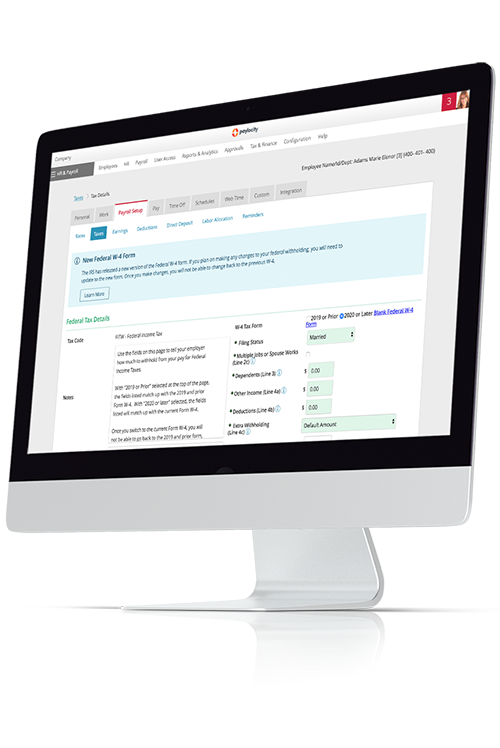
Paylocity is a unified payroll platform designed to automate complex administrative tasks and ensure multi-state compliance. The system features a Payroll Readiness Dashboard that runs over 40 real-time audits to catch errors, such as missing tax IDs or unusual pay spikes, before disbursing funds.
It also automates federal, state, and local tax filings while providing specialized services for wage garnishments and global payroll across more than 100 countries.
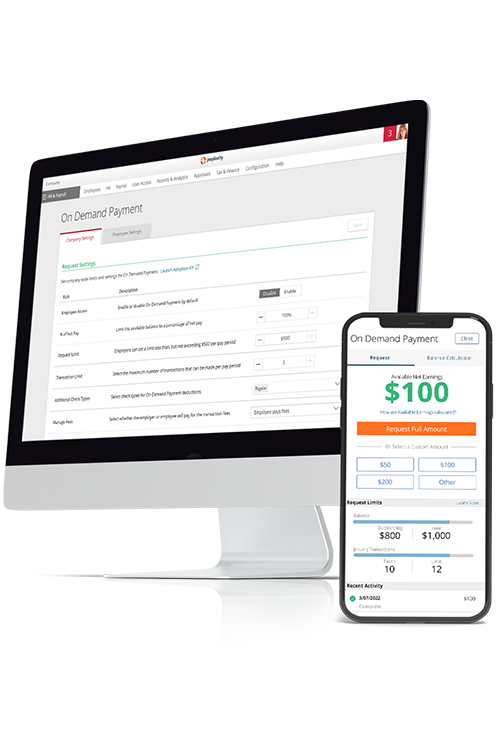
The platform prioritizes employee accessibility through a mobile-first self-service portal and on-demand pay. This allows workers to access earned wages before the scheduled payday, reducing financial stress without impacting employer cash flow.
Key features:
- Time and labor sync into payroll: Approved hours, overtime, and premiums from your time-tracking system flow directly into payroll. This cuts out manual data entry and helps prevent errors during the pay cycle.
- Touchless expense reports: Generative AI automatically parses receipt data and populates expense fields, including the expense reason for immediate employee review and submission.
- Guided error checks and compliance: The system's AI Assistant cross-references every submission against company policy handbooks in real time, flagging non-compliant spend or missing documentation.
- Employee self-service for paystubs, earned wage access, W-2s, and PTO: Through a mobile-friendly portal, employees can view paystubs, download tax forms, and check PTO balances anytime.
- Intuitive, guided GL experience: Payroll data is mapped to your general ledger through a structured workflow. Automated journal entries sync with accounting software, simplifying earnings, taxes, and deductions, ensuring financial statements remain accurate.
- Easily connect to other business systems: Pre-built integrations and APIs link payroll with ERP, benefits, and 401(k) platforms. Data flows instantly between systems, eliminating manual uploads and keeping everything up to date.
Pricing: Custom pricing available with the free demo
?ts=1767882597017&$ProductTIleImage$&dpr=off)
2. ADP Lyric

Best for: Large enterprises with complex, multi-state payroll
ADP Lyric is built for large, complex enterprises that need payroll and compliance support across multiple states and jurisdictions. It centralizes payroll, HR, and compliance data on a unified platform designed to handle scale, regulatory complexity, and frequent change. The system automates core functions, including wage calculations, direct deposits, and federal, state, and local tax filings.
It also manages administrative complexities, such as wage garnishments and unemployment insurance, across multiple jurisdictions. For organizations with a global footprint, ADP provides a unified framework to manage payroll and local compliance for employees in over 140 countries.ADP - Payroll
ADP offers comprehensive payroll services, but some users report challenges with support and ongoing issue resolution, noting that they often handle much of the process themselves.Trustpilot
Key features:
- Multi‑state and global payroll compliance support: Lyric’s payroll capabilities include scalable processing with built‑in tax and regulatory compliance for complex, multi‑jurisdiction payroll environments.
- ADP DataCloud benchmarking: This tool uses anonymized data from millions of workers to give companies a clear picture of how they stack up. Compares compensation, turnover, and overtime rates against real-time industry and regional standards.
- Advanced reporting and controls: Offers over 200 standard reports and customizable dashboards for managing multi-state taxes.ADP Payroll Review
Pricing: Custom
3. Workday HCM

Best for: Unified system for HR and payroll with real‑time visibility
Workday HCM Payroll runs on a single cloud system that keeps HR, finance, and compensation data in sync. When something changes in HR — like a new hire, promotion, or benefits update — it automatically flows straight into payroll, without file uploads or duplicate entries.
For global teams, Workday follows a “Global Payroll Cloud” approach. It runs payroll directly in countries like the U.S., Canada, the UK, and France, and relies on a certified partner network to support payroll in 180+ additional countries.Global Payroll Management
While Workday provides a unified platform for HR and payroll, some users report that the web interface can feel sluggish, particularly during peak periods such as payroll cutoffs or performance review cycles. Loading spinners appear frequently when switching between modules, and for a cloud-based platform, responsiveness isn’t as snappy as modern SaaS alternatives.G2
Key features:
- ML-infused payroll insights and audit: This feature uses machine learning to identify anomalies and abnormal results in real time.
- Continuous pay calculations: Recalculates pay results as data changes occur, providing constant visibility into labor costs and eliminating the need for traditional batch processing.
- Global payroll: This unified framework combines native processing for key regions with a certified partner network to manage compliance and reporting in over 180 countries.
Pricing: Custom
4. Dayforce

Best for: Real-time payroll with continuous calculations
Dayforce (formerly Ceridian) is an enterprise human capital management platform with payroll capabilities. The system utilizes a rules-based engine to automate wage calculations and tax withholdings across multiple jurisdictions, supporting native payroll processing in 200 countries and territories worldwide.Dayforce - Global Payment
Its functional capabilities include automated data flow from timecards to pay runs, a self-service mobile application for employees to view pay records, and administrative tools for managing garnishments and year-end tax reporting.
While the platform handles time tracking and course or application management, some users report that the interface can be confusing, slow to navigate, and lacking clear options for common tasks.Trustpilot
Key features:
- Continuous payroll calculation: The system recalculates net pay in real time as HR, time, or benefit records change, providing up-to-the-minute visibility into labor costs throughout the pay period.
- Unified payroll and time data: Eliminates manual data transfers and ensures that hours, taxes, and garnishments are instantly synchronized.
- Dayforce Wallet: This on demand pay solution allows employees to access their earned wages instantly after a shift, with the system automatically calculating and withholding the necessary taxes in real time.
Pricing: Custom
5. Paycom

Best for: Integrated workflow approvals
Paycom uses a single database to store employee data, such as hiring details, time tracking, and benefits. The system supports standard payroll tasks like tax filings, garnishment processing, and direct deposits, with data stored centrally for reporting.
The platform emphasizes employee-managed data to reduce payroll errors. Employees use the app to review and flag any information and address issues like missing time punches before payroll runs.
Paycom users note that payroll and time-tracking can be error-prone, with repeated issues in pay accuracy and limited flexibility for early payments, making the system feel time-consuming to manage.Trustpilot
Key features:
- Automated payroll experience (Beti): Pulls live data throughout the set period and requires employees to review and approve their own checks before submission.
- Guided error checks: Beti automatically identifies potential mistakes — like missing hours or incorrect tax setup — and alerts employees to fix them directly within the app before payday.
- Payroll and HR combined in one platform: Because all employee data lives in a single place, updates to information like benefits or raises flow into payroll without the need for manual data entry or syncing.
Pricing: Custom
6. Deel

Best for: Global payroll
Deel is a global payroll and compliance platform designed to manage diverse workforces, including direct employees, Employer of Record (EOR) hires, and independent contractors, across more than 150 countries.Deel - Global Payroll It supports payments in over 120 currenciesDeel - Features for startup payroll and integrates with major accounting and HR software to synchronize financial data and employee records.
The platform provides a single dashboard for administrators to fund payroll in one currency while distributing localized payments to workers via various methods, including direct deposit and digital wallets.
Some users report that while DEEL’s sales process is thorough, challenges with local employee recognition, unclear setups, and unresolved issues have caused frustration and limited the service’s effectiveness.Trustpilot
Key features:
- Multi-country payroll and contractor management: Centralizes the management of both direct employees and independent contractors in a single dashboard.
- EOR hiring without local entities: Businesses can legally hire and pay full-time workers in foreign countries by using Deel as the "Employer of Record" to handle all local tax, benefit, and legal obligations.
- Automated compliance and cross-border payments: Monitors changing local labor laws to ensure contracts and tax filings remain compliant while facilitating same-day international salary transfers.
PricingDeel - Pricing:
- Deel EOR (Employer of Record): $599/employee/month
- Deel Contractor Management: $49/contractor/month
- Deel Contractor of Record: $325/contractor/month
- Deel PEO: $95/employee/month
- Deel Global Payroll: $29/employee/month
- Deel US Payroll: Custom
7. UKG Pro

Best for: Scheduling and labor analytics
UKG Pro is a payroll and human capital management system that uses a single database to connect employee records with pay functions. The software automates wage calculations and tax withholding in accordance with the specific rules of the jurisdictions where employees work and live.
The platform also provides a mobile-ready portal where employees can view their pay stubs, update their personal information, and model how changes to their deductions might affect their future take-home pay.
Some reviews report that the app can be difficult to navigate, with frequent login issues, glitches, and errors that make managing schedules or leave requests frustrating.Trustpilot
Key features:
- Smart tax search: Identifies and recommends the correct federal, state, and local payroll taxes based on an employee's specific home and work addresses to ensure regional compliance.
- Flexible pay rules: Automates complex wage calculations, such as shift differentials and multiple position rates, by applying custom work rules across a single employee record.
- AI-backed alerts and readiness tools: Leveraging Bryte AI, the system continuously monitors payroll data to flag discrepancies and overtime thresholds, allowing administrators to resolve errors before processing.
Pricing: Custom
8. Oracle HCM

Best for: Retroactive payments
Oracle Cloud HCM Payroll is a global, rules-based engine unified with a single data source for human resources, benefits, and time tracking. The platform automates gross-to-net calculations and statutory withholdings for employees and contingent workers with multiple roles or assignments.
The system supports native payroll processing for several large countries and provides an interface for connecting to third-party providers in over 200 jurisdictions.Oracle HCM Cloud Overview Its functional capabilities include a dashboard for monitoring real-time processing insights, an AI-driven audit tool to identify data anomalies, and an anytime-pay feature for earned wage access.
Some users find Oracle’s support process slow and inconsistent, and note that the platform can feel expensive relative to its features and customer service.Gartner
Key features:
- Retroactive pay: Automatically identifies and calculates backdated adjustments, such as late-entered raises or timecards, and applies the differences as separate line items in the current pay run.
- Payroll integrated with Oracle Cloud HCM: Shares a single data model across HR, time, and benefits, eliminating manual data transfers and updating payroll calculations instantly when employee information changes.
- Enterprise payroll analytics and automation: Real-time dashboards and automated auditing tools to monitor global labor costs, detect anomalies, and streamline complex reporting across multiple business units.
Pricing: Custom
9. Paycor

Best for: Integrated payroll system with automation and reporting capabilities
Paycor is an integrated human capital management platform primarily designed for mid-market businesses. It helps organizations streamline payroll, HR, and benefits in a single system.
Its core functionality includes automated federal, state, and local tax filings, wage garnishment administration, and direct deposit processing across all 50 states.Paycor - Payroll Software Beyond standard processing, the platform provides a proactive compliance dashboard that flags potential errors, such as invalid tax IDs or direct deposit discrepancies, before a pay run is finalized.
While Paycor’s platform includes useful payroll features, ongoing issues with customer support, payroll errors, and billing practices have caused frustration and operational challenges.Trustpilot
Key features:
- Time and attendance sync: Approved hours, overtime, and shift differentials flow automatically from timecards into the payroll engine.
- Role-based permissions and approval workflows: Administrators can define specific access levels and automated routing for payroll tasks, ensuring that only authorized managers can review or approve pay changes and timecards.
- Automated onboarding tied to payroll: New hire tax forms, direct deposit details, and personal data are collected digitally and populate the payroll system.
Pricing: Custom
10. SAP SuccessFactors

Best for: Outsourced payroll management
SAP SuccessFactors Employee Central Payroll is an enterprise payroll software that automates wage calculations and tax withholdings by pulling data directly from a unified HR system.
The platform provides native payroll engines for over 50 countries and localized compliance support for more than 100.3sixtyinsights Its core functionality is centered on the Payroll Control Center, which uses proactive monitoring to identify data discrepancies and potential errors in real time before the final pay run is processed.
Users note that while the system functions well once implemented, the implementation process can be slow, and the interface may not be very user-friendly, making changes before launch time-consuming.Gartner
Key features:
- Payroll Control Center (PCC): Automates the end-to-end payroll process by using real-time validation rules to proactively identify and push data discrepancies to administrators for resolution before the final pay run.
- Retro and off-cycle payroll runs: Calculates back-dated pay adjustments (retro) when master data changes occur and allows for ad-hoc, unscheduled payments (off-cycle).
- Localized tax compliance management: Built-in, country-specific tax logic and regulatory updates for over 50 countries.
Pricing: Custom
Features to look for when choosing the best payroll software for large businesses
Large enterprises face complex payroll demands that can slow operations and introduce real risk like compliance gaps and pay errors.
The right payroll software reduces these risks by enforcing pay rules automatically and catching data issues before payroll is processed. This assures tighter control over who can make changes and how pay is calculated. Here’s a closer look at the features you should look out for when choosing or switching a payroll company:
Enterprise-grade pay rules
Look for software that handles multiple earning types, shift differentials, prevailing wage, union rules, and overtime rules by jurisdiction. Configurable retro pay calculations and automated rule enforcement reduce manual overrides and errors, ensuring consistent payroll processing across large teams.
Multi-entity controls and role-based approvals
Payroll platforms should manage multiple EINs, divisions, and locations while enforcing role-based permissions and approval chains. Built-in segregation of duties and detailed audit trails support enterprise governance, reduce compliance risk, and provide accountability across large organizations.
Integrations and fit with your tech stack
Effective payroll software connects directly to HRIS, time-tracking, benefits administration, accounting, and ERP systems. Look for a broad integrations library, open APIs, SSO support, and reliable sync monitoring to eliminate manual data imports and prevent errors.
Payroll audits, exceptions, and variance reporting
Pre-processing audits and exception dashboards help catch pay spikes, missing punches, duplicate entries, negative net pay, unusual overtime, and missing deductions. Variance reporting highlights trends and anomalies early, helping ensure payroll accuracy and compliance across large payroll runs
Time, scheduling, and labor cost integration
Software should sync time and attendance, scheduling, and labor allocations directly into payroll. This ensures accurate workforce cost visibility, simplifies job costing, and reduces rework caused by disconnected systems.
Employee self-service and case management
Self-service portals give employees access to pay stubs, on demand payment, W-2s, direct deposit, tax forms, and PTO balances, with mobile access for convenience. Integrated support workflows, like ticketing or document routing, reduce HR burden and speed issue resolution.
Run payroll faster and smoother with Paylocity
Choosing the right enterprise payroll system can transform how large organizations manage payroll. The best payroll software for large businesses simplifies complex calculations, reduces errors, and keeps your teams focused on strategic priorities rather than administrative work. To see how a solution like this fits into your operations, explore Paylocity’s features for enterprise payroll.
Request a Demo Today!
Learn more about Paylocity’s workforce management tools. Explore how Paylocity supports modern people operations across your organization.

Request a demo today to see exactly how Paylocity can help your organization run payroll faster, stay compliant, and keep your workforce satisfied.
Payroll software for large businesses FAQ
Payroll gets more complicated as organizations grow. These FAQs break down how payroll software works for large businesses and what to expect at scale.
What are typical implementation timelines and costs for payroll software companies?
Implementation timelines usually range from a few weeks to several months, depending on workforce size, the number of entities, and the complexity of the pay rules.
Costs vary widely and often include one-time implementation fees plus per-employee pricing, with larger organizations paying more for advanced integrations and support.
How do vendors sync time data with payroll for overtime calculation rules?
How do integrated systems handle multi-state and multi-country labor laws?
Integrated systems handle multi-state and multi-country labor laws by applying location-specific rules automatically based on where work is performed. They calculate overtime, taxes, and statutory deductions using local regulations, update rules as laws change, and flag exceptions when data doesn’t align with compliance requirements. This reduces manual intervention and helps payroll teams stay compliant across jurisdictions at scale.