
13 Best Employee Time Tracking Software
Tracking employee hours can quickly become a hidden drain on productivity. Especially if your organization still uses manual spreadsheets — correcting missed punches, reviewing timesheets, or handling approval requests — can add up to hours lost every week before payroll even begins.
Time tracking software solves this by capturing hours across mobile, kiosk, and desktop tools — reducing payroll mistakes. In this post, we’ll review the best time tracking software and what makes each one stand out for modern workplaces.
Best time tracking software of 2026
| Platform | Best For | Key Features | Pricing |
|---|---|---|---|
| Paylocity | Unified payroll integrated automation |
|
Custom pricing with a free demo
|
| Toggl Track | Fast, flexible team tracking |
|
|
| ClockShark | Field service and construction teams that need GPS-based time tracking at job sites |
|
|
| Apploye | Remote teams that need time tracking and productivity monitoring in one affordable platform |
|
|
| Clockify | Tracking all computer activities |
|
|
| TimeCamp | Tracking all computer activities |
|
|
| Hubstaff | Field teams that need accountability |
|
|
| Harvest | Vast app integration capabilities |
|
|
| Timely | Centralizing all work activity |
|
|
| RescueTime | Focus and habit insights |
|
|
| Everhour | Simple pricing |
|
|
| QuickBooks Time | Photo capture at clock‑in |
|
|
| TimeDoctor | Remote and distributed teams that need detailed productivity analytics alongside time tracking |
|
|
1. Paylocity

Best for: Unified payroll integrated automation
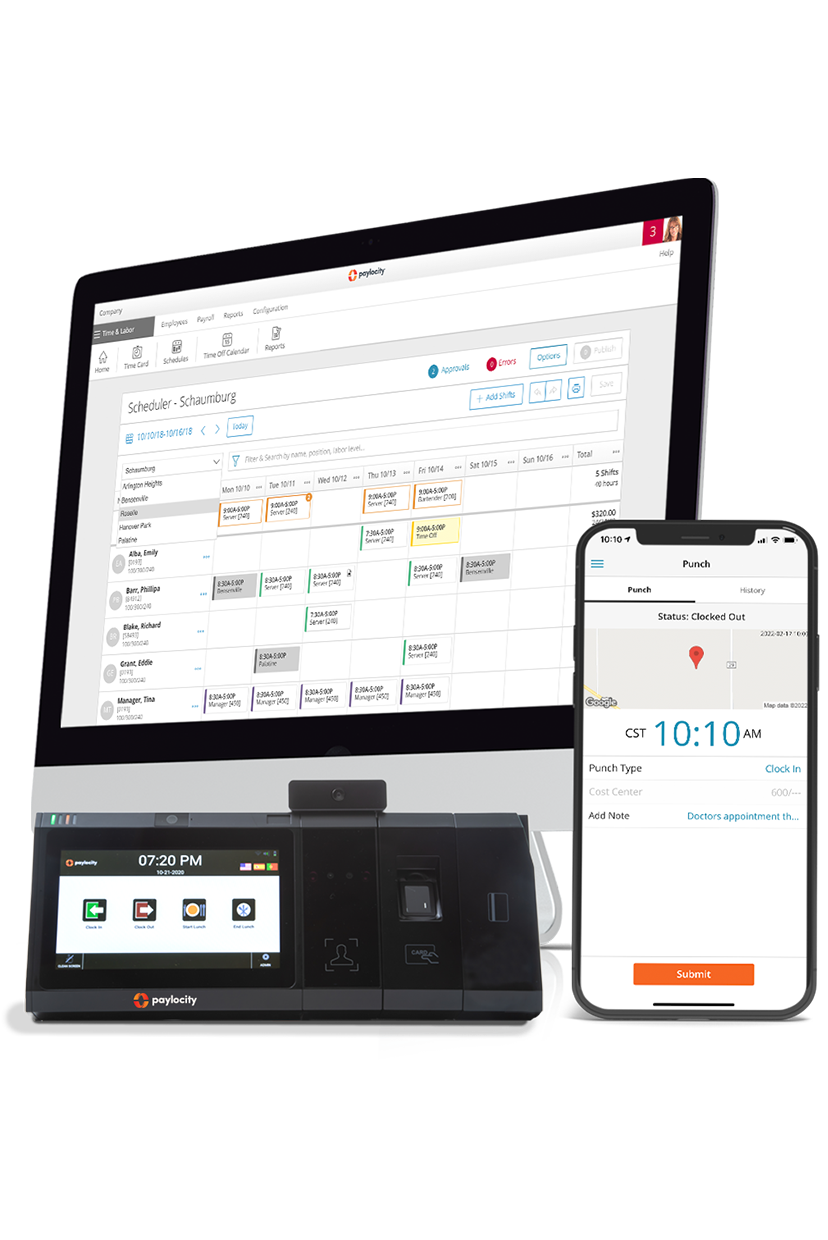
Paylocity gives employees multiple ways to track their time, combining hardware and software solutions to fit any workplace, from office desks to field teams. Staff can clock in with biometric time clocks, badge readers, kiosk tablets, the mobile app (including Apple Watch), or the web-based employee self-service portal.
Options support offline punching, photo capture, attestation prompts, and optional geofencing, giving organizations flexible, secure, and accurate time-tracking.
Key features:
- Advanced time clock options: Offers facial recognition, fingerprint scanning, badge readers, and optional thermal modules, allowing secure, touchless time tracking.
- Employee time-tracking app: Employees can record and manage time right from their phones, and they get notified if they forget to clock out.
- Multiple employee self-service solutions: Employees can use mobile apps (with Apple Watch support), kiosk tablets, or web self-service portals to punch in/out, submit timesheets, manage schedules, and handle meal or attestation prompts from anywhere.
- Flexible configuration and offline capability: Hardware and software options support offline punching, IP restrictions, geofencing, and flat-rate tip adjustments, ensuring accurate tracking regardless of connectivity or workplace setup.
- Attestation and compliance support: Automatically trigger meal attestations and apply premiums to help support regulatory compliance and reduce errors in time reporting.
- Direct timesheet visibility and management: Employees and managers can view, edit, and approve timesheets directly in the platform, streamlining payroll and boosting transparency.
Pricing: Custom pricing available with the free demo
?ts=1767882597017&$ProductTIleImage$&dpr=off)
2. Toggl Track

Best for: Fast, flexible team tracking
Toggl Track lets individuals and teams record work hours with one‑click timers or manual entries across web, desktop, and mobile apps. It syncs data in real time and accommodates both online and offline tracking.
Its core timing features support tagging, project/task assignment, and detailed timesheet generation to help monitor where time is spent and to accurately attribute it to clients or projects. Toggl Track also integrates with calendars and other tools to auto‑capture events and activities as trackable entries.
Toggl users report that sometimes the timer doesn’t start or stop as expected, particularly when switching between devices, and time syncing can be slow.G2 - Toggl
Key features:
- One‑click real-time timers & multi-mode logging: Start/stop timers instantly or enter time manually, with optional calendar and reminder integrations to reduce missed entries.
- 100+ integrationsToggl - Integrations: Connect Toggl Track with popular project management, productivity, and collaboration tools to keep all your time data in one place.
- Detailed tagging and categorization: Assign time to clients, projects, tasks, and tags for precise time attribution and clearer reporting.
Pricing:Toggl Pricing
- Free plan
- Starter: $9/user/mo
- Premium: $18user/mo
- Enterprise: Custom
3. ClockShark

Best for: Field service and construction teams that need GPS-based time tracking at job sites.
ClockShark is a GPS-enabled time-tracking app built for teams that work outside a traditional office, such as construction crews or field service technicians.
It logs employee hours automatically when they enter or leave a job site, giving managers real-time visibility into who's working where without manual check-ins.
The platform also handles crew scheduling and syncs directly with popular payroll systems, making it easy to turn tracked hours into accurate paychecks. Field service and construction teams that need GPS-based time tracking at job sites.
While ClockShark offers GPS geofencing, crew scheduling, and payroll integrations, some users report occasional glitches and note they can't assign pay rates per job. Scheduling is also built around individual employees rather than crews, making it less useful for crew-based teams.G2 - ClockShark reviews
Key features:
- GPS geofencing with job site clock-in/out: Automatically clocks employees in and out as they enter or exit a designated job site boundary, reducing time theft and manual entry.
- Drag-and-drop crew scheduling: Assigns shifts and job sites to entire crews in seconds, then notifies workers instantly when schedules change.
- QuickBooks and ADP payroll integration: Syncs tracked hours directly to payroll, eliminating manual timesheet entry and reducing payroll errors.
Pricing:ClockShark - Pricing
- Standard: $40/month
- Pro: $60/month
4. Apploye

Best for: Remote teams that need time tracking and productivity monitoring in one affordable platform.
Apploye is time-tracking software designed for teams that mix remote, hybrid, and field-based work, offering both productivity monitoring and location tracking in a single platform. It captures how employees spend their work hours through activity levels and optional screenshots, while also tracking the location of staff working outside the office.
Beyond time tracking, Apploye includes payroll tools that let businesses calculate pay based on tracked hours and export timesheets for processing.
G2 reviews mention that some reporting and customization options could be more flexible, especially for teams that need deeper analytics or more advanced workflow settings. There are also occasional delays when syncing activity updates for remote employees.G2 - Apploye reviews
Key features:
- Activity monitoring with optional screenshots: Tracks keyboard and mouse activity levels and captures periodic screenshots to give managers visibility into remote work, with the option to disable screenshots for privacy.
- GPS tracking for remote and field employees: Monitors employee locations during work hours; useful for teams with staff working from multiple sites or on the road.
- Built-in payroll management with timesheet exports: Calculates pay based on tracked hours and lets teams export timesheets for use in payroll processing.
Pricing:Apploye - Pricing
- Free plan
- Elite: $4.50/user/month
- Power: $8/user/month
- Enterprise: Custom
5. Clockify

Best for: Offline time tracking
Clockify tracks work hours using a real‑time timer, manual timesheet entries, or a shared kiosk. Its web, desktop, and mobile apps work offline, so all tracked time is preserved even without an internet connection. It categorizes entries by project, task, tag, and billability, and its auto‑tracker and reminders help surface missed time and maintain accurate logs .
Team leads can also review and approve timesheets, group time entries, and analyze where hours were spent with reporting tools that export to PDF, CSV, or Excel.
Users mention that while the interface is functional, it isn’t always intuitive, and some administrative tasks require more clicks than expected. Some reviews note that Clockify can feel somewhat rigid at times. Editing entries, switching tasks quickly, or managing more complex workflows requires a lot of additional steps..G2- Clockify
Key features:
- Flexible timer & manual entry: Start/stop a timer with one click or enter hours manually in timesheets to reflect work done outside the live timer.
- Offline tracking & sync: Track time on mobile or desktop even without connectivity, with automatic syncing when you reconnect.
- Categorization & reminders: Assign time to projects, tasks, tags, and billable status, and use reminders/idle detection to ensure entries are complete and accurate.
Pricing:Clockify - Pricing
- Standard: $5.49/user/month
- Pro: $7.99/user/month
- Enterprise: $11.99/user/month
- Bundle: $12.99/user/month
6. TimeCamp

Best for: Tracking all computer activities
TimeCamp provides flexible time tracking across web, desktop, and mobile that lets users start/stop timers, fill timesheets manually, or rely on automatic tracking that logs hours in the background and syncs when online. The desktop app can also track computer activities (apps/websites used) and automatically assign time to projects based on keywords, helping reveal where work hours are spent.
Users have reported that the desktop app updates the timer infrequently, which can make time tracking feel unclear. Manually entering time in the browser can also be difficult, as the input behavior can be unpredictable and confusing.G2- TimeCamp
Key features:
- Automatic and manual time capture: Log hours with one‑click timers, manual entries, or set rules/keywords so TimeCamp auto‑assigns time to projects and tasks .
- Flexible timesheets with multiple views: Use day, week, and calendar views to enter or review tracked hours, adjust entries, and mark billable time for client billing or payroll .
- Computer activity tracking & detailed reports: Track time spent in apps and websites on desktop, categorize activities, and generate precise reports that show where time was spent and support optimization.
Pricing:TimeCamp pricing
- Starter: $3.99/user/month
- Premium: $6.99/user/month
- Ultimate: $9.99/user/month
- Enterprise: Custom
7. Hubstaff

Best for: Field teams needing accountability
Hubstaff helps teams track time across web, desktop, and mobile. Users start timers or let Hubstaff automatically record hours for projects and tasks. The platform monitors activity levels, apps, and websites, and can capture screenshots to show how employees used their time. Managers can review, edit, and export timesheets for payroll processing and reporting, making oversight straightforward.
Some users report that Hubstaff’s tracker can stop unexpectedly during app updates or connectivity issues, which may result in missed time if not noticed.Hubstaff
Key features:
- GPS & geofenced tracking: Automatically start/stop time based on team members’ physical location to tie hours to job sites.
- Activity insights with benchmarks: Measure active keyboard/mouse engagement and compare productivity levels across your team.
- Productivity metrics & anomaly detection: Measures activity levels, flags unusual activity patterns (like fake input tools), and provides productivity benchmarks to help teams optimize focus and utilization.
Pricing:Hubstaff pricing
- Starter: $4.99/user/month
- Grow: $7.50/user/month
- Team: $10/user/month
- Enterprise: $25/user/month
8. Harvest

Best for: Vast app integration capabilities
Harvest tracks hours effortlessly across web, desktop, and mobile, letting users start timers, log time manually, and add notes for context. It links tracked hours directly to project budgets and client billing, giving teams real-time insight into scope, profitability, and resource allocation. Harvest also integrates with over 100 apps,Harvest integrations automatically surfacing tracked time in tools you already use.
Users note a lack of automatic time tracking in Harvest, which requires manually starting and stopping timers.G2- Harvest
Key features:
- Budget‑aware tracking: Automatically compares logged hours against project budgets and alerts managers before overruns occur.
- Integrated invoicing: Converts tracked time into client-ready invoices with optional approval workflows, removing manual billing steps.
- App ecosystem & automation: Syncs tracked hours with tools like Asana, Jira, and Trello, keeping all project data aligned and minimizing duplicate entry.
Pricing:Harvest pricing
- Free plan
- Teams: $9/user/month
- Enterprise: Custom
9. Timely

Best for: Centralizing all work activity
Timely centralizes all your work activity, automatically tracking time across web, desktop, and mobile devices. It organizes hours by projects and clients in a clean, visual timeline, and syncs with calendars and productivity apps to keep your workflow connected. Teams can get a real-time overview of work patterns and project engagement without manually logging hours.
While Timely is generally useful, its automatic tracking sometimes requires manual adjustments for accuracy. Some advanced reporting and customization options are limited for more complex project needs, and the pricing may feel high for small teams or individual users.G2 - Timely
Key features:
- Automatic memory tracking: Logs files, websites, and apps in the background so no billable time is missed.
- AI-powered Timesheet Assistant: Uses AI to suggest and fill timesheet entries from captured activity, letting users approve accurate timesheets with one click.
- Integrated project insights: Provides dashboards showing hours versus budgets, billable rates, and task breakdowns for better project management.
Pricing:Timely pricing
- Starter: $9/user/month
- Premium: $16/user/month
- Unlimited: $22/user/month
- Enterprise: Custom
10. QuickBooks Time

Best for: Photo capture at clock‑in
QuickBooks Time helps teams track hours from anywhere with clock‑in/out on web, mobile, and kiosk interfaces, and it ties those hours straight into payroll, scheduling, and accounting systems to keep time data actionable for operations and finance. The platform also supports multi‑user attendance, shift scheduling, and photo capture at clock‑in to reduce buddy punching and improve accuracy on shared devices.
Some users report issues with clocking in and out when QuickBooks Time doesn’t fully integrate with physical time-clock terminals. There are also occasional inaccuracies in PTO and sick leave accrual calculations, particularly when managing multiple accrual rules.G2 - QuickBooks
Key features:
- Crew clock‑in & group time capture: Managers can clock in entire crews at once and track labour collectively or individually for fast group time tracking (source:
- GPS & geofence‑triggered tracking: QuickBooks Time logs employee locations while on the clock and triggers reminders to clock in/out at job sites to improve accountability and timesheet accuracy.
- Kiosk with photo capture: A digital punch‑clock kiosk lets employees track hours from a shared device, with optional photo capture at clock‑in to help prevent time theft.
Pricing:QuickBooks Time pricing
- Time Premium: $30
- Time Elite: $55
11. Time Doctor

Best for: Remote and distributed teams that need detailed productivity analytics alongside time tracking.
Time Doctor is timesheet software built for teams that want detailed visibility into how work hours are actually spent, particularly for remote and distributed teams.
The tool monitors the websites and applications that employees use throughout the day and can flag potential distractions in real time, helping identify productivity gaps.
Key features:
- Website and app usage tracking with distraction alerts: Monitors which sites and applications employees use during work hours and sends alerts when activity suggests distraction or idle time.
- Automated productivity reports by employee and project: Generates reports that break down time and productivity data by individual employee or by project, making it easier to spot trends.
- Payroll integration with worked-hours verification: Connects tracked hours to payroll systems and allows managers to verify time worked before running payroll.
Pricing:TimeDoctor - Pricing
- Basic: $6.67/user/month
- Standard: $11.67/user/month
- Premium: $16.70/user/month
- Enterprise: Custom
Features to look for when choosing time management software
Online time tracking has come a long way from simple punch clocks. The best platforms today automatically enforce labor rules, route approvals to the right people, and provide leaders with clear visibility into labor costs in real time.
Here's what separates a platform that just logs hours from one that actually protects accuracy and your team's time.
- Configurable labor rules and premiums: Set various rules aligned with federal, state, or company policy, including shift differentials and attendance rules, so payroll is accurate the first time.
- Multi-location policies and role-based approvals: Apply policies by location, department, or job type with role-based permissions, approval chains, and audit history for smooth timecard review on any device.
- Time capture options for every work style: Support mobile punches, web kiosks, physical clocks, badge swipes, biometric recognition, and wearables, with prompts for breaks or attestations as needed.
- Scheduling and labor cost visibility: Tie time tracking to schedules and shift rules with real-time updates and automatic overtime calculations, giving deeper insight into labor costs.
- Integrations, APIs, and tech stack fit: Connect time data directly to payroll, HR, benefits, and accounting systems through an integration marketplace or open APIs, with SSO support to cut admin overhead.
- Exceptions, edits, and auditability: Flag missed punches or duplicate entries automatically, with detailed audit trails showing who changed what and why.
How to choose time-tracking software
Picking the right time-tracking software depends less on the flashiest features and more on how well it fits your workforce, workflows, and existing systems.
Before comparing platforms, it helps to walk through a few key questions to narrow down what actually matters for your team.
- Identify your workforce type: Determine whether your employees are remote, in-office, field-based, or a mix, since this shapes which tracking methods (GPS, kiosks, biometric, mobile) make sense.
- Define your core use case: Decide if the priority is productivity monitoring, job costing, compliance, or simple hour logging, so you can rule out tools built for a different purpose.
- Evaluate payroll and HR integration: Check whether the platform connects directly to your existing payroll and HR systems to avoid manual data transfers and errors.
- Assess reporting depth: Check whether reports break down by employee, project, or location, and whether they provide the level of detail your managers actually use.
- Check compliance requirements: Confirm that the software supports overtime rules, break policies, and any state or industry-specific labor laws relevant to your business.
- Consider scalability and pricing model: Factor in how pricing changes as headcount grows and whether the platform can support multiple locations or departments without added complexity.
Choose Paylocity for stress-free employee time tracking
Finding the best time tracking solution means choosing a platform that adapts to how your team works and reduces manual work.
Paylocity combines flexible time capture, automated labor rules, and seamless payroll integration to make time tracking simpler and more reliable. With support for mobile punches, web kiosks, and physical clocks, you can effortlessly manage approvals, audits, and labor costs.
Learn more about how Paylocity simplifies time tracking and explore the features that help you save time, reduce errors, and stay compliant.
Request a demo today, and experience stress-free time management for your organization.
Employee time-tracking solutions FAQ
Why is employee time tracking important?
Accurate time tracking ensures employees are paid correctly for the hours they work.
This includes overtime and premium payments while providing employers with the documentation needed to remain compliant with labor laws. It also gives managers visibility into labor costs by project or location, helping with budgeting and staffing decisions.
What is the best time-tracking software?
The best time-tracking software depends on your workforce and priorities. Teams with remote or hybrid staff often benefit from platforms with activity monitoring and screenshots. Field service and construction teams need GPS geofencing and job site tracking instead.
The right choice is the one that matches your work style, integrates with your payroll system, and supports the compliance rules that apply to your business.
How do you track employee time in the field?
Field employees are typically tracked using mobile apps with GPS geofencing. This automatically clocks workers in and out when they arrive at or leave a job site.
Some platforms also support badge swipes or biometric check-ins at fixed locations, giving managers real-time visibility into who’s on site without manual check-ins.
What works best for manual time logging and entry?
For teams that log hours manually, simple web or mobile timesheet software, such as Paylocity, works best. Look for software that automatically flags missed entries, duplicate punches, or unapproved overtime. Manual entry carries a higher risk of errors, so these safeguards help protect payroll accuracy.
Request a Demo Today!
Learn more about Paylocity’s workforce management tools. Explore how Paylocity supports modern people operations across your organization.

Request a demo today to see exactly how Paylocity can help your organization run payroll faster, stay compliant, and keep your workforce satisfied.
Sources
More time, less labor = a better experience
Say goodbye to manual tasks and hello to efficiency. Empower your employees with intuitive tools to manage their time—view balances, request time off, and get real-time notifications, all from one platform. Supervisors can access 100+ reports, track attendance, and approve requests in seconds. With instant insights at your fingertips, optimizing time and attendance has never been easier.
Related
![The 9 Best Payroll Software for Small Businesses [2026]](https://s7d9.scene7.com/is/image/paylocity/best-payroll-software-hero?$Hero-Card$)
The 9 Best Payroll Software for Small Businesses [2026]
