Two women conversing in corporate setting with laptop and tablet
Employee Experience Human Resources Time & Attendance Benefits Administration

The 10 Best HRIS Software for HR Managers

Explore the best HRIS software for busy HR teams, with automated workflows, self-service tools, and built-in compliance to save time and reduce errors.

If you work in HR, you know the drill: chasing down forms, repeatedly answering the same questions about pay stubs, and triple-checking spreadsheets before every payroll run. It’s a lot — and while this work matters, it often leaves less time for big-picture priorities like supporting managers or shaping culture. 

The best HRIS software is designed to take that weight off your shoulders by automating routine tasks, keeping important details in one place, and helping you feel confident that you’re covered in terms of accuracy and compliance. 

In this article, we’ll walk through what an HRIS actually does, the key features to look for, and some of the best options out there so you can find the right fit for your team.

Best HRIS Software of 2026

Here’s a quick snapshot of some of the best HRIS software options for HR teams today, so you can see how they stack up, side by side.  

These solutions are not listed in any particular order — use the table to compare features, pricing, and fit for your organization. 

Platform

Best For  Key Features Pricing

Paylocity

All-in-one HR/finance/IT platform with robust integration system 
  • AI embedded across the platform 
  • Prebuilt and configurable workflows 
  • Workforce analytics and compliance tracking 
  • IT access and asset management 
  • Employee experience tools  
  • Built-in expense management tied to payroll 
Custom
BambooHR Simplified onboarding for HR admins 
  • Employee satisfaction and well-being surveys 
  • AI-powered feedback insights 
  • Employee experience tools for engagement 
Plans start at $10/mo/employee 
Rippling HR-IT automation 
  • Cross-OS device management 
  • Identity, app, access automation 
  • Automated onboarding and provisioning 
Custom

Workday

Enterprise workforce planning 
  • AI-powered HCM platform 
  • Unified HR and finance 
  • Employee experience capabilities 
Custom
Gusto

Startups

  • Unlimited payroll runs 
  • Automated tax filing 
  • Syncs time with payroll 
Plans start at $49/mo 
SAP SuccessFactors  Global talent suites 
  • Employee Central core HRIS 
  • Talent management and learning 
  • HR analytics and planning 
Plans start at $6.30/mo/user 
Namely Midsize people ops
  • Social, feed-based employee hub 
  • Compliance tools plus expert guidance  
  • Benefits brokerage and managed services 
Plans start at $9/mo/user 
UKG Pro
Workforce management
  • AI-powered forecasting and scheduling 
  • Built-in attention for compliance 
  • Workforce-focused analytics 
Custom
ADP Workforce Now Industries requiring strict compliance 
  • SmartCompliance for complex payroll rules 
  • DataCloud benchmarking at massive scale 
  • Global payroll in 140+ countries 
Custom
Deel

Remote-first teams hiring globally

  • Global EOR network 
  • Deep contractor management with localized compliance 
  • Immigration, visas, and equipment support 
Individual pricing per service
HiBob Intuitive HRIS functionality for international companies
  • Culture-building and engagement tools
  • Talent management suite
  • People analytics with predictive insights
Custom
Zoho People Small to midsize companies
  • Workforce management tools
  • Employee onboarding solution
  • Integrated self-service portal
Plans start at $1.25/employee/month

1. Paylocity

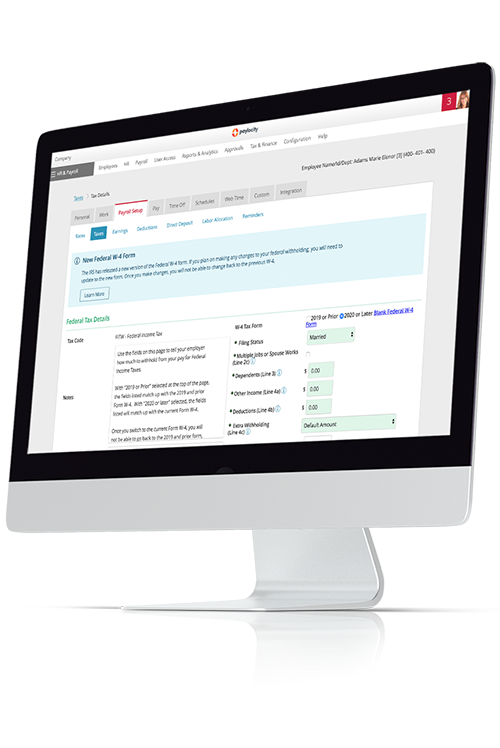
Paylocity payroll tools

Best for: All-in-one HR, Finance and IT platform that automates workflows and accelerates organizational performance across every department. 

Paylocity brings HR, Finance, and IT teams together on one modern platform built around a single employee database, embedding AI thoughtfully across your workflows to deliver intelligent automation, tailored insights, and proactive assistance. 

With automated workflows and synced data, complex processes that should be simple actually become simple again. Your teams spend less time on manual data entry, get onboarding and approvals done faster, and process changes more easily. Most importantly, you get clearer visibility into how decisions about your people affect budgets, productivity, and long-term growth.

Paylocity is a good fit for organizations that want a single place to run day-to-day people operations without losing sight of strategic initiatives like improving culture and strengthening the employee experience. 

It gives HR teams the automation and analytics they need to work smarter, while employees get an easy, mobile-friendly way to handle the basics — viewing pay, updating info, submitting expenses, and requesting time off — on their own schedule. 89% of G2 reviewers report Paylocity as a good partner to do business with, driven in part by the platform’s ease of use, which it has achieved an 91% rating on.G2.com – Grid Report for HCM Software | Summer 2026 | Paylocity

Key Features:  

  • AI embedded across the platform: Leverage AI across recruiting, performance management, and day-to-day admin tasks to surface candidate matches, flag potential compliance gaps, and generate first-draft job descriptions or review summaries — giving HR teams a head start on work that used to take hours. 
  • Prebuilt and configurable workflows: Automate everyday workflows (like onboarding, job and pay changes, and approvals) with templates you can turn on quickly, then tweak to match your policies and stakeholders. 
  • Workforce analytics and compliance tracking: Tap into dashboards, reports, and AI-driven insights to keep an eye on headcount, labor costs, turnover, and key compliance indicators in real time, so you can surface trends early and step in before they become bigger issues. 
  • IT access and asset management: Provision software accounts, assign hardware, and track company devices directly in the HRIS, so IT and HR can coordinate onboarding and offboarding without jumping between systems or losing track of who has what. 
  • Employee experience tools that drive productivity and culture: Go beyond basic self-service with social feeds, peer recognition, surveys, and two-way communication tools that help you share updates, gather feedback, and keep people connected — especially in hybrid or distributed teams. 
  • Built-in expense management tied to payroll: Capture, approve, and reimburse expenses in the same system you use to run payroll, so out-of-pocket spend gets routed, reviewed, and paid back quickly (with fewer spreadsheets and cleaner reporting for Finance). 

Pricing: Custom

2. BambooHR

BambooHR employee performance chart

Best for: Simplified onboarding for HR admins 

For lean HR teams that want to standardize new-hire workflows BambooHR - Onboarding and keep employee data in one place, BambooHR can be a big step up from manual processes. It focuses on core HR, time off, onboarding, and performance, with optional modules for payroll and benefits, all wrapped in a clean and easy-to-learn interface.  

As teams grow more complex, though, some users find that BambooHR’s feature depth and customization options don’t always keep pace — especially if they need highly tailored workflows, advanced reporting, or niche integrations.  

It’s a strong fit for organizations that value simplicity and quick adoption; just know that as you scale, you may eventually need to layer on additional tools or consider a more robust system to support more advanced requirements. Among G2 reviewers, BambooHR has achieved a 91% rating for ease of admin and 90% for ease of setup.G2.com – Grid Report for HCM Software | Summer 2026 | BambooHR

Key Features: 

  • Employee satisfaction and wellbeing surveys: BambooHR includes Employee Satisfaction surveys based on eNPS to track loyalty over time, along with Employee Wellbeing surveys that dig into areas like happiness, relationships, and motivators.  
  • AI-powered feedback insights: With AI Topic Summaries for eNPS, BambooHR automatically analyzes open-text survey responses and groups them into themes, so you can see what’s driving scores without reading every single comment.  
  • Employee experience tools for engagement: Beyond basic self-service, BambooHR offers an employee experience suite that supports wellness, rewards, feedback, and recognition in one place. These tools are designed to boost connection and satisfaction by making it easier to gather feedback, celebrate wins, and keep a pulse on culture directly inside the HR platform. 

Pricing: Plans start at $10/mo/employeeBambooHR - Pricing

3. Rippling

Rippling dashboard with tasks listed

Best for: HR-IT automation 

Rippling is a workforce platform built around automation — especially for tasks that sit between HR and IT. It’s a strong fit for remote and hybrid teams that are constantly spinning up laptops, logins, and permissions for new hires, role changes, and departures.  

Instead of handling each request as a one-off ticket, admins can lean on clear, reusable workflows to take more of that work off their plate. 

Compared to more traditional HRIS tools, Rippling leans into device security, identity management, and access controls alongside standard people operations.  

While 91% of G2 reviewers are happy with the ease of administration,G2.com – Grid Report for HCM Software | Summer 2026 | Rippling some reviews note that the platform’s depth can feel like overkill for smaller organizations with simple HR needs.Forbes - Rippling Review They also say that pricing can climb as you add modules.Rivermate - Rippling Pricing

Key Features:  

  • Cross-OS device management: Rippling’s mobile device management lets admins manage Mac, Windows, iOS, and iPadOS devices from a single dashboard, with tools for zero-touch deployment, OS patching, encryption, and remote lock or wipe.  
  • Identity, app, access automation: Rippling’s identity and access management gives you one place to set up, adjust, and disable accounts across hundreds of apps, with SSO, MFA, and role-based permissions. You can base access rules on attributes like role, department, or location, so changes to someone’s job can automatically update what they can see and use. 
  • Automated onboarding and provisioning: User provisioning in Rippling is designed as a “set it and forget it” process: when you hire someone, the system follows your rules to create accounts, assign groups, and grant access to the right tools — and automatically removes that access when they leave.  

Pricing: Custom Rippling - Pricing

4. Workday

Workday HRIS platform

Best for: Enterprise workforce planning 

If you’re running HR at a large, complex organization, you’ve probably heard of Workday. It’s an enterprise HCM platform built for companies that need to plan, manage, and analyze their workforce at scale, often across multiple countries and business units.  

Workday leans heavily on AI, branded as Workday Illuminate, to speed up routine work, surface insights, and help leaders model “what if” scenarios around headcount, skills, and budgets on a single platform. 

In practice, that makes Workday a better fit for organizations that think in terms of multi-year workforce plans and complex financial models than for teams that just want a straightforward HRIS. 

Reviews consistently praise its depth and analytics. For instance, G2 reviewers gave it an 93% rating for candidate sourcing.G2.com – Grid Report for HCM Software | Summer 2026 | Workday HCM However, other reviewers call out high costs,Workday Negotiations - Workday Pricing Benchmarks and Market Rates for Enterprises longer implementations,APTY - 10 Common Workday Implementation Challenges for 2025 and a steep learning curve,Working Day - Workday Review especially for smaller teams or those with simpler needs. 

Key Features:  

  • AI-powered HCM platform: Workday bakes AI into core HCM, using Illuminate to automate tasks, flag anomalies, and generate recommendations across HR and finance workflows.  
  • Unified HR and finance: HR and finance run on the same platform and data model, so people and money are tied together. That makes it easier to see the impact of headcount changes, model different scenarios, and keep HR and finance leaders working from the same numbers (instead of stitching together reports from separate systems). 
  • Employee experience capabilities: Workday offers employee experience tools, like Workday Journeys and employee voice/engagement capabilities, that guide employees through “moments that matter” (onboarding, role changes, leave, open enrollment). They offer personalized steps and content, while ongoing pulse surveys help HR keep a steady read on sentiment and engagement. 

Pricing: Custom Workday - Pricing

5. Gusto

Gusto payroll dashboard

Best for: Startups 

Gusto is an online payroll and HR platform for small businesses that want to get people paid reliably without becoming payroll experts.  

It offers tools for pay runs, benefits, basic HR, and compliance in a straightforward, easy-to-learn interface, making it especially appealing to young companies that don’t yet have a full HR team or tech stack in place.

Most teams use Gusto as a payroll-first system that also covers essentials like onboarding, time off, and employee self-service. Third-party reviews reveal that the platform is intuitive, with Gusto achieving a 95% ease of use rating among G2 reviewers.G2.com – Grid Report for HCM Software | Summer 2026 | Gusto At the same time, reviewers often note that its non-payroll HR features are relatively light and that pricing has increased over time.Business - Gusto Payroll Review

As companies grow and need deeper HR capabilities or tighter budget control, they may eventually want to look at more robust HRIS options. 

Key Features:  

  • Unlimited payroll runs: Gusto lets you run payroll as often as you need — regular cycles, bonuses, or off-cycle corrections — without charging extra per run. That’s helpful for startups that frequently adjust salaries, bonuses, or contractor payments as they grow. 
  • Automated tax filing: Every time you run payroll, Gusto automatically calculates, files, and pays federal, state, and local payroll taxes, and it also generates and files W-2s and 1099s at year-end. This takes a big chunk of compliance work off a founder or lean HR/finance team’s plate. 
  • Syncs time with payroll: With built-in time tracking in Plus and Premium plans — and integrations to third-party time tools — hours worked can flow straight into payroll so you’re not re-entering timesheets by hand.  

Pricing: Plans start at $49/mo Gusto - Pricing

6. UKG Pro

UKG Pro payroll gateway

Best for: Workforce management 

For organizations that live and breathe schedules — like healthcare, manufacturing, retail, and other 24/7 operations — UKG Pro is built to keep day-to-day workforce management under control. It’s a cloud HCM platform with a heavy emphasis on scheduling, time and attendance, and labor compliance, while using AI and workforce data to forecast staffing needs and stay ahead of overtime, meal breaks, and local labor rules. 

UKG Pro tends to make the most sense for mid-sized and large organizations with complex, often hourly workforces that need a dedicated workforce management solution in addition to HR and payroll. 

Reviews frequently highlight its workforce management and compliance capabilities as key strengths, while noting that pricing is on the higher end. They also say that implementations can be more involved, especially for global or highly distributed teams.TechRaisal - UKG Pro: Features, Reviews, and Complete Guide for Business Still, 86% of G2 reviewers are likely to recommend the platform.G2.com – Grid Report for HCM Software | Summer 2026 | UKG Pro

Key Features: 

  • AI-powered forecasting and scheduling: UKG Pro Forecasting uses UKG Bryte AI to analyze your own business data — like sales, seasonality, and holidays — to predict staffing needs and suggest the right mix of people for each shift. 
  • Built-in attestation for compliance: Attestation prompts employees to answer quick questions about things like symptoms or meal and rest breaks right at punch-in. It then feeds those responses into configurable workflows and reports so you can track issues, prove compliance, and spot trends early. 
  • Workforce-focused analytics: UKG’s analytics tools tap into a large workforce dataset and people-first AI to surface patterns around staffing, overtime, and risk, then turn those into practical recommendations so leaders can adjust schedules, headcount, and policies with data instead of guesswork. 

Pricing: Custom Outsail - A Comprehensive Look at UKG's Pricing

7. ADP Workforce Now

ADP Workforce Now dashboard

Best for: Industries requiring strict compliance 

ADP Workforce Now is a payroll-centered HR platform often used by small to mid-sized — and increasingly larger — organizations in highly regulated industries, like healthcare, retail, and financial services.  

Its strengths are payroll accuracy and compliance: continuous calculations, automated tax filing in all 50 states, and add-ons like SmartCompliance for ACA, wage and tax, and other post-payroll requirements. 

ADP stands out for that deep payroll and compliance engine and the surrounding service model, rather than a lighter, “self-serve” HR experience.  

Third-party reviews, however, frequently mention tradeoffs: a steeper learning curve, an interface that can feel dated, inconsistent support,G2 - ADP Workforce Now and higher, quote-based pricing that can climb as you add modules or expand internationally.People Managing People - ADP Workforce Now Pricing Tiers & Costs With that said, 88% of G2 reviewers said that Workforce Now meets their requirements.G2.com – Grid Report for HCM Software | Summer 2026 | ADP Workforce Now

Key Features:  

  • SmartCompliance for complex payroll rules: ADP SmartCompliance handles employment tax, garnishments, ACA, unemployment, I-9/E-Verify, and tax credits as an added compliance layer with specialists monitoring rule changes. 
  • DataCloud benchmarking at massive scale: ADP DataCloud lets you compare your pay, turnover, and workforce metrics against anonymized data from millions of employees across thousands of employers. 
  • Global payroll in 140+ countries: ADP’s global payroll solutions (Celergo and GlobalView) support running payroll in 140+ countries with centralized oversight and local compliance support, making it a good option for multinationals with distributed teams.ADP – Global Payroll

Pricing: Custom ADP Workforce Now - Compare Options

8. Deel

Deel payroll software

Best for: Remote-first teams hiring globally 

Hiring in multiple countries usually means wrestling with local entities, unfamiliar labor laws, and messy contractor setups. Deel is built to smooth that out. It lets you hire full-time employees through its employer-of-record (EOR) network, manage contractors, and run multi-currency payroll across 130+ countries,Deel - Global Payroll Services while keeping contracts and core HR details in one system. 

It tends to be a strong fit for remote-first startups and scaling teams where global hiring and compliance are the main headaches, not day-to-day HR admin in a single country.  

Reviewers often call out Deel’s clean interface and broad international coverage, but also note that EOR and global payroll pricing can be higher than those of domestic-only tools and that how “deep” the product goes can vary from country to country.People Managing People - Deel Pricing Guide 2025: Tiers, Costs, & Value Still, it boasts ratings from G2 reviewers across most categories, with a standout 99% positive ratings for salary structures.G2.com – Grid Report for HCM Software | Summer 2026 | Deel HR

Key Features:

  • Global EOR network in 150+ countries: Deel acts as the legal employer for your team in 150+ countries, Deel – Hire Employees Globally so you can hire full-time employees without opening local entities while Deel handles contracts, payroll, taxes, and local labor-law compliance behind the scenes. 
  • Deep contractor management with localized compliance: Beyond basic vendor payments, Deel generates localized contractor agreements, automates tax forms like W-8BEN/W-9, and pays contractors in 120+ currencies with transparent, compliant payouts.Deel - Contractor Management System (CMS)
  • Immigration, visas, and equipment support: Deel can help with global mobility by supporting visas and immigration in many markets. And since acquiring Hofy, the platform can also coordinate remote equipment and office gear for new hires, tying hardware and logistics to the hiring workflow. 

Pricing: Individual pricing per service Deel - How Much Does Deel Cost?

8. Deel

HiBob screenshot.

Best for: Intuitive HRIS functionality for international companies

HiBob, also known simply as “Bob,” is an HRIS platform for midsize companies. It emphasizes scalability, process simplification, and data accessibility while helping organizations continue to prioritize employee engagement and culture as they grow.

It includes tools for payroll and benefits administration, performance management, employee experience management, and more. These features are integrated directly into the platform, rather than being priced separately as add-ons.

On G2, reviewers consistently praise its ease of use (91%) and strong customer support (88%).G2.com – Grid Report for HCM Software | Summer 2026 | HiBob HRIS However, others note limited customization, missing features, and integration issues with certain third-party apps.G2.com - HiBob Reviews 2026 - Pros & Cons

Key Features:

  • Culture-building and engagement tools: HiBob’s toolset includes a variety of features you can use to build your company culture and nurture employee engagement, even as you grow. For instance, employees can recognize one another via Shoutouts and Kudos, and you can deploy surveys to actively gather data on employee satisfaction.
  • Talent development suite: HiBob includes hiring and onboarding tools as well as an integrated learning management system, making sourcing and ramping new employees easier. It also includes a performance management suite with integrated reviews, goal tracking, and feedback tools.
  • People analytics with predictive insights: The platform includes an analytics solution that flags employees at risk of attrition based on engagement levels and performance metrics. It also lets you track DEIA metrics, turnover trends, and headcount forecasts, enabling you to plan staffing well in advance.

Pricing: CustomHiBob – Pricing

10. Zoho People

Zoho People screenshot.

Best for: Small to midsize companies

Zoho People is an HR software solution within the broader Zoho Ecosystem. It’s designed for small- to midsize companies that want core HRIS functionality at an affordable price.

Teams already using Zoho ecosystem products (like Zoho Books or Zoho WorkDrive) can integrate Zoho People natively, syncing up your data and keeping your tech stack simple. Even if you aren’t using other Zoho products, it covers all the essentials, from employee records and people analytics to workflow automation tools.

95% of G2 reviewers are happy with the product’s direction and 90% are satisfied with the ease of use.G2.com – Grid Report for Core HR | Summer 2026 | Zoho People However, some find the customization options limited, and the setup process overly complex.G2.com - Zoho People Reviews 2026 – Pros & Cons

Key Features:

  • Workforce management tools: Zoho People includes intuitive solutions for attendance tracking, time-off management, and performance management. Data is seamlessly integrated into analytics tools, which can be used to track patterns in hiring, attrition, and more.
  • Employee onboarding solution: The platform streamlines the onboarding process, from pre-onboarding paperwork to training. HR staff can track the process through an intuitive dashboard, sending notifications and reminders as needed.
  • Integrated self-service portal: Zoho People includes an employee self-service platform where people can view their information, handle routine tasks (like logging time or requesting time off), and answer common questions, reducing the day-to-day workload for HR staff.

Pricing: Plans start at $1.25/employee/monthZoho People – Pricing

Features to look for in the best HRIS software 

Once you’ve narrowed your list of vendors, the next step is figuring out which HR software solution will make life easier for you and your team in a way that tangibly benefits the organization. A purchase will only be authorized if you can demonstrate the ROI of an HRIS.

As you compare options, look for features that keep your data in one place, cut down on busywork, and support the culture you’re trying to build. This will help stakeholders understand each platform’s value and why it might be worth investing in. 

Payroll 

In an ideal world, payroll runs quietly in the background — and a strong HRIS helps you get closer to that. When payroll is built into your HRIS, it can pull in hours, pay rates, deductions, and tax details automatically, so you’re not keying the same information into multiple systems.

That means more accurate paychecks, fewer last-minute fixes, and better confidence that you’re staying compliant with federal, state, and local rules. 

Core HR 

Core HR is where you manage the basics: employee records, job and pay details, org structure, policies, and key documents.  

Good HRIS solutions make it easy to find what you need quickly, automate routine workflows (like address changes or title updates), and keep everything clean and consistent as people join, move, and grow in the organization. 

Audits and reporting 

HR teams get asked for data, like headcount, turnover, and overtime, all the time. The best HRIS systems make those answers easy to find with out-of-the-box reports and simple tools to build your own, plus audit trails that show who changed what and when.  

That way, you’re ready for leadership questions, board decks, and surprise audits without digging through old emails or spreadsheets. 

Security and compliance 

HR data is some of the most sensitive information a company holds, so security can’t be an afterthought. The best HRIS software includes role-based permissions, strong access controls, and data encryption, along with tools to support key compliance needs, like audit logs, retention rules, and region-specific regulations.  

The goal is to keep your data safe, your processes consistent, and your team confident that the system is doing its part to protect employees and the business. 

Benefits administration 

Benefits are important to employees — and often a headache for HR. With the right HRIS, you can manage enrollments, track eligibility, and handle life events in a single system, then send clean data to your carriers.  

Employees get a clearer view of their choices, and you spend less time fixing file errors or answering the same questions on repeat. 

Employee time tracking and scheduling 

If you have hourly or shift-based employees, time tracking and scheduling are big pieces of the puzzle. Look for HRIS tools that let employees clock in and out, track breaks, and request PTO, while managers can build and adjust schedules without starting from scratch every week.  

When those hours and schedules flow directly into payroll, you cut down on manual entry and the back-and-forth over missing or incorrect time. 

Document management 

From offer letters and I-9s to policies and performance reviews, HR runs on documents. Look for HRIS platforms that let you store, organize, and search all of that in one place, with e-signatures and clear version control.  

When documents live alongside employee records and workflows, you spend less time chasing attachments and more time making sure people have what they need. 

Talent management 

A modern HRIS should support people beyond day one. Talent tools help you post jobs, track candidates, onboard new hires, and manage performance and development in the same system.  

That gives you better visibility into your pipeline and makes it easier for managers to give feedback, set goals, and support growth. 

HR analytics 

HR analytics within your HRIS can give you ready-made reports on headcount, turnover, overtime, and more — plus the ability to slice and dice data when leadership asks tougher questions.  

When your information is accurate and up to date, you can move from gut feel to data-backed decisions without spending hours exporting spreadsheets. 

Employee experience tools 

The best HRIS software also helps people feel more connected. Features like surveys, recognition, social feeds, and feedback tools give employees an easy way to share their voice and celebrate wins.  

When these tools sit alongside everyday tasks like time, pay, and benefits, engagement becomes part of daily work — not a once-a-year initiative. 

Seamlessly integrate HRIS workflows and payroll with Paylocity 

Choosing the best HRIS software isn’t just about checking boxes on a feature list — it’s about finding a system that keeps your data clean, your workflows connected, and your people supported.  

Paylocity’s modern HRIS software connects HR, payroll, time, and employee self-service in one place, so work moves forward instead of getting stuck in bottlenecks.  

When you’re ready to see automated workflows, built-in compliance, and employee tools people actually use in action, request a demo today! 

HRIS Software FAQs

As you weigh different HRIS options, a few practical questions tend to come up again and again. Here are quick answers to some of the biggest ones. 

How do you securely migrate employee data to a new HRIS?

To safely migrate sensitive employee data to a new HRIS, start by getting your data house in order. Export records from your current system, clean up duplicates and outdated fields, and decide what actually needs to move versus what can be archived.  

From there, map every field to the new HRIS (for example, how your old “Department” values line up with the new structure) and run a test import with a small group of records before you move everything. 

On the security side, make sure any exports and imports are encrypted in transit, shared only with a small group of admins, and stored in secure locations that get deleted once migration is done. Limit who can see sensitive fields (SSNs, bank details, salary), turn on audit logs in the new system, and plan a short “freeze” window where changes are tightly controlled so you don’t lose updates during cutover. 

Which HRIS software products offer the strongest reporting and analytics tools?

Vendors aimed at larger or more complex organizations usually offer deeper analytics — richer dashboards, drill-downs, and trend reports — while tools for smaller teams tend to focus on cleaner, prebuilt reports.  

No matter the product, you’ll want easy custom report-building, the ability to slice by things like location and role, scheduled reports, and simple exports so you can quickly answer questions about headcount, turnover, and costs. 

What HRIS features matter most for small businesses?

For small businesses, usability and compliance matter most, like simple employee records, onboarding checklists, basic time and PTO tracking, and solid payroll/tax support (even if payroll is a connected tool).  

Add in employee self-service for pay and time off, straightforward reporting, and pricing that scales gently as you hire, and you’ve got a setup that supports growth without adding extra headaches. 

Which Platforms Offer the Strongest Accounting System Integrations?

When it comes to expense management, solid accounting integrations can make or break your workflow. The best tools don’t just export data — they sync directly with your general ledger, keep books up to date in real time, and eliminate manual reconciliation. 

Paylocity stands out for its unified HR and finance ecosystem, integrating directly with platforms like QuickBooks Online, NetSuite, and other leading accounting systems. Expenses flow seamlessly from submission to payroll or reimbursement, keeping budgets accurate without extra data entry. 

For larger organizations, SAP Concur offers over 200 global integrations built for companies managing multi-entity accounting and complex reporting structures. 

No matter which tool you choose, look for direct GL mapping, real-time syncing, and compatibility with your chart of accounts. These are the hallmarks of a truly integrated expense platform. 

Sources

011002000110a-taxservices-smalltiled

Taxes done right

We know there's a lot that goes into preparing and filing payroll tax forms. Get support from our expert team.

Payroll Tax Services
25-0601000407-corporate-cards-small-tiled

Control corporate spending

Paylocity corporate cards simplify spending with automated workflows that drive compliance, efficiency, and ease of use.

Get Corporate Cards