
The 10 best corporate LMS software solutions for employee training
Employee training can quickly spiral into chaos without a centralized system. Scattered onboarding documents, compliance gaps, and hours spent manually assigning courses or chasing down completion status not only slow down learning but also drain resources and frustrate teams.
LMS software consolidates all your training in one place, making it easier to grow your programs without hiring more people.
In this blog, we’ll compare top LMS software options to show how each handles course delivery, compliance, and engagement. We’ll also break down what to look for when choosing the right LMS and provide practical tips for matching a platform to your team’s needs.
What is LMS software?
A learning management system (LMS) is a software platform that creates, delivers, and manages training programs and learning content for employees, customers, or partners. It centralizes learning in one place, allowing administrators to assign courses, track progress, and support compliance, while learners can access training anytime, anywhere.
Modern LMS platforms often include social or collaborative learning, AI-driven content recommendations, and analytics to measure learning impact. When they’re connected to your HR or payroll system, training also aligns with people’s roles and growth, rather than feeling like a separate, one-off task.
The best learning management solutions of 2026
Here are the best learning management solutions of 2026, based on features, scalability, and real-world use cases. Whether you’re training employees, customers, or partners, these platforms cover a range of needs and team structures.
| Platform | Best for | Key features | Pricing |
|---|---|---|---|
| Paylocity | Companies that want employee training tightly connected to payroll, HR, and compliance tracking in one system |
|
Custom |
| Trainual | Turning SOPs and internal processes into structured onboarding and training |
|
Custom
|
| Workday | Enterprises using Workday HCM that want to automate training workflows and eliminate manual data syncing |
|
Custom with free trial
|
| Moodle | Universities and organizations that need a fully customizable, open-source LMS |
|
|
| TalentLMS | Companies training multiple departments, franchises, or external partners |
|
|
| SAP SuccessFactors Learning | Global companies that need to manage complex compliance requirements within an existing SAP environment |
|
Custom
|
| Docebo | AI-driven learning tied to skills development and measurable business outcomes |
|
Custom |
| 360Learning | Internal subject-matter experts to co-create training content |
|
|
| Adobe Learning Manager | Scalable, API-first LMS with advanced content delivery and personalization |
|
Custom |
| LearnUpon | Customer and partner training with strong admin controls and reporting |
|
Custom |
1. Paylocity

Best for: Companies that want employee training tightly connected to payroll, HR, and compliance tracking in one system.
Paylocity’s corporate LMS is built directly into its broader HCM platform, which means employees can access training in the same place they handle everyday tasks like clocking in or viewing paychecks. That tight integration removes the usual friction of separate systems and makes it easier for teams — especially deskless or distributed ones — to complete assigned training.
On the admin side, it focuses on making training simple to manage and track. You can auto-assign courses by role, automate recurring compliance training, and monitor completion in real time, with records automatically saved to employee profiles. It also balances out-of-the-box training (such as workplace safety training) with 360 integration into a large external course library, with the flexibility to upload or create your own courses.
Key features
- Native payroll-to-learning sync within unified HCM suite: Training is embedded directly into Paylocity’s HR and payroll platform, so employee data (like roles and status) automatically informs course assignments without needing integrations.
- Support compliance with automated recordkeeping: Assign and manage mandatory training and have skills and certifications automatically added to employee records after training completion.
- Automated new hire training: Create and assign onboarding training paths to new employees. Training paths allow admins for bulk enrollment in relevant courses and provide learners with clear visibility into their progress and expectations.
- Access to hundreds of out-of-the-box courses: Tap into hundreds of courses, including Paylocity software training, a Safety Training bundle, a Healthcare Training bundle, and an additional 95,000+ paid courses from Go1 to accelerate learning.
Pricing: Custom pricing with free demo
2. Trainual

Best for: Turning SOPs and internal processes into structured onboarding and training.
Trainual is built for companies that want to turn their internal knowledge — like SOPs, policies, and workflows — into structured, repeatable training. Instead of building courses from scratch, you document how your business runs, and Trainual organizes that into step-by-step training modules employees can follow. It’s especially useful for onboarding and operations-heavy teams where consistency and clarity matter more than traditional e-learning formats.
It also stands out in how it connects training to roles within your company. With a built-in org chart, you can assign content based on responsibilities, ensuring employees only see what’s relevant to their job.
Key features:
- Process documentation converted directly into step-based training: Turn SOPs, policies, and workflows into structured training modules with step-by-step content, multimedia, and clear progression.
- Built-in org chart with role-specific content assignments: Assign training by role using an internal org chart, so employees automatically receive content tailored to their responsibilities.
- Auto-generated knowledge tests from documented SOPs: Create quizzes and assessments tied to your documented processes to verify understanding and track completion.
Pricing: CustomTrainual.com – Pricing
3. Workday
?ts=1776371186853&$ProductTIleImage$&dpr=off)
Best for: Enterprises using Workday HCM that want to automate training workflows and eliminate manual data syncing.
Workday Learning is an enterprise-grade LMS built directly into the Workday HCM ecosystem. Its primary strength lies in its "trigger-based" automation; because the LMS shares a single data source with HR and payroll, it can automatically assign training based on specific worker events.
For example, a change in job title or a move to a new department can immediately trigger the relevant compliance or skill-based courses without manual intervention from an admin.
Key features:
- Trigger-based automation: Automatically assigns or suggests training content based on real-time HR events like new hires, promotions, or departmental transfers.
- Skills cloud integration: Uses machine learning to identify employee skill gaps and surface personalized learning paths that align with their specific career goals.
- Unified reporting and compliance: Centralizes all training transcripts and audit trails within the core HCM, allowing admins to run compliance reports against live employee data without external integrations
Pricing: Custom
4. Moodle

Best for: Universities and organizations that need a fully customizable, open-source LMS
Moodle is built for organizations that want full control over how their learning environment is structured. Unlike plug-and-play tools, Moodle lets you customize everything—from course layouts to user experiences—by modifying the underlying code.
It’s also backed by a massive global community, which means you’re not limited to out-of-the-box functionality. You can extend the platform with plugins, tailor roles and permissions to build highly structured learning paths.
Key features:
- Open-source architecture with full code customization: Access and modify the platform’s source code to tailor the LMS to your exact needs, from design to functionality.
- Extensive plugin marketplace with community-built extensions: Thousands of plugins add features like analytics, certifications, integrations, and more, built and maintained by a global community.
- Granular role and permission controls at course/activity level: Define detailed user roles and permissions, controlling access and capabilities down to specific courses or activities.
Pricing:MoodleCloud.com – Plans and Pricing
- Starter: $160/ 50 users / mo
- Mini: $270/ 100 users / mo
- Small: $490/ 200 users / mo
- Medium: $1,190/ 500 users / mo
- Standard: $2,090/ 750 users / mo
5. TalentLMS

Best for: Companies training multiple departments, franchises, or external partners.
TalentLMS is built for organizations that need to train different audiences without creating chaos across multiple systems. Its standout feature is the ability to create separate “branches” (essentially mini-portals) under one account, each with its own users, branding, and training content. That makes it a strong fit for franchises, customer training, or companies managing multiple teams with different learning needs.
Beyond structure, TalentLMS focuses on engagement and speed. You can quickly roll out training using pre-built courses, while built-in gamification features like badges and leaderboards help keep users motivated.
Key features:
- Branching portals for managing multiple audiences under one account: Create separate training environments for different teams, clients, or regions, each with its own users, content, and branding.
- Built-in gamification engine with points, badges, and leaderboards: Motivate learners with rewards, progress tracking, and friendly competition to boost course completion rates.
- Ready-made course library via TalentLibrary add-on: Access a library of pre-built courses covering business, compliance, and soft skills to speed up training deployment.
Pricing:TalentLMS.com – Pricing
- Core: $119 / up to 40 users/mo
- Grow: $229/ up to 70 users/mo
- Pro: $449/ up to 100 users/mo
- Enterprise: Custom
6. SAP SuccessFactors Learning

Best for: Global companies that need to manage complex compliance requirements within an existing SAP environment.
SAP SuccessFactors Learning is a cloud-based platform used by mid-market and enterprise organizations to centralize employee training and certification. Because it is a module within the larger SuccessFactors HXM suite, it connects learning activities to broader HR data like performance reviews and succession planning.
The platform provides a centralized hub for various training formats, including virtual instructor-led sessions, e-learning modules, and external content. It uses a recommendation engine to suggest courses based on an employee’s current role or identified skill gaps.
Key features:
- Automated assignment profiles: Uses preset rules to automatically assign specific training or compliance tracks based on an employee's attributes, such as location or job code.
- Integrated skill gap analysis: Links learning history with performance management data to identify areas where employees require further development to meet role requirements.
- External content integration: Connects with third-party providers via an open network, allowing users to launch and track courses from external libraries within the internal system.
Pricing: Custom
7. Docebo

Best for: AI-driven learning tied to skills development and measurable business outcomes.
Docebo is a more advanced LMS built for organizations that need to manage large-scale training across employees, customers, or partners. It relies heavily on AI to automate tasks such as content organization and skill mapping, helping teams surface the right training without manually tagging or structuring everything.
It also goes beyond basic course delivery by focusing on measurable impact. Docebo connects learning activity to business performance metrics, so teams can see how training influences outcomes.
Key features:
- AI-powered content auto-tagging and skill mapping engine: Uses AI to automatically tag content, map skills, and surface relevant training to learners without manual organization.
- Learning impact analytics tied to business performance metrics: Track how training programs influence KPIs with advanced reporting and analytics dashboards.
- Discover, Coach & Share module for social learning at scale: Built-in social learning tools enable knowledge sharing, peer coaching, and collaborative learning across the organization.
Pricing: Custom
8. 360Learning

Best for: Internal subject-matter experts to co-create training content.
360Learning is designed for collaboration, enabling subject-matter experts to contribute directly to course creation. Instead of relying solely on instructional designers, teams can quickly turn internal knowledge into structured training. This makes it ideal for organizations that need fast, relevant learning programs and want employees to learn from those who actually do the work.
The platform also emphasizes continuous improvement and engagement. Peer feedback is integrated directly into modules, encouraging interaction and knowledge sharing, while analytics identify learning gaps and performance issues.
Key features:
- Collaborative course authoring with subject-matter expert input: Multiple experts can create and update courses together, ensuring content stays accurate and relevant.
- Integrated peer feedback loops inside learning modules: Learners can give and receive feedback directly within courses to reinforce knowledge sharing and engagement.
- Learning needs detection via performance and skill gap insights: Analytics identify skill gaps and suggest training tailored to employees’ performance and development needs.
Pricing:360Learning.com – Pricing
- Team: $8/user/mo
- Business: Custom
9. Adobe Learning Manager

Best for: Scalable, API-first LMS with advanced content delivery and personalization.
Adobe Learning Manager is a cloud-based LMS designed for large organizations that require a flexible, enterprise-grade LMS. Its integration of Adobe Sensei AI drives personalized content recommendations based on learner behavior, skills, and performance. Combined with its multi-format delivery, it allows employees to access videos, documents, and interactive courses all within a single, seamless interface.
It also offers robust API support, making it highly customizable and capable of integrating with existing HR, ERP, or other enterprise systems. The Fluidic Player enables smooth delivery of diverse content types without switching platforms, and administrators can track engagement and learning outcomes at scale.
Key features:
- Headless LMS capabilities via robust API framework: Integrate Adobe Learning Manager with other enterprise systems or build custom interfaces using its API-first architecture.
- AI-driven content recommendations through Adobe Sensei: Learners receive personalized course suggestions based on skills, behavior, and performance insights.
- Fluidic Player enabling multi-format content delivery in one interface: Access videos, PDFs, SCORM/AICC courses, and interactive content in a single, responsive player for seamless learning.
Pricing: Custom
10. LearnUpon LMS

Best for: Customer and partner training with strong admin controls and reporting.
LearnUpon LMS is designed for organizations that need to train multiple groups—employees, customers, and partners—without creating confusion or losing oversight. Its multi-portal architecture allows companies to set up separate branded learning environments under a single account, giving each audience a tailored experience while admins maintain centralized control.
The platform also supports both global reach and blended learning. Its eCommerce engine enables course sales in multiple currencies with tax handling built in. Integrated instructor-led training (ILT) and webinar management allow companies to mix live sessions with on-demand courses.
Key features:
- Multi-portal architecture for separate branded training environments: Set up distinct portals for different teams, clients, or regions while managing all users and content from one LMS account.
- Global eCommerce engine with multi-currency and taxation support: Sell courses worldwide with native multi-currency support, tax configurations, and payment gateway integrations.
- Built-in instructor-led training (ILT) and webinar management: Schedule and manage live sessions and webinars alongside on-demand courses to create blended learning programs.
Pricing: Custom
What to look for when choosing an LMS software
Top LMS platforms should make training easy to assign, track, and manage, while providing clear, actionable insights into performance. It should also scale with your business as your team grows—without adding unnecessary complexity or admin overhead.
Below are the key features and capabilities to look for when evaluating an LMS provider.
Key considerations:
- Robust learning library: Access to extensive pre-built courses or the ability to import your own ensures learners always have relevant, high-quality content.
- Advanced reporting with exportable performance dashboards: Clear analytics on progress, completions, and skills, with dashboards and exports, help measure impact and stay audit-ready.
- Native integrations with HRIS, CRM, and SSO providers: Seamless connections reduce administrative work and ensure employee data flows automatically.
- Add-on courses with automatic updates: Browse, purchase, and add courses from external libraries that update automatically within the LMS.
Simplify training and HR in one platform with Paylocity
When it comes to LMS software, Paylocity stands out by combining learning and HR tools in a single, unified platform. Employees can access training alongside payroll, benefits, and time tracking. Managers get real-time insights and automated compliance tracking.
Choosing Paylocity means less juggling between systems and more focus on growing your team and their skills. Our pre-built courses, automated reminders, and reporting can help your organization simplify learning and HR in one platform.
See how Paylocity’s LMS software simplifies employee training, compliance tracking, and course management in one platform.
About the Author
LMS software FAQ
What’s the difference between a traditional LMS and a collaborative learning platform?
A traditional LMS is primarily designed for structured course delivery, compliance tracking, and reporting. It focuses on assigning courses, tracking completion, and ensuring employees meet learning requirements.
In contrast, a collaborative learning platform—like Paylocity’s LMS—integrates training into the broader workplace culture and empowers subject-matter experts (SMEs) to create their own courses. This shifts the focus from purely corporate-led training to peer-to-peer learning, where employees can learn directly from the experts within their own teams.
Our LMS connects with Community and Recognition & Rewards, allowing employees to share their completed certifications to social feeds. This allows managers and peers to provide immediate recognition or points for development, turning training into a visible, celebrated part of the employee experience.
How can an LMS support skills-based learning strategies?
An LMS can map training to specific skills, track learner progress, and recommend courses based on skill gaps or role requirements. Platforms like Paylocity, Docebo, or Adobe Learning Manager suggest relevant content, helping employees build the exact skills needed for their roles.
By aligning learning with skill development, organizations can ensure training improves capability and drives business outcomes.
How do you measure the ROI of a new LMS?
ROI can be measured by tracking both engagement and business impact. Look at course completion rates, time to proficiency, and skill improvement, then connect learning to metrics such as productivity, compliance, and customer satisfaction.
Many LMS platforms, including Paylocity and LearnUpon, provide dashboards and exportable analytics to quantify results. Comparing these outcomes to the platform and administration costs provides a clear picture of the return on investment.
Sources
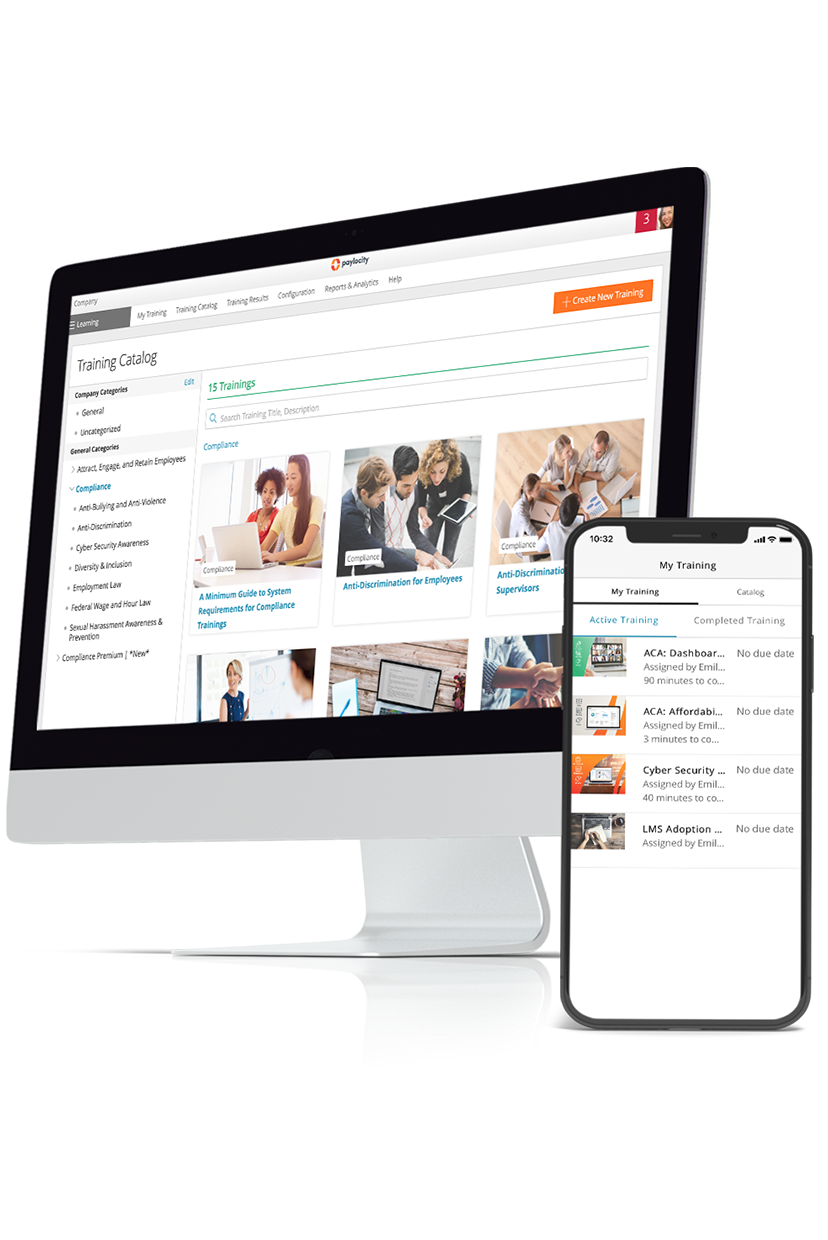
Grow your talent with better training
Now, more than ever, employees want more career development opportunities from their employers. The right Learning Management System (LMS) can help develop new skills while training your workforce on company policies, products, and more. Empower your employees to grow professionally with Learning, a modern, mobile solution that fits different learning styles and connects to your existing systems and processes.
Related
![The 9 Best Payroll Software for Small Businesses [2026]](https://s7d9.scene7.com/is/image/paylocity/best-payroll-software-hero?$Hero-Card$)
The 9 Best Payroll Software for Small Businesses [2026]
