
10 Best Employee Time Tracking Software [2026]
Tracking employee hours can quickly become a hidden drain on productivity. Especially if your organization still uses manual spreadsheets — correcting missed punches, reviewing timesheets, or handling approval requests — can add up to hours lost every week before payroll even begins.
Time tracking software solves this by capturing hours across mobile, kiosk, and desktop tools — reducing payroll mistakes. In this post, we’ll review the best time tracking software and what makes each one stand out for modern workplaces.
Best time tracking software of 2026
| Platform | Best For | Key Features | Pricing |
| Paylocity | Unified payroll integrated automation |
|
Custom pricing with a free demo
|
| Toggl Track | Fast, flexible team tracking |
|
|
| Clockify | Tracking all computer activities |
|
|
| TimeCamp | Offline time tracking |
|
|
| Hubstaff | Field teams that need accountability |
|
|
| Harvest | Vast app integration capabilities |
|
|
| Timely | Centralizing all work activity |
|
|
| RescueTime | Focus and habit insights |
|
|
| Everhour | Simple pricing |
|
|
| QuickBooks Time | Photo capture at clock‑in |
|
|
1. Paylocity

Best for: Unified payroll integrated automation
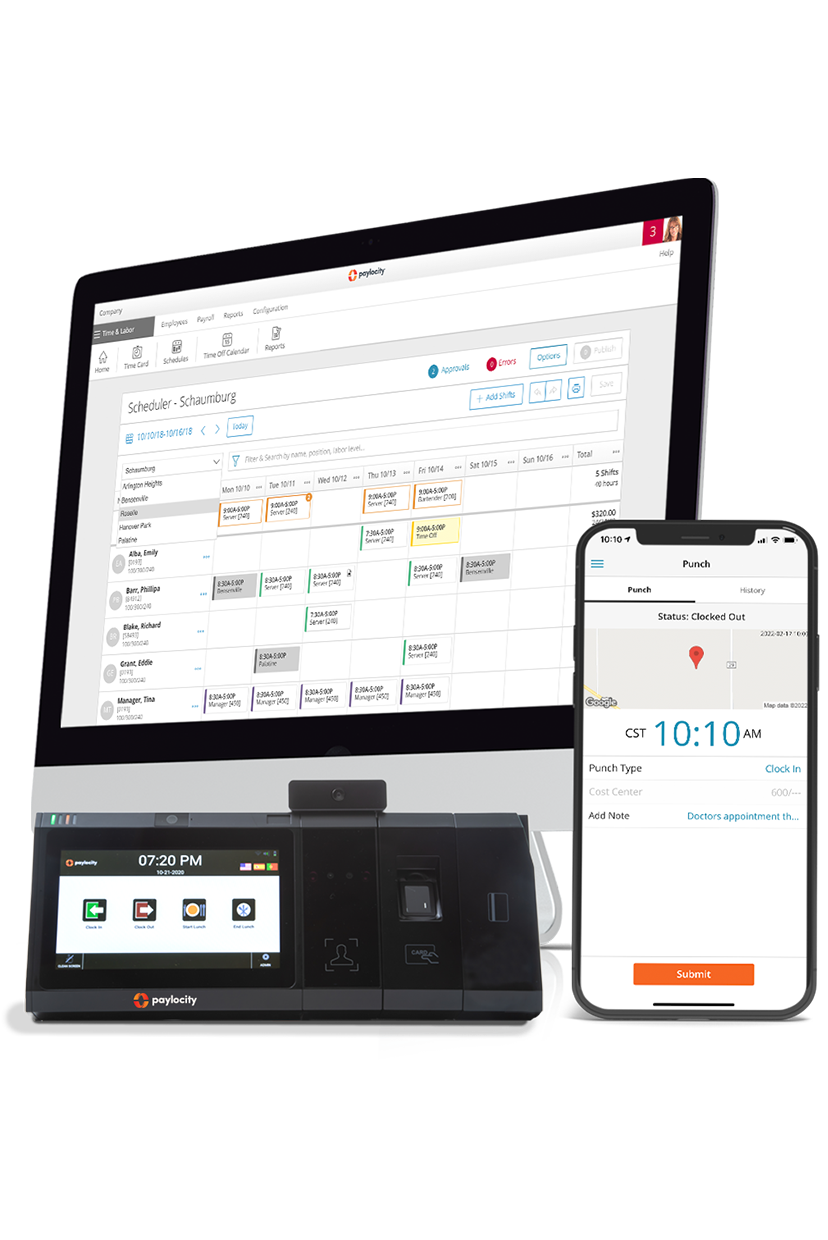
Paylocity gives employees multiple ways to track their time, combining hardware and software solutions to fit any workplace, from office desks to field teams. Staff can clock in with biometric time clocks, badge readers, kiosk tablets, the mobile app (including Apple Watch), or the web-based employee self-service portal.
Options support offline punching, photo capture, attestation prompts, and optional geofencing, giving organizations flexible, secure, and accurate time-tracking.
Key features:
- Advanced time clock options: Offers facial recognition, fingerprint scanning, badge readers, and optional thermal modules, allowing secure, touchless time tracking.
- Mobile time tracking: Employees can record and manage time right from their phones, with access to schedules, time-off requests, and approvals — and get notified if they forget to clock out.
- Multiple employee self-service solutions: Employees can use mobile apps (with Apple Watch support), kiosk tablets, or web self-service portals to punch in/out, submit timesheets, manage schedules, and handle meal or attestation prompts from anywhere.
- Flexible configuration and offline capability: Hardware and software options support offline punching, IP restrictions, geofencing, and flat-rate tip adjustments, ensuring accurate tracking regardless of connectivity or workplace setup.
- Attestation and compliance support: Automatically trigger meal attestations and apply premiums to help support regulatory compliance and reduce errors in time reporting.
- Direct timesheet visibility and management: Employees and managers can view, edit, and approve timesheets directly in the platform, streamlining payroll and boosting transparency.
Pricing: Custom pricing available with the free demo
?ts=1767882597017&$ProductTIleImage$&dpr=off)
2. Toggl Track

Best for: Fast, flexible team tracking
Toggl Track lets individuals and teams record work hours with one‑click timers or manual entries across web, desktop, and mobile apps. It syncs data in real time and accommodates both online and offline tracking.
Its core timing features support tagging, project/task assignment, and detailed timesheet generation to help monitor where time is spent and to accurately attribute it to clients or projects. Toggl Track also integrates with calendars and other tools to auto‑capture events and activities as trackable entries.
Toggl users report that sometimes the timer doesn’t start or stop as expected, particularly when switching between devices, and time syncing can be slow.G2 - Toggl
Key features:
- One‑click real-time timers & multi-mode logging: Start/stop timers instantly or enter time manually, with optional calendar and reminder integrations to reduce missed entries.
- 100+ integrationsToggl - Integrations: Connect Toggl Track with popular project management, productivity, and collaboration tools to keep all your time data in one place.
- Detailed tagging and categorization: Assign time to clients, projects, tasks, and tags for precise time attribution and clearer reporting.
Pricing:Toggl Pricing
- Free plan
- Starter: $9/user/mo
- Premium: $18user/mo
- Enterprise: Custom
3. Clockify

Best for: Offline time tracking
Clockify tracks work hours using a real‑time timer, manual timesheet entries, or a shared kiosk. Its web, desktop, and mobile apps work offline, so all tracked time is preserved even without an internet connection. It categorizes entries by project, task, tag, and billability, and its auto‑tracker and reminders help surface missed time and maintain accurate logs .
Team leads can also review and approve timesheets, group time entries, and analyze where hours were spent with reporting tools that export to PDF, CSV, or Excel.
Users mention that while the interface is functional, it isn’t always intuitive, and some administrative tasks require more clicks than expected. Some reviews note that Clockify can feel somewhat rigid at times. Editing entries, switching tasks quickly, or managing more complex workflows requires a lot of additional steps.G2- Clockify
Key features:
- Flexible timer & manual entry: Start/stop a timer with one click or enter hours manually in timesheets to reflect work done outside the live timer.
- Offline tracking & sync: Track time on mobile or desktop even without connectivity, with automatic syncing when you reconnect.
- Categorization & reminders: Assign time to projects, tasks, tags, and billable status, and use reminders/idle detection to ensure entries are complete and accurate.
Pricing:Clockify - Pricing
- Standard: $5.49/user/month
- Pro: $7.99/user/month
- Enterprise: $11.99/user/month
- Bundle: $12.99/user/month
4. TimeCamp

Best for: Tracking all computer activities
TimeCamp provides flexible time tracking across web, desktop, and mobile that lets users start/stop timers, fill timesheets manually, or rely on automatic tracking that logs hours in the background and syncs when online. The desktop app can also track computer activities (apps/websites used) and automatically assign time to projects based on keywords, helping reveal where work hours are spent.
Users have reported that the desktop app updates the timer infrequently, which can make time tracking feel unclear. Manually entering time in the browser can also be difficult, as the input behavior can be unpredictable and confusing.G2- TimeCamp
Key features:
- Automatic and manual time capture: Log hours with one‑click timers, manual entries, or set rules/keywords so TimeCamp auto‑assigns time to projects and tasks .
- Flexible timesheets with multiple views: Use day, week, and calendar views to enter or review tracked hours, adjust entries, and mark billable time for client billing or payroll .
- Computer activity tracking & detailed reports: Track time spent in apps and websites on desktop, categorize activities, and generate precise reports that show where time was spent and support optimization.
Pricing:TimeCamp pricing
- Starter: $3.99/user/month
- Premium: $6.99/user/month
- Ultimate: $9.99/user/month
- Enterprise: Custom
5. Hubstaff

Best for: Field teams needing accountability
Hubstaff helps teams track time across web, desktop, and mobile. Users start timers or let Hubstaff automatically record hours for projects and tasks. The platform monitors activity levels, apps, and websites, and can capture screenshots to show how employees used their time. Managers can review, edit, and export timesheets for payroll processing and reporting, making oversight straightforward.
Some users report that Hubstaff’s tracker can stop unexpectedly during app updates or connectivity issues, which may result in missed time if not noticed.Hubstaff
Key features:
- GPS & geofenced tracking: Automatically start/stop time based on team members’ physical location to tie hours to job sites.
- Activity insights with benchmarks: Measure active keyboard/mouse engagement and compare productivity levels across your team.
- Productivity metrics & anomaly detection: Measures activity levels, flags unusual activity patterns (like fake input tools), and provides productivity benchmarks to help teams optimize focus and utilization.
Pricing:Hubstaff pricing
- Starter: $4.99/user/month
- Grow: $7.50/user/month
- Team: $10/user/month
- Enterprise: $25/user/month
6. Harvest

Best for: Vast app integration capabilities
Harvest tracks hours effortlessly across web, desktop, and mobile, letting users start timers, log time manually, and add notes for context. It links tracked hours directly to project budgets and client billing, giving teams real-time insight into scope, profitability, and resource allocation. Harvest also integrates with over 100 appsHarvest integrations, automatically surfacing tracked time in tools you already use.
Users note a lack of automatic time tracking in Harvest, which requires manually starting and stopping timers.G2- Harvest
Key features:
- Budget‑aware tracking: Automatically compares logged hours against project budgets and alerts managers before overruns occur.
- Integrated invoicing: Converts tracked time into client-ready invoices with optional approval workflows, removing manual billing steps.
- App ecosystem & automation: Syncs tracked hours with tools like Asana, Jira, and Trello, keeping all project data aligned and minimizing duplicate entry.
Pricing:Harvest pricing
- Free plan
- Teams: $9/user/month
- Enterprise: Custom
7. Timely

Best for: Centralizing all work activity
Timely centralizes all your work activity, automatically tracking time across web, desktop, and mobile devices. It organizes hours by projects and clients in a clean, visual timeline, and syncs with calendars and productivity apps to keep your workflow connected. Teams can get a real-time overview of work patterns and project engagement without manually logging hours.
While Timely is generally useful, its automatic tracking sometimes requires manual adjustments for accuracy. Some advanced reporting and customization options are limited for more complex project needs, and the pricing may feel high for small teams or individual users.G2 - Timely
Key features:
- Automatic memory tracking: Logs files, websites, and apps in the background so no billable time is missed.
- AI-powered Timesheet Assistant: Uses AI to suggest and fill timesheet entries from captured activity, letting users approve accurate timesheets with one click.
- Integrated project insights: Provides dashboards showing hours versus budgets, billable rates, and task breakdowns for better project management.
Pricing:Timely pricing
- Starter: $9/user/month
- Premium: $16/user/month
- Unlimited: $22/user/month
- Enterprise: Custom
8. RescueTime

Best for: Focus and habit insights
RescueTime runs in the background, tracking your work automatically as you go about your day. It automatically logs how you spend time on apps and websites, giving you a real view of your digital work habits without having to start or stop timers.
It builds a timeline of activity that filters out distractions and non‑work time, so you can see where your focus goes day‑to‑day and map it to the goals you set. For teams or freelancers who need project context, RescueTime can link tracked activity into Timesheets that assign hours to clients, projects, and tasks, reducing manual entry and speeding up reporting.
Some users report that RescueTime’s tracking can be inconsistent, which is a concern when relying on it for accurate usage data. The feature set is also fairly limited, particularly around session management and manual project input, which can be frustrating for users who need more control.G2 - RescueTime
Key features:
- Automatic background activity logging: Captures apps, websites, and documents you use without manual timers so you get complete data on where your digital time goes.
- Focus and productivity insights: Shows patterns in how and when you work, including alerts and summaries that help you pinpoint peak productivity or distraction trends.
- Auto‑generated timesheets: Uses tracked activity to suggest and fill timesheet entries by client, project, and task, making weekly reporting and billing far less manual.
Pricing:RescueTime pricing
- Solo: $7/user/month
- Solo+: $10/user/month
- Team: $12/user/month
- Team+: $16/user/month
9. Everhour

Best for: Simple pricing
Everhour blends time tracking with project workflows so teams can see tracked hours directly where work happens inside tools like Asana, ClickUp, Jira, Trello, and Monday.
You can start/stop timers or add time manually for any task, then manage and review team timesheets from a centralized hub that shows who’s working on what and how hours stack up week by week. Everhour also supports budgeting, billable vs. non‑billable categorization, and real‑time syncing so project cost and profitability stay visible alongside work activity.
Users report that Everhour requires users to remain on the active project page or remember to manually stop the timer when switching tasks. This can be inconvenient when work involves multiple tools or background tasks that aren’t tied to a specific page, requiring users to review and adjust time entries afterward.G2 - Everhour
Key features:
- Embedded tracking in PM tools: Track time directly inside Asana, Jira, Trello, Linear, ClickUp, Monday, and 10+ other tools18 without the need to switch tabs.
- Timesheet approvals & editing controls: Managers review and approve team timesheets, lock past periods, and enforce time entry rules to keep records clean for payroll and invoicing.
- Real‑time dashboards & live team visibility: See who’s currently working on which tasks and monitor active timers across your team without leaving the tool you use for daily work.
Pricing:Everhour PM tools integration
- Free for up to 5 seats
- Team: $8/mo. Minimum 5 seats.
10. QuickBooks Time

Best for: Photo capture at clock‑in
QuickBooks Time helps teams track hours from anywhere with clock‑in/out on web, mobile, and kiosk interfaces, and it ties those hours straight into payroll, scheduling, and accounting systems to keep time data actionable for operations and finance. The platform also supports multi‑user attendance, shift scheduling, and photo capture at clock‑in to reduce buddy punching and improve accuracy on shared devices.
Some users report issues with clocking in and out when QuickBooks Time doesn’t fully integrate with physical time-clock terminals. There are also occasional inaccuracies in PTO and sick leave accrual calculations, particularly when managing multiple accrual rules.G2 - QuickBooks
Key features:
- Crew clock‑in & group time capture: Managers can clock in entire crews at once and track labour collectively or individually for fast group time tracking (source:
- GPS & geofence‑triggered tracking: QuickBooks Time logs employee locations while on the clock and triggers reminders to clock in/out at job sites to improve accountability and timesheet accuracy.
- Kiosk with photo capture: A digital punch‑clock kiosk lets employees track hours from a shared device, with optional photo capture at clock‑in to help prevent time theft.
Pricing:QuickBooks Time pricing
- Time Premium: $30
- Time Elite: $55
Features to look for when choosing time tracking software
Not all employee time tracking apps or platforms are created equal. The right platform goes beyond logging hours, helping organizations enforce rules, manage approvals, and gain visibility into labor costs. Choosing a system with flexible features ensures accuracy, compliance, and smoother payroll processing.
Configurable labor rules and premiums
Strong platforms let admins set overtime, break, and premium rules based on federal, state, or company policies. They support shift differentials, meal and rest rules, and attendance policies that apply automatically. Configurable rules reduce manual edits and rework, ensuring payroll is accurate the first time.
Multi-location policies and role-based approvals
Large teams need policies that vary by location, department, or job type, with different approvers for each step. Role-based permissions, approval chains, and audit history make it easy to review timecards on mobile or desktop without losing control. This ensures smooth handoffs from supervisor review to payroll-ready totals.
Time capture options for every work style
Time tracking should match how employees work. Mobile punches suit on-the-go roles, web kiosks work for shared devices, and physical clocks serve worksites. Options like badge swipes, biometric facial or fingerprint recognition, and wearable integration allow employees to clock in with prompts for breaks or attestations as needed.
Scheduling and labor cost visibility
Time tracking works best when it ties to schedules, planned breaks, and shift rules. Real-time updates, notifications, and automatic calculations of overtime and premiums help enforce policies consistently. Linking time to schedules unlocks deeper insights into labor costs by role, shift, and location.
Integrations, APIs, and tech stack fit
Time data should flow directly into payroll, HR, benefits, accounting, and reporting systems without manual exports. Look for an integration marketplace, open APIs, and clear support documentation. Support for single sign-on (SSO) and identity management reduces admin overhead and credential issues.
Exceptions, edits, and auditability
Strong platforms surface problems before they affect pay. Missed punches, early clock-ins, long breaks, unapproved overtime, and duplicate entries are flagged proactively. Detailed edit tracking and audit trails show who changed what, when, and why, simplifying disputes and compliance reviews.
Choose Paylocity for stress-free employee time tracking
Finding the best time tracking solution means choosing a platform that adapts to how your team works and reduces manual work.
Paylocity combines flexible time capture, automated labor rules, and seamless payroll integration to make time tracking simpler and more reliable. With support for mobile punches, web kiosks, and physical clocks, you can effortlessly manage approvals, audits, and labor costs.
Learn more about how Paylocity simplifies time tracking and explore the features that help you save time, reduce errors, and stay compliant.
Request a demo today, and experience stress-free time management for your organization.
Request a Demo Today!
Learn more about Paylocity’s workforce management tools. Explore how Paylocity supports modern people operations across your organization.

Request a demo today to see exactly how Paylocity can help your organization run payroll faster, stay compliant, and keep your workforce satisfied.
Sources
More Time, Less Labor = A Better Experience
Say goodbye to manual tasks and hello to efficiency. Empower your employees with intuitive tools to manage their time—view balances, request time off, and get real-time notifications, all from one platform. Supervisors can access 100+ reports, track attendance, and approve requests in seconds. With instant insights at your fingertips, optimizing time and attendance has never been easier.
Related
![Top 10 Best Payroll Software for Small Businesses [2026]](https://s7d9.scene7.com/is/image/paylocity/best-payroll-software-hero?$Hero-Card$)
Top 10 Best Payroll Software for Small Businesses [2026]
