Image of two women having a conversation in workplace setting.
Employee Experience Human Resources

11 Best Workforce Management Software Solutions to Optimize Your Team

Compare the best workforce management software based on features, real-world reviews, and what matters most when managing your workforce.

Managing schedules, tracking hours, and planning labor across multiple teams is harder than it looks. Even small mistakes can lead to overtime costs or understaffed shifts. Workforce management (WFM) software centralizes these tasks, giving managers clear visibility into schedules, real-time hours, and labor allocation, so teams run efficiently and predictably. 

In this article, we break down 11 top workforce management tools, highlighting what each does best so you can pick the solution that fits your team. 

What is workforce management? 

Workforce management is the set of tools, processes, and practices that companies use to ensure the right employees are in the right place, at the right time, with the right skills. It covers everything from scheduling and time tracking to labor forecasting, compliance, and performance management — all aimed at keeping operations efficient and employees supported. 

Workforce management includes several key areas, such as: 

  • Labor management: Covers planning and reporting on workforce productivity. 
  • Time and attendance tracking: Capture hours worked, track overtime, and ensure accurate labor data. 
  • Leave management: Handles vacation, sick leave, parental leave, and other time-off requests. 
  • Shift and coverage planning: Adjust staffing in real time to fill gaps, manage absences, and balance workload. 
  • Workforce analytics: Use dashboards and reports to track labor trends, costs, and staffing efficiency. 

Best workforce management tools of 2026 

Platform

Best for  Key features Pricing

Paylocity

Time tracking, scheduling, and labor planning 
  • Time and attendance tracking 
  • Scheduling 
  • AI-driven shift recommendations 
  • Adaptable time capture options 
  • Headcount planning 
  • Performance management 
Custom
BambooHR HR management
  • Project or job tracking 
  • Performance management 
  • HR reporting and analytics 
Custom 
ADP Workforce Now Labor costs and staffing needs 
  • Skill‑based & demand‑aware scheduling 
  • Tax filing and compliance 
  • Workforce analytics 
Custom 

Connecteam 

Daily operations 
  • Employee time clock 
  • Scheduling 
  • Task management 
  • Basic: $29/mo. 
  • Advanced: $49/mo.
  • Expert: $99/mo. 
  • Enterprise: Custom 
Deel Global teams hiring and paying international contractors and employees
  • Contracts & compliance in 150+ countries
  • Global payroll that consolidates full-time employees and contractors in
  • Automated onboarding with localized documents
Custom
Homebase Businesses with hourly workers in retail, hospitality, and food service
  • Drag-and-drop scheduling with AI-assisted shift creation
  • Time clock with mobile clock-in and overtime compliance
  • Built-in team messaging
  • Basic: $0/location/mo.
  • Essentials: $24/location/mo.
  • Plus: $56/location/mo.
  • All-in-One: $96/location/mo.
Zoho People

Small business

  • Flexible attendance management 
  • Shift and job scheduling with patterns 
  • Learning and performance 
  • Essential HR: $1.50/user/mo. 
  • Professional: $2/user/mo. 
  • Premium: $3/user/mo.
When I Work Employee scheduling
  • Shift scheduling 
  • Time clock and attendance 
  • Team messaging 
  • Single Location  or Schedule: $2.50/user/mo. 
  • Multiple Locations & Schedules: $5/user/mo. 
Dayforce Real-time labor insights
  • Demand-based scheduling 
  • Labor planning 
  • Task management 
Custom
Rippling Custom reporting
  • IT device provisioning 
  • HR workflow automation 
  • Real‑time labor cost visibility during scheduling 
Custom
UKG
Large-scale workforce
  • Time tracking and attendance 
  • Workforce scheduling 
  • Reporting and analytics 
Custom

1. Paylocity

Paylocity homepage

Best for: Time tracking, scheduling, and labor planning 

When teams manage scheduling, time tracking, and labor across multiple systems, even simple tasks such as approving timecards, filling shifts, or tracking labor costs can quickly get complicated. 

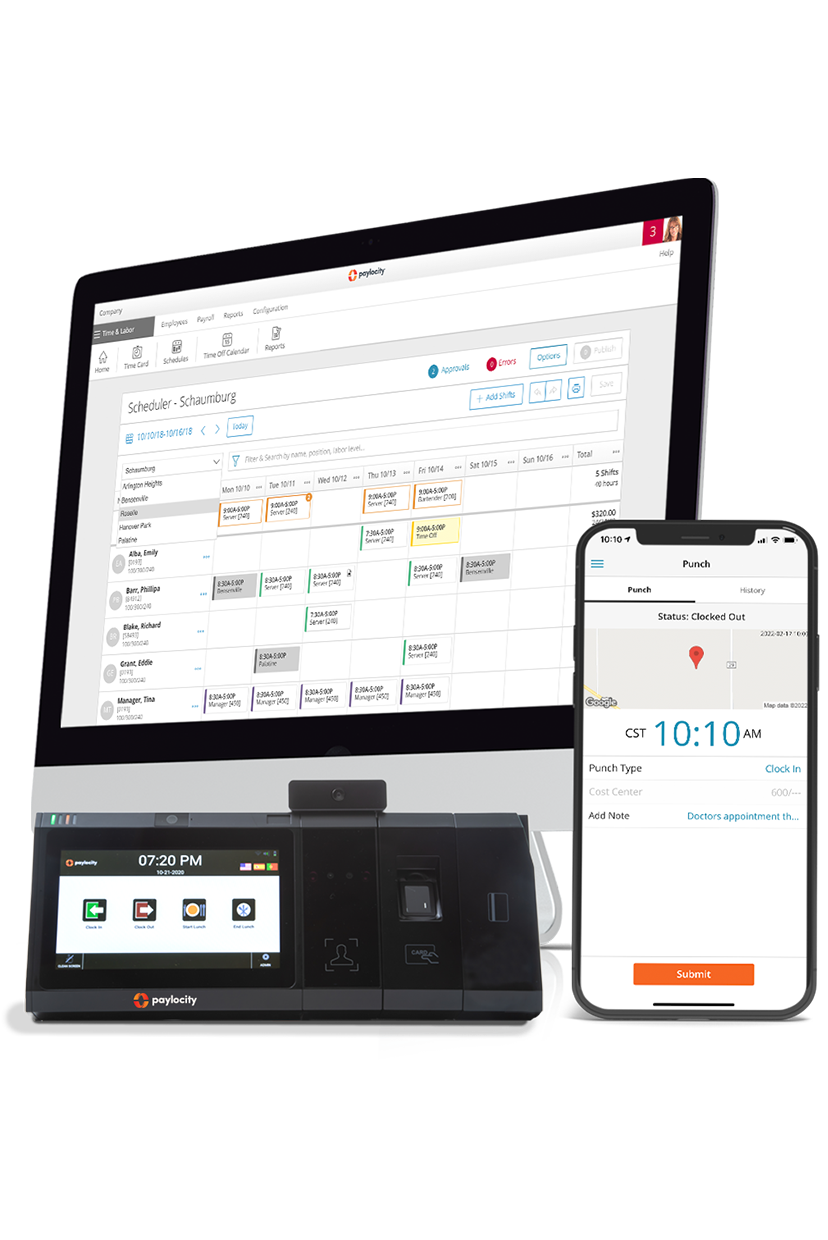
Paylocity brings all these workforce management processes together on one platform, letting users automate scheduling, time and attendance, and shift planning, rather than managing them manually. 

Paylocity is a good fit for organizations that want a single platform to manage their team’s time and schedules without compromising efficiency and employee experience.

Employees can manage their own schedules, swap shifts, and submit time-off requests without having to chase down a manager. Eighty-eight percent of G2 reviewers rate Paylocity's self-service capabilities on par with the category average, reflecting that flexibility in practice.

Their dashboards score 89%, slightly above the category average of 88%, giving workforce managers a clear, real-time view of labor data across the organization.

Overall, 89% of G2 reviewers say Paylocity meets their requirements, matching the category benchmark for workforce management tools.G2.com – Grid Report for Workforce Management | Summer 2026 | Paylocity

Key features:  

  • Time and attendance tracking: Captures hours across mobile, web, badge, and biometric systems, letting employees submit time and managers approve it in one place. It also tracks attendance, absences, and shift participation, giving managers clear visibility to plan coverage and keep labor costs on target. 
  • Scheduling: Paylocity’s scheduling tools let managers build and adjust employee schedules with smarter staffing logic and real‑time updates. Employees can view their schedules, claim open shifts, or swap shifts through the mobile app, helping teams stay covered and labor costs in line 
  • AI-driven shift recommendations: The platform uses historical data and scheduling rules to suggest optimal shifts. This helps managers fill schedules efficiently and maintain coverage across teams and locations. 
  • Adaptable time capture options: Employees can clock in using a badge, biometric scanner, tablet, mobile app, or web browser. Features like geolocation, facial recognition, and fingerprint validation help prevent time theft and ensure compliance.  
  • Headcount planning: Managers can utilize staffing data to help managers plan team sizes and budgets with precision. Real-time insights and collaborative workflows make it easier to align headcounts with business goals and adjust quickly to changing needs. 
  • Performance management: Centralizes goal setting, real-time feedback, and 360° reviews to keep teams aligned and accountable. Managers can track progress, gather multi-source feedback, and identify high-potential employees to drive engagement and development year-round. 

Pricing: Custom 

2. BambooHR

BambooHR homepage

Best for: HR management 

BambooHR is a cloud‑based human resources information system (HRIS) designed to centralize core HR tasks in one place for HR teams to manage employee data, onboarding, performance, and reporting.  

It pulls employee records, approvals, and workflows into a unified platform that’s commonly used by small to medium‑sized businesses that want a single system to handle HR operations. 

G2 reviewers give BambooHR high marks for ease of use (94%) and absence and leave management (92%), both above category averages.G2.com – Grid Report for Workforce Management | Summer 2026 | Bamboo HR That said, teams with heavier scheduling needs may hit some friction.

Shift scheduling scores 67% — well below the 88% category average — and mobile shift scheduling sits at 69% against an 85% average.G2.com – Grid Report for Workforce Management | Summer 2026 | Bamboo HR These points highlight gaps that matter for organizations managing shift-based workforces.

Key features: 

  • Project or job time tracking: Allows teams to assign hours to specific projects or tasks, giving managers insight into where labor hours are spent. 
  • Performance management: BambooHR provides tools to set review cycles, track goals, and collect feedback. It includes templates and reminders to keep performance evaluations on schedule. 
  • HR reporting and analytics: The platform offers built-in and customizable reports on metrics like headcount, turnover, and time-off usage. 

Pricing: Custom

3. ADP Workforce Now

ADP Workforce Now homepage

Best for: Labor costs and staffing needs

ADP Workforce Now is a cloud‑based human capital management (HCM) platform that combines payroll, workforce management, HR, and benefits in one system. 

It’s designed for mid‑sized to large organizations that need robust payroll processing and compliance support while also managing employee data, time, scheduling, and reporting from a single dashboard.

Some users find parts of ADP Workforce Now unintuitive, with document management and scheduling requiring extra steps or lacking clarity.3G2.com - ADP Workforce Now Reviews

Key features:

  • Skill‑based and demand‑aware scheduling: Managers can create schedules that match employee skills, certifications, and availability while aligning with budget or demand patterns, and employees can swap shifts or share availability.
  • Tax filing and compliance: ADP Workforce Now calculates payroll taxes and files them automatically across relevant jurisdictions. It monitors regulatory updates to keep processes compliant. 
  • Workforce analytics: It provides dashboards and reports on labor costs, headcount, and turnover to help plan staffing needs.

Pricing: Custom4ADP.com - Pricing

4. Connecteam

Connecteam homepage

Best for: Daily operations

Connecteam is a workforce planning software that brings scheduling, time tracking, communication, and basic HR workflows into a single mobile-first app — particularly for teams that aren’t always at a desk. 

It lets managers plan shifts, capture hours with GPS-enabled clock-ins, assign tasks and checklists, and share updates or forms with employees from one interface. Employees can see their schedules, clock in and out, access job details, and communicate with teammates all from their phone or desktop.

Connecteam scores well across the board on G2, with reviewers rating mobility at 93% and team communication at 93%.5G2.com – Grid Report for Workforce Management | Summer 2026 | Connecteam

Where it shows limitation is on the technical side. Integration APIs score 80% against an 83% average, and workforce analytics, while functional, is among its lower-rated features.5G2.com – Grid Report for Workforce Management | Summer 2026 | Connecteam This is something worth keeping in mind for organizations that need deeper reporting or system connectivity.

Key features: 

  • Employee time clock: Connecteam’s time clock captures employee hours through mobile or desktop clock-ins and can include GPS location tracking to tie time entries to work sites. 
  • Scheduling: The platform provides tools to build and share schedules, set recurring shifts, and notify employees of assignments, helping managers coordinate coverage more efficiently. 
  • Task management: Managers can assign tasks and checklists, track completion in real time, and digitize workflows that would otherwise rely on paper or spreadsheets.  

Plans and pricing:6Connecteam.com - Pricing

  • Basic: $29/month 
  • Advanced: $49/month 
  • Expert: $99/month 
  • Enterprise: Custom

5. Deel

Deel workforce management software.

Best for: Global teams hiring and paying international contractors and employees

Deel is a global staff management tool built for companies hiring across borders. It supports compliance, contracts, and payroll complexity for managing international employees and contractors.

With operations spanning 150+ countries,LetsDeel.com – Where is Deel Available it's designed for organizations where global reach is a core part of how they work, not an afterthought.

G2 reviewers give Deel high marks for ease of use (96%) and absence and leave management (100%). On the other hand, customization scores 80% against an 85% average, and dashboards score 83% against an 88% benchmark.G2.com – Grid Report for Workforce Management | Summer 2026 | Deel This is worth considering for teams that need more flexibility in how they configure and view workforce data.

Key features:

  • Contracts and compliance in 150+ countries: Deel generates locally compliant contracts and handles regulatory requirements by country, reducing legal risk when hiring internationally.
  • Global payroll that consolidates full-time employees and contractors in a single run: Run payroll across employment types and geographies from one place, without juggling multiple systems or manual currency conversions.
  • Automated onboarding with localized documents: New hires receive the right paperwork for their country automatically, streamlining the onboarding process regardless of where they're located.

Pricing: Custom

6. Homebase

Homebase workforce management software.

Homebase is built with hourly workforces in mind, where managers need tools that keep up with constantly changing schedules. It handles scheduling, time tracking, and team communication in one place, prioritizing simplicity over complexity.

For small- to mid-sized businesses managing shift-based teams, it covers the day-to-day without requiring much setup or training.

G2 reviewers rate Homebase's shift scheduling at 96%, well above the 88% category average. Where it shows gaps is on the integration side: integration APIs score 69% compared to an 83% average.9G2.com – Grid Report for Workforce Management | Summer 20206 | Homebase

This may be a limitation for businesses that need their WFM solution to connect with other systems in their tech stack.

Key features:

  • Drag-and-drop scheduling with AI-assisted shift creation: Build and adjust schedules quickly with an intuitive interface that uses AI to suggest shifts based on availability, role, and historical patterns.
  • Time clock with mobile clock-in and overtime compliance: Employees can clock in from their phones or a shared device, with built-in alerts to help managers stay on top of overtime before it becomes a cost issue.
  • Built-in team messaging: Managers and employees can communicate directly within the platform, reducing the need for separate group chats and keeping shift-related conversations in one place.

Pricing: 10Homebase.com - Pricing

  • Basic: $0/location/month
  • Essentials: $24/location/month
  • Plus: $56/location/month
  • All-in-One: $96/location/month

7. Zoho People

Zoho People homepage

Best for: Small business

Zoho People is part of the broader Zoho ecosystem, and it integrates natively with other Zoho apps like Zoho Recruit, Zoho Payroll, Zoho CRM, and Zoho Projects. It can connect with over 950 third-party applications via Zoho Flow.11Zoho Integrations 

It’s used by organizations of various sizes that want a single place to manage employee data and routine HR workflow. 

G2 reviewers give Zoho People good marks across the board. Absence and leave management scores 94% against an 89% average, and time and attendance tracking comes in at 93% versus a 90% benchmark.12G2.com – Grid Report for Workforce Management | Summer 2026 | Zoho People

Quality of support (87%) and ease of admin (87%) trail their respective category averages slightly,12G2.com – Grid Report for Workforce Management | Summer 2026 | Zoho People which may be worth factoring in for teams that anticipate needing hands-on help during setup or ongoing use.

Key features: 

  • Flexible attendance management: Zoho People lets employees check in/out via web or mobile with IP/location rules, facial recognition, and biometric support so attendance is captured accurately in real time. 
  • Shift and job scheduling with patterns: Define custom shift patterns, auto‑assign schedules based on those patterns, and rotate shifts automatically across teams, departments, or locations. 
  • Learning and performance: Zoho People includes a built-in learning management system (LMS) for employee training and tools for setting goals, gathering feedback, and conducting performance reviews.

Plans and pricing:13SoftwareAdvice.com - Zoho People Pricing

  • Essential HR: $1.50/user/month 
  • Professional: $2/user/month 
  • Premium: $3/user/month 

8. When I Work

When I Work homepage

Best for: Employee scheduling 

When I Work is workforce management software designed to support scheduling, time tracking, and communication for hourly teams. Managers can create schedules, approve time-off requests, review shift swaps, and assign open shifts. Employees receive their schedules and confirm shifts through the app. 

The platform includes mobile clock-ins with schedule and location restrictions, overtime alerts, labor reports, and payroll integrations.

When I Work scores well where it counts for shift-based teams. Shift scheduling leads at 93% against an 88% average, and absence and leave management comes in at 91% versus an 89% benchmark.14G2.com – Grid Report for Workforce Management Software | Summer 2026 | When I Work

On the lower end, integration APIs score 74% compared to an 83% average — a notable gap for businesses that need the platform to connect with payroll or other tools outside the system.14G2.com – Grid Report for Workforce Management Software | Summer 2026 | When I Work

Key features:

  • Shift scheduling: When I Work allows managers to build and publish schedules, assign open shifts, and review shift swaps from one system.
  • Time clock and attendance: The platform includes a mobile time clock that records hours worked and supports schedule and location-based clock-in restrictions. 
  • Team messaging: It provides built-in one-to-one and group messaging so managers can notify teams of schedule changes or operational updates.

Pricing:15WhenIWork.com - Pricing

  • Single Location  or Schedule: $2.50/user/month
  • Multiple Locations & Schedules: $5/user/month

9. Dayforce

Dayforce homepage

Best for: Real-time labor insights

Dayforce provides workforce management tools that support demand-based scheduling, time and attendance tracking, and labor planning within a single platform that also connects to global payroll. 

Managers can use real-time workforce data to monitor coverage, address absences, and adjust schedules, while multiple time clock options and task management tools help coordinate labor and operational work across locations.

Dayforce's self-service capabilities score 89%, just above the 88% category average,16G2.com – Grid Report for Workforce Management | Summer 2026 | Dayforce one of its stronger data points among G2 reviewers.

Most other metrics fall below benchmarks, with quality of support at 80% versus an 89% average and ease of setup at 73% against an 87% average — a notable gap that may reflect the implementation complexity often associated with enterprise-level platforms.16G2.com – Grid Report for Workforce Management | Summer 2026 | Dayforce

Key features:

  • Demand-based scheduling: Dayforce builds schedules using business demand, labor budgets, pay rates, and worker availability. This supports more accurate staffing and helps limit over- or under-scheduling.
  • Labor planning: Dayforce provides tools to plan staffing based on business demand and operational goals. Managers can adjust labor plans using workforce data to support coverage and productivity.
  • Task management: The platform allows managers to create, assign, and track tasks by location or department. Task progress can be reviewed in one place to support day-to-day operations.

Pricing: Custom17Dayforce.com - Pricing

10. Rippling

Rippling homepage

Best for: Custom reporting 

Rippling’s ecosystem has 600+ pre-built third-party apps18Rippling - Third Party Apps — including tools like QuickBooks Online, Google Workspace, Slack, and NetSuite. Rippling also supports custom integrations via API, which helps companies connect workforce management data with payroll, IT, accounting, and other systems

Managers can set up schedules, track attendance, and handle overtime, with the system automatically applying rules for breaks and overtime approvals. You can also build reports on attendance, labor costs, and productivity, and get alerts when employees are late or missing shifts.

Some users note that Rippling can be slow to load at times, particularly when clocking in or navigating pages. A few also mention that certain modules, like performance review tools, can be confusing to navigate.19G2.com - Rippling User Reviews

Key features:

  • IT device provisioning: Automatically assign and track laptops, phones, and other devices for new hires and returning employees.
  • HR workflow automation: Automate tasks like time-off approvals, shift assignments, and onboarding checklists to keep processes consistent.
  • Real‑time labor cost visibility during scheduling: As you build or adjust schedules, Rippling shows live labor cost impact — including flagged overtime or compliance issues.

Pricing: Custom20Rippling.com - Custom pricing

11. UKG

UKG homepage

Best for: Large-scale workforce analytics 

UKG’s workforce management tools help organizations track time, manage schedules, and monitor labor data in real time. Employees can clock in using devices such as mobile apps, web browsers, or biometric clocks, and the system captures the hours worked, attendance, and any exceptions for managers to review. 

UKG offers tools such as strategic workforce planning for forecasting labor needs and UKG One View™ to unify payroll data across many countries.

Across satisfaction metrics, most ratings fall slightly below category average. Ease of setup scores at 81% against an 87% benchmark and quality of support at 83% versus an 89% average.G2.com – Grid Report for Workforce Management | Summer 2026 | UKG Pro

Mobility and mobile shift scheduling both score 80% — notably below their respective averages of 88% and 85%.G2.com – Grid Report for Workforce Management | Summer 2026 | UKG Pro This gap may be a friction point for the frontline, shift-based teams that make up much of its user base24.

Key features:

  • Time tracking and attendance: UKG captures employee hours accurately through mobile, web, or biometric clocks. Attendance and exceptions are tracked in real time to monitor labor costs and maintain clean payroll data.
  • Workforce scheduling: AI-assisted scheduling helps cover shifts while accounting for availability and preferences.
  • Reporting and analytics: Provides real-time workforce data and alerts for overtime, compliance, and labor planning.

Pricing: CustomUKG - Pricing

How to choose the right workforce management solution for your company

The best enterprise workforce management software balances automation, visibility, and flexibility, helping managers make informed decisions while giving employees easy access to the tools they need. Here are key factors to consider when evaluating options:

  • Comprehensive time tracking and scheduling capabilities: Choose a system that accurately records hours across devices, supports flexible scheduling, and adapts to shift changes, helping managers align labor with business needs. 
  • Integrated payroll and benefits management: Integration with payroll and benefits ensures that hours worked, overtime, and leave feed directly into pay calculations, reducing errors and saving time. 
  • Advanced reporting and analytics for labor costs and productivity: Software with real-time dashboards and customizable reports helps managers track labor costs, overtime, attendance patterns, and productivity, supporting better staffing decisions. 
  • Compliance features: Ensure the platform enforces labor policies, tracks mandatory breaks and overtime, and updates automatically to reflect changing labor laws, helping reduce risk. 
  • Scalability and flexibility to support company growth: The right solution should adapt as your business grows, handling more employees, locations, or complex schedules without requiring a complete system overhaul. 

Simplify payroll, scheduling, and HR with Paylocity 

Choosing the best workforce management software comes down to finding a platform that balances accurate time tracking, flexible scheduling, compliance support, and clear reporting — without adding unnecessary complexity. The right solution should make it easier to manage labor today while supporting your organization as it grows. 

Paylocity brings time, scheduling, payroll, and workforce insights together in one platform, giving teams a clearer view of how labor decisions affect costs, productivity, and employee experience. 

Request a Demo Today!

Learn more about Paylocity’s workforce management tools. Explore how Paylocity supports modern people operations across your organization. 

Paylocity logo
Request a Demo Today!

Learn more about Paylocity’s workforce management tools. Explore how Paylocity supports modern people operations across your organization. 

Workforce Management Software FAQs

What is the difference between HCM and WFM?

Human capital management (HCM) platforms focus on the full employee lifecycle, including hiring, onboarding, payroll, benefits, and performance management.  

Workforce management (WFM) software is more narrowly focused on day-to-day operations like time tracking, scheduling, attendance, labor forecasting, and compliance. Many modern platforms combine both, but WFM tools are specifically designed to help organizations manage labor more accurately and efficiently. 

Can workforce management platforms be customized for specific industries?

Yes, many workforce management platforms offer industry-specific features or configurations. For example, tools may support shift-based scheduling for retail and hospitality, compliance tracking for healthcare, or complex pay rules for manufacturing and education.  

That said, the level of customization varies, and some platforms are better suited for standardized workflows than highly specialized requirements. 

What is the most affordable workforce management software for small businesses?

Affordability depends on pricing models, required features, and company size. Some tools offer lower-cost plans focused on scheduling and time tracking, while more comprehensive platforms include payroll, reporting, and compliance tools at a higher price point. Small businesses should consider both upfront costs and long-term value as their workforce grows.

Are there any hidden costs associated with workforce management tools?

Some workforce management platforms charge extra for advanced reporting, integrations, additional users, or implementation support. Others may require add-ons for payroll, compliance tools, or mobile access. Reviewing pricing details and understanding what’s included upfront can help avoid surprises later.

What WFM tools are best for restaurants with hourly staff?

For restaurants managing hourly staff, the best workforce management software depends on the complexity of your operation. Tools like Homebase and When I Work are popular for their strong shift scheduling features, but they can fall short when it comes to integrations and scaling beyond basic scheduling.  

Paylocity offers a more complete solution, covering scheduling, time and attendance, and payroll in one platform, so growing restaurant groups don't have to stitch multiple tools together as their needs evolve.

Which WFM software is tailored for healthcare shift scheduling?

For healthcare shift scheduling, the best workforce management software needs to handle high staff volumes, compliance requirements, and round-the-clock coverage.  

Paylocity is well-suited for healthcare organizations that want scheduling, time tracking, and HR management under one roof — without the implementation complexity or support gaps that some enterprise platforms are known for. It's a strong fit for hospitals and the healthcare workforce that need reliability and ease of use across large, distributed teams.

Sources

011002000108a-time-attendance-fullwidth

More time, less labor = a better experience

Say goodbye to manual tasks and hello to efficiency. Empower your employees with intuitive tools to manage their time—view balances, request time off, and get real-time notifications, all from one platform. Supervisors can access 100+ reports, track attendance, and approve requests in seconds. With instant insights at your fingertips, optimizing time and attendance has never been easier.

Save time now