The best BILL alternatives at a glance
We've evaluated the top BILL competitors across features, pricing, and ideal use cases to help you narrow the field fast.

Managing back-office finances looks nothing like it did five years ago, and if your current accounts-payable (AP) stack is still stitching together disconnected tools, you're already behind.
There's no shortage of teams exploring BILL competitors as AP software has matured, and expectations around automation, integrations, and unified workflows have risen. The platforms available today are more capable, more connected, and often more cost-effective than the ones many teams currently use.
The good news: today's market offers a strong lineup of options built to meet those higher expectations. In this guide, we break down eight top alternatives, covering who each solution is best suited for, standout features, and how pricing structures compare as your team grows.
BILL (formerly Bill.com) is one of the most widely recognized platforms for accounts payable and accounts receivable automation, built to help businesses manage invoices, approvals, and payments.
It's a legacy solution that's served many finance teams well over the years. But as business needs grow more complex, some of its limitations become harder to ignore.
Here are the most common frustrations around BILL that bring finance teams to start shopping around:
We've evaluated the top BILL competitors across features, pricing, and ideal use cases to help you narrow the field fast.
| Platform | Best for | Key features | Pricing |
|---|---|---|---|
| Paylocity | All-in-one finance, HR, and IT |
|
Custom |
| Ramp | Fee-free spend management and corporate cards |
|
Free base plan, with paid plans starting at $15/user/mo |
| Tipalti | Global enterprise AP and tax compliance |
|
Plans start at $99/mo |
| Melio |
Straightforward small business bill pay |
|
Free plan available, with paid plans starting at $25/mo |
| Stampli | Interactive AP approval workflows |
|
Custom |
| Routable | High-volume B2B and mass payouts |
|
Paid plans start at $1,250/mo |
| Brex | High-growth scaling companies and startups |
|
Free plan available, with paid plans starting at $12/user/mo |
| AvidXchange | High-volume mid-market invoice processing |
|
Custom |

Best for: Organizations looking for an integrated AP and spend management solution
Paylocity is a modern workforce and financial management platform built to eliminate the friction of juggling separate tools for payroll, HR, and accounts payable.
Where BILL focuses on AP and AR, Paylocity brings your entire back office together, from invoice capture to payroll runs to employee self-service, so finance and HR teams are working from the same source of truth.
Vendors get a self-service portal to submit invoices and track payment status directly, without registering on a separate network just to get paid. No reconciling data across disconnected systems or chasing down payment confirmations — just a faster path to close.
Key features:
Pricing: Custom
?ts=1785441891882&$ProductTIleImage$&dpr=off)

Best for: Fee-free spend management and corporate cards
Ramp is a spend management platform built around corporate cards, expense automation, and accounts payable, all on a free base plan.
Instead of centering around invoice workflows like BILL, Ramp leads with card-first spend control, giving finance teams real-time visibility into every transaction as it happens. It's a good fit for businesses that want to cut manual expense work without taking on additional software costs.
That said, Ramp has limitations worth knowing. Reviews note the platform excels at card management and receipt automation but falls short for teams that need robust AP automation or complex approval workflows.Stampli.com - Ramp User Reviews: The Good, Bad, and a Better AP & P2P Option
Key features:
Pricing: Free base plan, with paid plans starting at $15/user/monthRamp.com - Ramp Pricing Plans

Best for: Global enterprise AP and tax compliance
For companies managing high volumes of cross-border payments, Tipalti operates at a different scale than BILL. The platform is built to handle payments to 200+ countries in 120 currencies,Tipalti.com - Global Payments with a KPMG-approved tax engine that automates W-8/W-9 collection, 1099 and 1042-S generation, and VAT reporting across multiple jurisdictions. BILL covers domestic AP reasonably well, but Tipalti is built for the compliance complexity that comes with global supplier networks.
The tradeoff is setup time and cost. Users consistently note that Tipalti's depth of features comes with a steep learning curve,Capterra.com - Tipalti Reviews 2026. Verified Reviews, Pros & Cons and some users report persistent sync issues with NetSuite and pricing that can feel steep for smaller teams.Stampli.com - Tipalti Reviews: What Users Say About Complexity vs Ease of UseIt's a platform that rewards organizations with the resources to implement it fully.
Key features:
Pricing: Plans start at $99/monthTipalti.com - Tipalti Pricing

Best for: Straightforward small business bill pay
Melio strips accounts payable down to its essentials without the enterprise complexity that makes platforms like BILL or Tipalti overkill for smaller teams. It's a practical fit for small businesses that need a clean, low-friction way to manage outgoing payments without a steep learning curve.
Unlike BILL, Melio doesn't require vendors to create an account to receive payment. ACH transfers are free on all plans, though credit card payments carry a 2.9% transaction fee.Meliopayments.com - Payment Platform Pricing for Businesses | Melio
The main limitations surface for growing teams. Users report inconsistent customer support and payment delays,Capterra.com - Melio Reviews 2026. Verified Reviews, Pros & Cons and the platform's integrations are narrower than what mid-market teams typically need.G2.com - Melio Pros and Cons | User Likes & Dislikes
Key features:
Pricing: Free plan available, with paid plans starting at $25/monthMeliopayments.com - Payment Platform Pricing for Businesses | Melio

Best for: Interactive AP approval workflows
Stampli takes a collaboration-first approach to AP automation, centering the entire invoice process around communication. Every invoice becomes its own thread where finance teams and vendors can ask questions, flag issues, and leave notes directly on the document itself.
For teams where approval bottlenecks stem from back-and-forth emails and lost context, that's a meaningful departure from how BILL handles the same problem.
Users highlight ease of use and responsive customer support as consistent strengths.Capterra.com - Stampli Reviews 2026. Verified Reviews, Pros & Cons However, some have experienced limitations around GL access controls and customization.G2.com - Stampli User Review
Key features:
Pricing: CustomStampli.com - Stampli Pricing

Best for: High-volume B2B and mass payouts
Routable is built for finance teams processing payments at scale. Where BILL is designed around a relatively standard invoice-to-payment workflow, Routable's architecture focuses on volume first, with API-native infrastructure that lets engineering teams trigger disbursements programmatically or finance teams execute thousands of payments via CSV upload.
The platform supports payments to 220+ countries in 140+ currenciesRoutable.com - B2B Cross-Border Payments Platform and claims to reduce manual AP work by up to 80%.Routable.com - Vendor Onboarding Software It's a strong fit for marketplaces, nonprofits, and mid-market companies with complex payout needs, though pricing starts significantly higher than most alternatives on this list.
Key features:
Pricing: Paid plans start at $1,250/monthRoutable.com - Pricing

Best for: High-growth scaling companies and startups
Brex combines corporate cards, expense management, bill pay, travel, and business accounts into a single platform designed for companies moving fast across multiple entities and geographies. It's a natural fit for startups and scaling businesses that need spend controls to keep pace with headcount growth. It also integrates directly with HR platforms, including Paylocity, Workday, and Rippling, to automatically pull employee data into expense approvals.
Users point to an intuitive interface and near-zero learning curve as consistent strengths, particularly for teams managing card programs across distributed workforces. On the downside, users report payment denials, restrictive spend guardrails, and account verification delaysG2.com - Brex Pros and Cons | User Likes & Dislikes that can create friction for smaller or newer businesses.
Key features:
Pricing: Free plan available, with paid plans starting at $12/user/monthBrex.com - Brex Pricing Plans | Get Started Today

Best for: High-volume mid-market invoice processing
AvidXchange is built for mid-market businesses that have outgrown basic bill pay but don't need a full enterprise suite. The platform automates invoice capture, approval routing, and supplier payments end-to-end. BILL covers similar AP territory, but AvidXchange is designed specifically for the volume and complexity that mid-market finance teams encounter, including industry-specific workflows for real estate, construction, and financial services.
Users consistently praise its audit trail capabilities and invoice tracking, and the platform's 200+ ERP integrations make it easier to plug into existing systems without disrupting current workflows.Avidxchange.com – Integrations Recurring complaints center on slow customer support and limited reporting, and some vendors report unexpected fees tied to virtual card payments.G2.com - AvidXchange Pros and Cons | User Likes & Dislikes
Key features:
Pricing: Custom
Not every BILL alternative solves the same problem, and choosing the wrong one can mean trading one set of frustrations for another. The right fit depends on where your current process is actually breaking down.
Before evaluating vendors, it helps to clarify the specific friction points your team is experiencing today.
Start the evaluation process internally. The answers to these questions will tell you more about what you need than any feature comparison chart:
If your team is spending significant time manually keying invoice data, hunting down approvals, or resolving discrepancies after the fact, the problem is workflow, not payment infrastructure.
Platforms built for collaborative invoice management, like Paylocity or Stampli, are designed for this scenario. They center the AP process on the invoice itself, with communication threads, AI-assisted coding, and approval routing that keep everyone working in the same place.
The goal here is to reduce the number of handoffs and the amount of human judgment required for routine invoices. Look for tools with strong AI expense management features, like extraction, configurable approval logic, and clear visibility into where every invoice stands at any given moment.
If your finance and HR teams are working out of separate systems, the underlying problem isn't any one tool. It's the architecture. Every handoff between systems introduces reconciliation work, and every data gap creates reporting blind spots that slow down decision-making.
Consolidating onto a unified platform like Paylocity addresses this at the root. When employee expenses, corporate cards, accounts payable, and payroll all live in the same ecosystem, your team stops reconciling and starts operating.
Finance and HR leaders share the same data in real time, approvals route through org structures that stay current automatically, and closing the books stops being a multi-system project.
For teams whose biggest pain point is operational fragmentation, consolidating onto a unified platform is the most direct path to lasting efficiency.
Most businesses treat payroll and accounts payable as separate problems — which is exactly why they end up on separate platforms, managed by separate teams, producing separate reports. The BILL competitors on this list each solve a piece of that puzzle, but few address both sides of the equation at once.
If you've been searching for a way to consolidate your back-office finances without sacrificing depth in either area, Paylocity's spend management solutions are worth a closer look. It's the only platform on this list that combines AP automation, expense management, and a full payroll and HR suite.
Request a free demo to see what’s possible with Paylocity’s attendance software!
About the Author

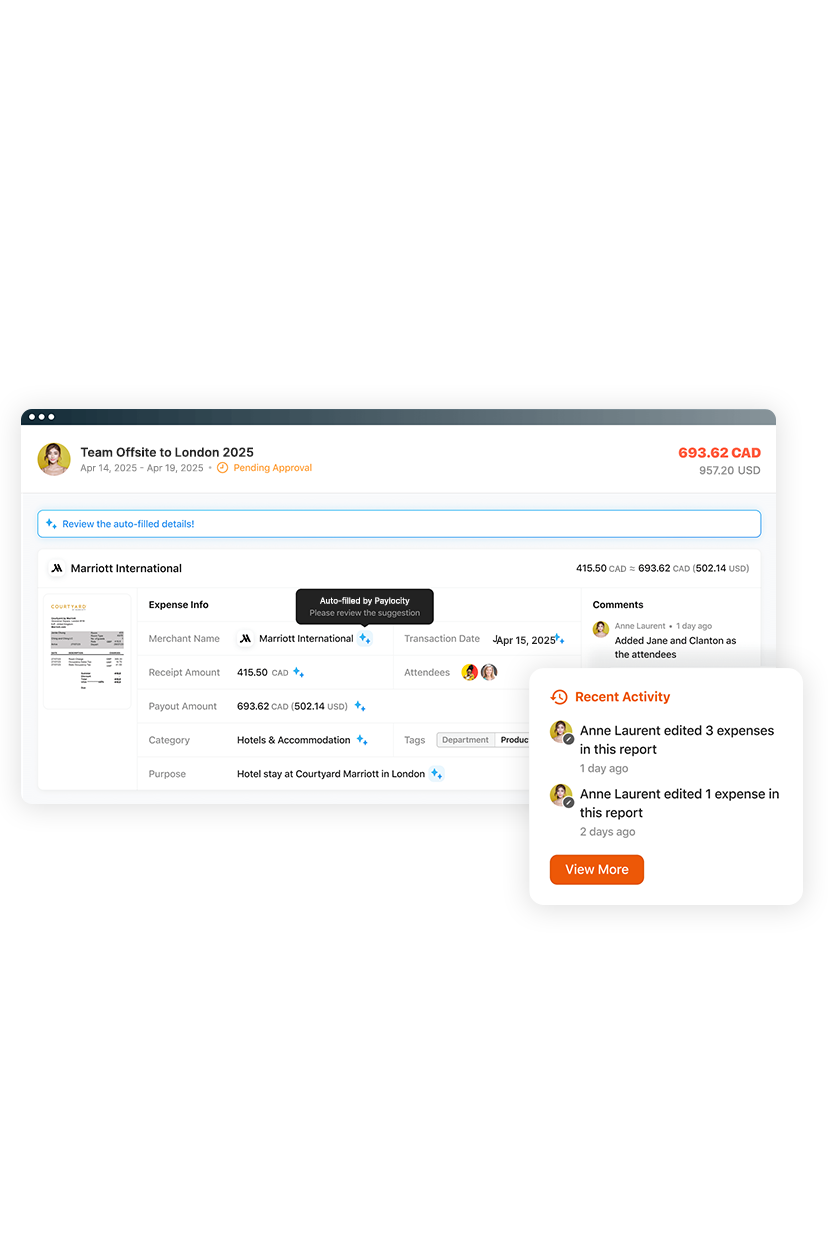
Manual expense reporting wastes time and frustrates employees and finance teams. Paylocity for Finance automates the entire process with AI-powered, touchless workflows. Simply snap a receipt and get reimbursed fast — no spreadsheets, no delays. Finance gets real-time visibility, accurate coding, and a faster month-end close.
![The 9 Best Payroll Software for Small Businesses [2026]](https://s7d9.scene7.com/is/image/paylocity/best-payroll-software-hero?$Hero-Card$)
