
12 Best Rippling Alternatives for HR and Payroll in 2026
When your payroll lives in one system, benefits in another, time tracking in a third, and HR compliance scattered across spreadsheets, the inefficiencies add up fast.
That's why more businesses are turning to all-in-one platforms like Rippling that promise to bring everything together. But Rippling isn't your only option, and it might not be the right fit for your business.
Whether you're outgrowing your current setup or evaluating Rippling competitors for the first time, the right platform should align with your actual priorities.
This guide walks you through the top alternatives in the space, from platforms emphasizing employee engagement and hands-on support to those offering adaptable reporting and global capabilities.
What is Rippling?
Rippling is a cloud-based workforce management platform founded in 2016 that brings together HR, payroll, IT, and benefits administration. The platform automates employee lifecycle management, reducing the need to manually update multiple systems when employees join or leave the company.
Here's what draws users to Rippling:
- Native IT management: Rippling manages employee devices, apps, software provisioning, and security policies directly within the platform, setting it apart from competitors that rely on partner integrations for device management and access controls.
- Global payroll and EOR services: The platform supports payroll and Employer of Record (EOR) services across 185+ countriesRippling Home, making it a strong option for companies hiring internationally or managing distributed global teams.
- Extensive third-party integrations: Rippling offers pre-built integrations with popular business applications, allowing companies to connect their existing tech stack without complex custom development.
- AI-powered automation across modules: Workflow Studio and App Studio enable AI-driven automation across HR, IT, and finance functions, allowing companies to build sophisticated workflows that trigger actions across multiple systems.
- Lower entry-level pricing: Rippling's base platform starts at $8 per employee per monthRippling Pricing for the core HCM module, though total costs typically range from $25 to $50 per employee per month once you add modules like payroll, benefits, and IT management.
The platform primarily serves small to mid-sized businesses looking to consolidate their HR and IT tech stacks, with adoption across various industries, including tech startups and growing companies.
Why consider a Rippling Alternative?
No platform is perfect, and Rippling has some limitations worth considering before making a decision. While many of these concerns depend on your specific business needs and priorities, they're important to understand as you evaluate whether Rippling is the right fit for you.
Steeper learning curve: Rippling's extensive capabilities and depth can feel overwhelming initially, particularly for HR teams new to integrated workforce management platforms. Users note that while the platform becomes more intuitive over time, the initial setup and learning period require dedicated effort to leverage its automation features fully.G2 Rippling User Reviews
Limited employee engagement features: The platform focuses primarily on operational efficiency and lacks robust social collaboration tools, community features, and culture-building capabilities compared to competitors. Reviews indicate that Rippling is stronger on admin-side functionality than employee-facing engagement tools.Thrivea Rippling Review 2026
Customer support accessibility issues: Rippling uses chat-first support with video call escalation when needed. However, only company admins can contact support—employees have to go through HR for any issue, creating bottlenecks. Some users report inconsistent support qualityRippling Customer Service and frustrating experiences resolving tax filing errors and W-2 delays.BBB Rippling Profile
Implementation model differences: Rippling emphasizes a self-service approach, which can work well for tech-savvy teams but may feel less hands-on than competitors that offer dedicated implementation specialists who guide you through every step.
Newer features lack depth: Recently added modules like recruiting (ATS), expense management, and benefits enrollment don't match the sophistication of specialized standalone tools.Outsail Rippling Review For example, the ATS lacks features like Kanban pipeline views and CV parsers that dedicated recruiting platforms offer.
The top Rippling competitors in 2026 at a glance
| Platform | Best for | Key features | Pricing |
| Paylocity | A single unified platform for HR, Finance, and IT |
|
Custom |
| Gusto | Small businesses;seeking;a simple, automated payroll |
|
|
| Deel | Global hiring and international contractor/employee payments |
|
|
| Multiplier | Cost-effective EOR services with strong Asia-Pacific coverage |
|
|
| Workday | Large enterprises with complex, multinational HR needs |
|
Custom |
| BambooHR | SMBs prioritizing user-friendly HR and employee experience |
|
Custom |
| HiBob | Mid-market companies focused on employee engagement and culture |
|
Custom |
| Paychex | Established small businesses needing reliable payroll with local support |
|
Custom |
| Papaya Global | Enterprises managing global payroll consolidation across multiple countries |
|
|
| ADP | Businesses of all sizes seeking comprehensive payroll with extensive compliance support |
|
Custom |
| Paycom | Mid-sized companies want employee-driven payroll and self-service tools |
|
Custom |
| Paycor | Manager-centric tools and workflows |
|
Custom |
1. Paylocity

Best for: A single unified platform for HR, Finance, and IT
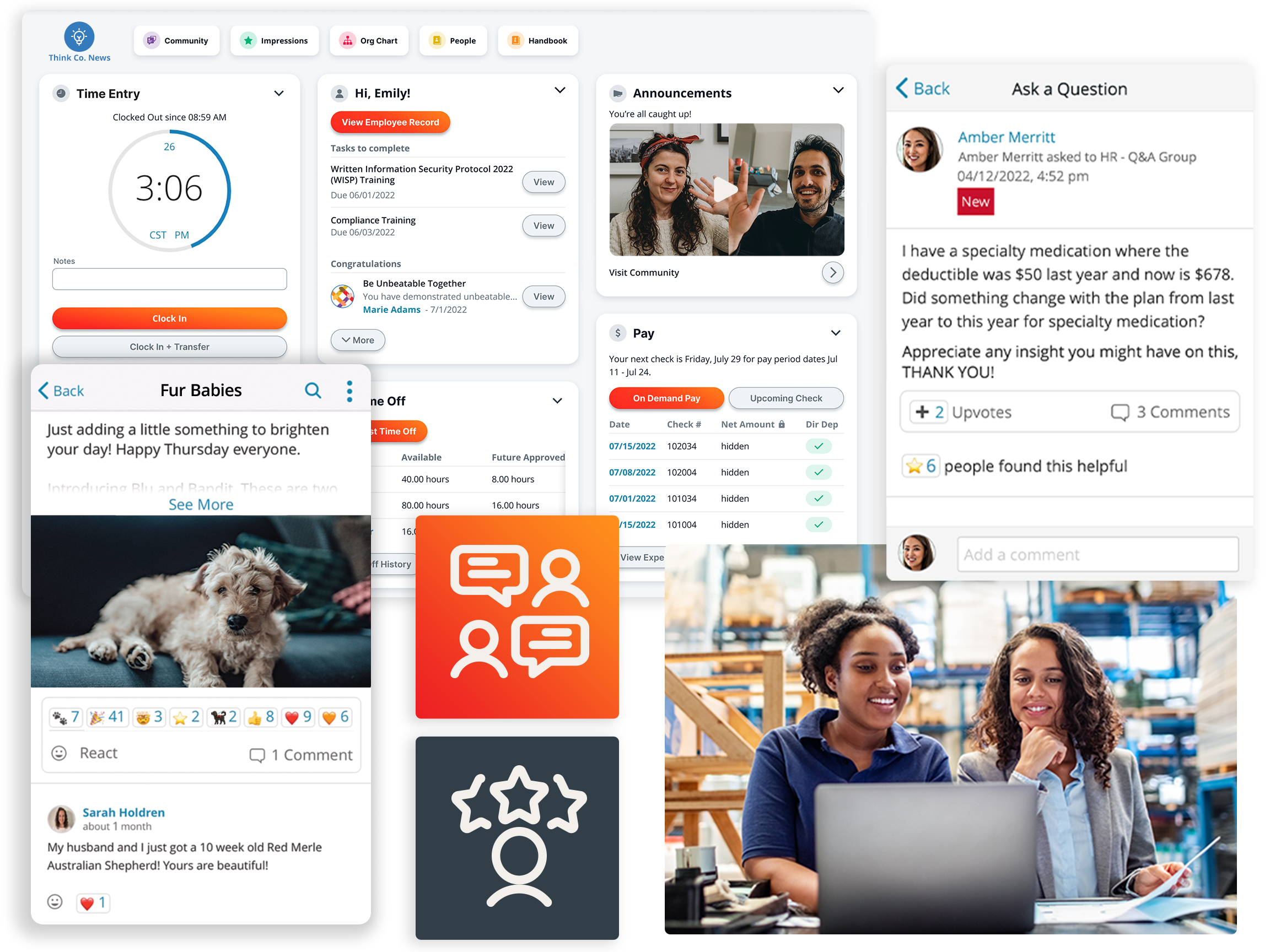
Paylocity is an all-in-one HR, payroll, and finance platform designed for mid-market companies looking to streamline operations and keep their teams engaged. Unlike competitors that require you to piece together multiple tools or sacrifice features for simplicity, Paylocity brings everything together in a single platform — recruiting, onboarding, payroll, time tracking, benefits administration, performance management, employee engagement, and finance — all connected through one unified employee data core.
While Rippling and other competitors on this list excel in specific areas, Paylocity is purpose-built to serve the complete needs of a wide range of companies. The platform prioritizes employee engagement, intuitive user experiences, and personalized support over pure operational automation. Rather than just processing transactions efficiently, Paylocity empowers companies to connect teams, build culture, and drive real business results.
Key features:
- Platform adaptability that scales with growth: Paylocity's architecture adapts as you add locations, scale headcount, or enter new markets, with built-in tax filing and compliance across all 50 states and global payroll capabilities in 30+ countries. The platform flexes to support your unique workflows, compensation structures, and reporting requirements as your business evolves.
- AI-powered analytics and innovation: With more than three times as many pre-built reports as Rippling, Paylocity embeds AI-driven insights and custom reporting designed for business users, not just technical teams.
- Industry-leading engagement and mobile experience: The platform's engagement suite includes Community — a workplace social hub with chat, video, and surveys — and Recognition & Rewards, driving 500%+ increases in peer recognition within six months and 93% organic mobile app adoption.
- Seamless integration with your tech stack: With 350+ marketplace integrations and open APIs, Paylocity connects seamlessly with your existing business systems, from accounting software to benefits providers, ensuring real-time data flow without manual imports or exports.
- Award-winning support: Paylocity delivers white‑glove implementation with dedicated teams and is recognized for its responsive support and strong client satisfaction. You get a true partnership, not just a software license.
Pricing: Custom
Paylocity vs. Rippling
| Paylocity | Rippling | |
| Platform scope |
|
|
| Automation depth |
|
|
| Employee experience and engagement |
|
|
| Reporting and analytics |
|
|
| Implementation and support | White-glove implementation with dedicated teams who partner closely to understand unique business needs and tailor the platform accordingly |
|
2. Gusto

Best for: Small businesses seeking simple, automated payroll
Gusto is a cloud-based payroll and HR platform designed specifically for small businesses that want payroll to just work without the complexity. The platform focuses on simplicity and ease of use, making it accessible for business owners without dedicated HR teams.
Unlike Rippling's emphasis on IT infrastructure and global operations, Gusto prioritizes straightforward payroll processing, benefits administration, and compliance for U.S.-based small businesses.
Gusto's AutoPilot feature automatically runs payroll on your schedule, and the platform handles all tax filings and year-end forms at no extra cost. However, users note that the platform may lack scalability for larger organizations (typically those with 150+ employees)Outsail Gusto HR Software Review and has historically lagged behind competitors in HR point-solution integrations, though they've recently opened their API marketplace to expand capabilities.
Key features:
- Full-service payroll with automatic tax filing: Gusto runs unlimited payroll, calculates taxes automatically, and files federal, state, and local taxes with guaranteed accuracy—all included in the base price.
- AutoPilot automated payroll: The platform can run payroll automatically each pay period, eliminating manual intervention, making it ideal for businesses with consistent pay schedules.
- Benefits administration: Gusto offers health insurance, 401(k), workers' comp, and commuter benefits with built-in administration at no extra cost for many offerings.
Pricing:
- Simple plan: $49/month + $6 per employee
- Plus plan: $80/month + $12 per employee
- Premium plan with dedicated support at custom pricingGusto Pricing
Gusto vs. Rippling
| Gusto | Rippling | |
| Platform scope |
|
|
| Automation depth |
|
|
| Employee experience and engagement |
|
|
| Reporting and analytics |
|
|
| Implementation and support |
|
|
3. Deel

Best for: Global hiring and international contractor/employee payments
Deel entered the market in 2019 with a focus on making international hiring as simple as domestic hiring. The platform specializes in Employer of Record (EOR) services, contractor payments, and multi-country payroll across 150+ countriesDeel Homepage, handling everything from localized contracts to compliance with local labor laws. Companies use Deel to hire talent internationally without the time and expense of establishing legal entities in each country.
What sets Deel apart from broader platforms like Rippling is its depth of global employment expertise. Deel maintains 2,000+ in-house legal, tax, and compliance specialistsWhere You Can Pay Employees with Deel Global Payroll who stay current on regulations across different jurisdictions — critical when labor laws vary dramatically by country. While Rippling offers global payroll as part of its unified workforce platform, Deel's entire infrastructure was built specifically for international employment scenarios.
Key features:
- Employer of Record services in 150+ countries: Deel acts as the legal employer for your international hires, managing contracts, payroll, statutory benefits, and compliance so you can onboard employees in new countries without establishing local entities.
- Global contractor payments with flexible withdrawal options: The platform processes contractor payments across 150+ countries, supporting 120+ payout currenciesDeel Payroll Solutions and multiple payment methods, including bank transfers, PayPal, Payoneer, Wise, and cryptocurrency, giving contractors flexibility in how they receive funds.
- Localized contracts with built-in compliance monitoring: Deel automatically generates country-specific employment contracts that comply with local labor laws, tax requirements, and mandatory benefits, with legal templates maintained by their in-house compliance specialists.
Pricing:
- US PEO Employees: $125 /employee/month
- Standard: $599 /employee/month
- Enterprise: $899 /employee/month
- Contractor payments start at $49 per contractor per monthDeel Pricing
Deel vs. Rippling
| Deel | Rippling | |
| Platform scope |
|
|
| Automation depth |
|
|
| Employee experience and engagement |
|
|
| Reporting and analytics |
|
|
| Implementation and support |
|
|
4. Multiplier

Best for: Cost-effective EOR services with strong Asia-Pacific coverage
Multiplier is another global employment platform that aims to make international hiring faster and more affordable. The platform handles EOR services, contractor payments, and multi-country payroll across 150+ countriesMultiplier EOR services, with a particularly strong presence in Singapore, Australia, and Japan.
Companies choose Multiplier when they need solid EOR capabilities without enterprise-level pricing — the platform charges $400 per employee per monthMultiplier pricing compared to Deel's $599, making it attractive for mid-sized businesses expanding into Asia-Pacific markets.
What makes Multiplier different from broader platforms like Rippling is its EOR-specific use case. The platform can generate locally compliant contracts in about five minutesMultiplier Employer of Record Services based on location, role, and employment type, then onboards new employees in as little as 24 hours, with dedicated setup managers guiding the process.
The platform focuses exclusively on international hiring without local entities, leaving IT management and domestic HR features to broader workforce platforms.
Key features:
- Fast contract generation and employee onboarding: Multiplier generates locally compliant employment contracts in about four minutesWhat is an Employer of Record - Multiplier blog based on location, role, and employment type, then onboards new employees in as little as 24 hours with dedicated setup managers guiding the process.
- Multi-currency payroll with gross-to-net calculations: The platform processes payroll in 150+ currencies, with automated tax calculations, deductions, and statutory contributions specific to each country, providing companies with clear visibility into employment costs across jurisdictions.
- Strong Asia-Pacific regional expertise: Multiplier has local teams and direct partnerships in Singapore, Australia, Japan, and India, providing deeper regional compliance knowledge and faster support in markets where employment laws can be particularly complex.
Pricing:
- EOR services: start at $400 /employee/month
- Contractor management: start at $40 /contractor/month
- Custom global payroll and immigration add-ons availableMultipler pricing
Multiplier vs. Rippling
| Multiplier | Rippling | |
| Platform scope |
|
|
| Automation depth |
|
Automation runs deeper for IT provisioning and domestic processes than Multiplier's international compliance focus |
| Employee experience and engagement |
|
|
| Reporting and analytics |
|
Stronger workforce analytics than Multiplier's compliance-focused dashboards |
| Implementation and support |
|
|
5. Workday

Best for: Large enterprises with complex, multinational HR needs
Workday is a cloud-based HCM software designed for enterprise-level organizations that need to manage complex HR, payroll, and talent operations across multiple countries. The platform serves large companies with its unified data model that eliminates silos across HR and finance functions — a deeper financial integration than Rippling's focus on HR and IT operations.
Workday has the capabilities to handle complex requirements such as workforce planning, succession management, and compliance across jurisdictions. However, users note that navigation can feel clunkyCapterra Workday HCM Reviews 2026 and that the platform has a steep learning curveG2 Workday HCM Pros and Cons, which smaller organizations might find overwhelming compared to more straightforward systems. That said, for enterprises needing deep configurability and comprehensive HR-finance integration, Workday's unified data model serves multinational organizations with complex financial planning requirements well.
Key features:
- Unified HR and finance platform for enterprise financial planning: Workday operates on a single data model that connects core HR, payroll, talent management, workforce planning, and enterprise financial management (ERP), enabling large companies to manage complex multi-entity accounting, consolidations, and strategic financial planning alongside workforce data.
- Advanced workforce analytics and planning: The platform includes predictive analytics, workforce planning tools, and customizable AI-powered dashboards that help enterprises forecast talent needs, track performance trends, and make data-driven decisions about their global workforce.
- Global compliance and localization: Workday supports 190+ countriesSkima.ai Workday HCM Reviews 2026 with multi-currency handling and region-specific compliance for labor laws, tax regulations, and statutory requirements.
Pricing: CustomWorkday Pricing
Workday vs. Rippling
| Workday | Rippling | |
| Platform scope |
|
|
| Automation depth |
|
Automation runs deeper for device management and app access than Workday's HR-finance focus |
| Employee experience and engagement |
|
Like Workday, it focuses on operational efficiency over social engagement features |
| Reporting and analytics |
|
Stronger cross-system reporting for HR-IT-finance than Workday's specialized workforce analytics |
| Implementation and support |
|
Faster setup but less hands-on guidance than Workday's implementation approach |
6. BambooHR

Best for: SMBs prioritizing user-friendly HR and employee experience
BambooHR has built its reputation around simplicity and ease of use for small and mid-sized companies looking to move beyond spreadsheets. The platform covers core HR functions like employee records, onboarding, time tracking, performance management, and payroll through its acquisition of Trax Payroll, all wrapped in an interface that doesn't require IT expertise to manage.
BambooHR shines when you need something your entire team — including non-HR staff — can navigate without training, which explains why users consistently praise its intuitive design and clean interface. However, the platform's off-the-shelf approach means limited customizationG2 BambooHR Reviews 2026 for companies with complex workflows, and some users note that the reporting tools lack flexibility for deep, custom analytics.Research.com BambooHR Reviews 2026
Compared to Rippling's IT-focused automation and cross-system workflows, BambooHR keeps things straightforward — ideal for growing companies that value ease of use over technical depth.
Key features:
- Employee self-service portal with visual org charts: Employees can update their own information, request time off, view pay stubs, and navigate visual team maps that show reporting structures and departmental relationships
- Streamlined onboarding with digital workflows: The platform automates new hire onboarding with e-signatures, task assignments, and document collection, guiding both new employees and internal teams through the process with automated reminders and proactive checklists.
- Pre-built reports and custom report builder: BambooHR includes 49 pre-built reports for turnover, headcount, and HR metricsResearch.com BambooHR Reviews 2026, plus a custom report builder that lets you create tailored reports in seconds with real-time previews, though power users note limitations for complex cross-module analysis.
Pricing: CustomBambooHR Software Pricing
BambooHR vs. Rippling
| BambooHR | Rippling | |
| Platform scope |
|
Built for operational efficiency with IT provisioning, BambooHR doesn't offer |
| Automation depth |
|
Automation runs deeper for IT and cross-functional processes than BambooHR's HR-focused workflows |
| Employee experience and engagement |
|
Like BambooHR, it focuses on operational tools over social engagement features |
| Reporting and analytics |
|
Stronger cross-system analytics than BambooHR's straightforward HR reporting |
| Implementation and support |
|
|
7. HiBob

Best for: Mid-market companies focused on employee engagement and culture
HiBob takes a people-first approach to HR software, integrating engagement, recognition, and performance management into the platform's core rather than treating them as add-ons. The platform serves mid-sized companies — particularly tech startups and modern organizations — that want to consolidate tools like Culture Amp, 15Five, or Lattice into a single system.
HiBob stands out for its emphasis on employee engagement and workplace culture, with features such as recognition programs, employee surveys, and social collaboration woven into the interface. Users consistently praise its modern UI and intuitive design, noting how it feels more like a social platform than traditional HR software.
However, some users mention that specific modules like the ATS and benefits administration aren't as advanced as dedicated toolsThrivea HiBob review 2026, and the platform can feel complex during initial setupThrivea HiBob review 2026 when customizing surveys or advanced reporting.
Key features:
- Continuous performance management with objectives and key results (OKR) tracking: HiBob facilitates regular check-ins, real-time feedback, and OKR management that aligns individual goals with company objectives, keeping performance conversations ongoing throughout the year.
- Employee engagement tools with recognition and surveys: The platform includes built-in recognition programs, employee lifecycle surveys, and engagement tracking that measure satisfaction at different milestones, helping companies act on feedback to improve culture and retention.
- People analytics with predictive insights: HiBob's analytics can flag employees at risk of leaving based on engagement levels and performance patterns, plus track diversity metrics, turnover trends, and headcount forecasts to support proactive workforce planning.
Pricing: CustomHiBob pricing
HiBob vs. Rippling
| HiBob | Rippling | |
| Platform scope |
|
Built for operational efficiency with IT provisioning, HiBob doesn't offer |
| Automation depth |
|
Automation runs deeper for IT and cross-functional processes than HiBob's HR-focused workflows |
| Employee experience and engagement |
|
Limited social collaboration — Rippling prioritizes operational efficiency over HiBob's engagement focus |
| Reporting and analytics |
|
Stronger cross-system analytics than HiBob's HR-focused reporting |
| Implementation and support |
|
|
8. Paychex

Best for: Established small businesses needing reliable payroll with local support
Paychex has been around since 1971, building a reputation as one of the most established payroll providers in the U.S. The company serves over 73,000 customers with a focus on reliable payroll processing, tax filing, and compliance support, especially valuable for small businesses that need dependable service without managing payroll in-house.
Paychex stands out for its extensive local presence and dedicated payroll specialists who get to know your business, which appeals to companies that value personalized support over self-service platforms.
However, users frequently mention issues with customer support responsiveness and billing problemsPaychex Reviews 2026, and the platform charges extra for tax filing — a service included in competitors' base pricing.Business.org Paychex Reviews 2026 Additionally, integration with accounting software like QuickBooks is only available with higher-tier plansBusiness.org Paychex Reviews 2026, unlike most payroll providers.
While Rippling emphasizes modern IT automation and cross-system workflows, Paychex takes a more traditional approach centered on payroll expertise and human support, making it a better fit for established businesses that value reliability and local service over cutting-edge technology.
Key features:
- Dedicated payroll specialists for personalized support: Paychex assigns dedicated payroll specialists to your account who learn your business's specific payroll needs and provide direct assistance with processing, tax questions, and compliance issues rather than routing you through general support.
- Multi-state tax filing and compliance alerts: The platform manages tax filings across all 50 states and provides timely alerts on labor law changes, such as minimum wage updates and overtime regulations.
- PEO services for full HR outsourcing: Paychex offers certified Professional Employer Organization services that create a co-employment relationship where Paychex handles all HR functions (payroll, benefits, compliance, and employee questions) while you remain the legal employer.
Pricing: CustomPaychex Pricing
Paychex vs. Rippling
| Paychex | Rippling | |
| Platform scope |
|
Built for modern operations with IT provisioning, Paychex doesn't offer |
| Automation depth |
|
|
| Employee experience and engagement |
|
Like Paychex, it focuses on operational efficiency over engagement features |
| Reporting and analytics |
|
Stronger cross-system analytics than Paychex's payroll-focused reporting |
| Implementation and support |
|
|
9. Papaya Global

Best for: Enterprises managing global payroll consolidation across multiple countries
Papaya Global is designed for enterprises navigating the complexity of multi-country payroll. It supports EOR, contractor management, and global payments across 160+ countriesPapaya Global Countrypedia, with strengths in automation, real-time analytics, and compliance oversight, making it a natural fit for finance and HR teams that need consolidated visibility across large international operations.
Where Rippling approaches global workforce management as one component of a broader HR/IT/finance platform, Papaya Global is built specifically around global payroll as its foundation. It uses a volume-based pricing model that reduces costs as headcount grows — an uncommon approach in an industry where most competitors charge a flat or escalating per-employee fee. That scaling advantage tends to benefit large, established enterprises more than early-stage or mid-market companies, and the platform's depth can feel like overhead for organizations that don't yet need enterprise-grade payroll analytics across dozens of countries.
Key features:
- Single platform for multi-country payroll consolidation: Papaya's global payroll solution covers 160+ countries, giving enterprise finance and HR teams a unified dashboard to manage payroll across every market.
- Contractor and Agent of Record (AOR) management for global contingent workforces: Contingent OS unifies classification, onboarding, and international payment for every worker type — EOR, AOR, SOW, and third-party vendors — with the ability to instantly pay workers in 130+ currenciesPapaya Global Contingent Workforces via secure, bulk cross-border payments.
- Real-time workforce analytics and spend visibility: The platform's advanced analytics and real-time dashboards provide actionable insights into workforce spend and performance, giving finance leaders consolidated visibility across all employment types in one place.
Pricing:
- Employer of Record (EOR): starting at $499/employee/month
- Contractor of Record (COR): starting at $295/contractor/month
- Contractor solution: starting at $55/contractor/month
- Payroll Plus: starting at $29/employee/month
- Payments OS: starting at $3.50/transactionPapaya Global Pricing
Papaya Global vs. Rippling
| Paychex | Rippling | |
| Platform scope |
|
|
| Automation depth |
|
|
| Employee experience and engagement |
|
|
| Reporting and analytics |
|
|
| Implementation and support |
|
|
10. ADP

Best for: Businesses of all sizes seeking comprehensive payroll with extensive compliance support
ADP has been processing payroll since 1949, and that legacy is both its greatest strength and its most visible limitation. Its product suite spans payroll, HR, talent management, time, and benefits administration across multiple platform tiers, from RUN Powered by ADP for small businesses to ADP Workforce Now for mid-market companies and ADP Lyric HCM for large enterprises. For organizations that need a managed service model with certified payroll professionals handling the complexity, ADP delivers that reliability.
The tradeoff is fundamental, though. ADP built its platform through more than 100 acquisitions, with users flagging a clunky, outdated UI with complex menus that make simple tasks feel buried.G2 ADP Workforce Now Reviews 2026 If your team doesn't need the full weight of ADP's enterprise service model, that usability gap is worth thinking through before you commit.
Key features:
- AI-powered payroll anomaly detection for accuracy at scale: ADP Workforce Now uses AI to surface payroll issues and guide users through resolution, with real-time gross-to-net calculations and automated tax compliance built in.
- Compensation benchmarking powered by a 42-million-employee data set: ADP Workforce Now includes compensation benchmarking insights drawn from a data pool of over 42 million employeesADP Workforce Now All-In-One Software, helping HR teams compare pay competitiveness, overtime, and compensation packages against similar organizations.
- PEO and managed HR outsourcing: ADP's Professional Employer Organization offering provides expert, legally backed HR guidance, benefits, and full-service HR and payroll support suited for businesses that want to outsource HR administration rather than manage it in-house.
Pricing: Custom
ADP vs. Rippling
| ADP | Rippling | |
| Platform scope |
HCM platform covering payroll, HR, benefits, time, and talent — built through 100+ acquisitions rather than a unified architecture |
|
| Automation depth |
|
Automation runs deeper across HR, IT, and finance workflows than ADP's payroll-focused automations |
| Employee experience and engagement |
Employee and manager self-service available via web and mobile for pay stubs, time-off requests, and benefits |
Like ADP, it covers core self-service and benefits access |
| Reporting and analytics |
ADP DataCloud delivers AI-powered analytics, pre-designed metrics, and customizable dashboards across the employee lifecycle |
|
| Implementation and support |
|
Faster self-serve implementation than ADP |
11. Paycom

Best for: Mid-sized companies wanting employee-driven payroll and self-service tools
Paycom is a comprehensive, single-database HR and payroll software designed to handle the entire employee life cycle from recruitment to retirement. Primarily used by mid-to-large-sized organizations, it centralizes data to eliminate the need for multiple third-party integrations and manual data re-entry. It is particularly popular with HR teams that want to shift administrative tasks, like data updates and payroll verification, directly to their employees.
While Rippling excels at IT automation and a modern, app-like interface, Paycom leans into a more traditional HCM structure that prioritizes payroll precision. However, some users have noted that Paycom’s interface can feel clunky or dated compared to Rippling’s "all-in-one" cloud.Gartner Paycom vs. Rippling Review Additionally, reviews often mention a steep learning curve for admins and a lengthy implementation process that can be frustrating for fast-moving teams.Paycom - G2 Review
Key features:
- Employee-guided payroll for proactive error correction: This industry-first payroll experience lets employees find and fix errors before payroll is even submitted, shifting the responsibility of accuracy to the person who knows their pay best.
- Mobile-first leadership tasks: This tool allows supervisors to manage essential functions, such as time-off requests and expense approvals, from anywhere, removing bottlenecks even when leadership is away from their desks.
- AI-powered HR assistant for instant data retrieval: This command-driven AI engine lets employees and managers ask natural-language questions to retrieve HR data instantly.
Pricing: Custom
Paycom vs. Rippling
| Paycom | Rippling | |
| Platform scope |
|
Built for operational efficiency with IT provisioning and spend management Paycom doesn't offer natively |
| Automation depth |
|
Automation runs deeper across HR, IT, and finance workflows than Paycom's payroll-focused automations |
| Employee experience and engagement |
|
|
| Reporting and analytics |
|
|
| Implementation and support |
High-touch implementation led by a dedicated specialist, which can result in a lengthy onboarding process |
|
12. Paycor

Best for: Manager-centric tools and workflows
Paycor centralizes payroll, HR, and talent management for organizations that need a strong focus on people operations. It is widely used by mid-market businesses across sectors such as healthcare, manufacturing, and retail, where complex labor laws and shift-based scheduling are the norm. The system aims to give frontline managers better visibility into their teams' performance while keeping administrative tasks within a single interface.
While Rippling builds its value on automating technical infrastructure like hardware and app access, Paycor differentiates itself by leaning into leadership development and frontline manager support.
However, because the suite was built in part through acquisitions, the user experience across modules isn't always seamless. Users often report that while the core payroll engine is reliable the reporting tools can feel restrictive.Capterra Paycor vs. Rippling
Key features:
- Leadership insights for tracking manager effectiveness: This tool provides leaders with data-driven insights into how their managers interact with teams, helping to identify coaching needs and monitor engagement levels across different departments.
- AI companion for routine HR support: This mobile-friendly AI tool lets employees and managers find policy information and complete basic tasks via natural language, reducing the volume of repeat questions sent to the HR department.
- Structured professional development: Paycor offers pre-built training tracks designed to help frontline employees move into leadership roles, linking individual learning progress directly to the company's performance management goals.
Pricing: CustomPaycor Pricing
Paycor vs. Rippling
| Paycor | Rippling | |
| Platform scope |
|
Built for operational efficiency with IT provisioning and spend management Paycor doesn't offer natively |
| Automation depth |
|
Automation runs deeper across HR, IT, and finance workflows than Paycor's payroll-focused automations |
| Employee experience and engagement |
|
Offers a sleek, consumer-grade UI that feels like a modern app |
| Reporting and analytics |
|
|
| Implementation and support |
|
|
How to compare Rippling alternatives
Choosing the right HR and payroll platform is about finding the one that actually fits how your team works. The platforms we've covered each excel in different areas, whether that's Paylocity's adaptability for mid-market companies, Deel's global hiring expertise, or BambooHR's simplicity for small businesses. Before you get caught up in demos and sales calls, take time to clarify what matters most for your organization.
Here are the key factors to consider when evaluating Rippling alternatives.
Know what you actually need
Start by separating must-haves from nice-to-haves before you talk to vendors. If you're not managing IT equipment or don't need device provisioning, paying for those capabilities doesn't make sense. Focus on the features that solve your current pain points.
Consider employee experience
The best HR platform is one that your employees will actually use without constant help from HR. Look for intuitive self-service features, mobile access, and straightforward navigation that doesn't require training. If your team struggles to request time off or check their pay stubs, you'll end up fielding the same questions over and over instead of focusing on strategic work.
Evaluate implementation and support
Ask vendors directly about their implementation process. Some platforms, like Workday, require months of implementation with dedicated consultants, while others, like BambooHR, can be up and running in weeks. Consider whether you need white-glove support or if your team is comfortable with self-service setup, and check if employees can contact support directly or if everything routes through HR admins.
Look for true integration
A marketplace with 500+ integrations sounds impressive until you realize most are one-way data syncs that still require manual work. Test how data actually flows between systems. True integration means you're not entering the same information twice or reconciling data across platforms.
Prioritize scalability and flowability
Choose a platform that can grow with you without requiring a complete reimplementation in two years. Ask vendors how the system handles organizational changes, like adding new departments, opening locations in different states or countries, or implementing new workflows. The right platform should flex to accommodate your unique processes rather than forcing you to adapt to its rigid structure.
Test reporting and analytics capabilities
Request specific reports you actually need during the demo, not the vendor's pre-built showcase. Can you easily pull headcount by department, track turnover trends, or analyze compensation data without exporting to Excel? The best reporting tools give you answers in minutes, not hours of manual work, and let business users create their own reports without waiting on IT or HR.
Compare pricing transparently
Watch for hidden costs beyond the per-employee rate, like implementation fees, module add-ons, API access charges, and support tier upgrades. Get quotes in writing that include everything you need, and ask about price increases at renewal.
Request a demo that reflects your actual workflows
Don't settle for a generic demo. Ask vendors to show you how their platform handles your specific use cases, whether that's running multi-state payroll, managing shift workers, or onboarding remote employees across different countries. Bring real scenarios like "show me how an employee updates their address and how that flows through to payroll and benefits" to see if the platform actually works the way you work.
See why more companies choose Paylocity
Finding the Rippling alternative ultimately comes down to whether you want a platform that just manages devices or one that also helps you manage your culture.
Paylocity is built for teams that want a unified HCM experience where payroll and engagement live in the same place, not in separate silos. This approach takes the headache out of data accuracy while delivering a streamlined experience that simplifies every part of your workday.
If you’re ready to see how this looks in practice, request a demo today, and we can walk through your specific payroll needs together. It’s the fastest way to see how features like automated tax filing and real-time reporting can clear those repetitive tasks off your plate for good.
Sources
Unlock Your Company's Potential with Connected HR
From automating processes to driving culture, you need an HR system as connected to your company as you are. Discover how you can break down communication barriers, simplify processes, and drive a more connected workplace with an all-in-one platform.
Related
![Top 10 Best Payroll Software for Small Businesses [2026]](https://s7d9.scene7.com/is/image/paylocity/best-payroll-software-hero?$Hero-Card$)
Top 10 Best Payroll Software for Small Businesses [2026]
