
10 Top Time and Attendance Software Tools for Modern Teams
Managing employee hours across a patchwork of disconnected tools creates problems fast.
Payroll managers spend hours reconciling timesheets pulled from one system, schedules living in another, and compliance rules buried in a third. Buddy punching inflates labor costs. Missed punch corrections generate audit risk. And every manual export is another opportunity for a costly calculation error.
The best attendance software systems eliminate that sprawl and the risks that come with it. They unify attendance workflows into a single platform, reducing administrative overhead, and improving visibility into labor costs.
That way, HR and payroll admins can focus on strategic workforce management rather than tracking down errors or jumping between platforms.
We evaluated the market to compile the top 10 platforms below to help you find the right solution for your workforce.
Best 10 attendance tracking software in 2026
The table below summarizes the attendance software platforms covered in this guide, sorted by best use case, key features, and pricing.
| Platform | Best for | Key features | Pricing |
|---|---|---|---|
| Paylocity | All-in-one finance, HR, and IT |
|
Custom |
| BambooHR | Simple time and leave tracking for growing SMBs |
|
Custom |
| Buddy Punch | Flexible clock-in options and buddy punching prevention |
|
Plans start at $4.49/user/mo. |
| Rippling |
Workflow-automated time tracking and app-lock compliance |
|
Custom |
| ADP (Workforce Now / RUN) | Enterprise-scale workforce compliance and traditional payrol |
|
Custom |
| Paycom | Single database for comprehensive time management |
|
Custom |
| Clockify | Budget-conscious companies needing project-based time tracking |
|
Plans start for free |
| UKG (Ready / Pro) | AI-driven scheduling and complex frontline labor rules |
|
Custom |
| Connecteam | Deskless and field-based teams needing GPS tracking |
|
Plans start at $29/mo. |
| Paycor | HR and labor analytics for midsize businesses |
|
Custom |
1. Paylocity
?ts=1785179692011&$ProductTIleImage$&dpr=off)
Best for: All-in-one finance, HR, and IT
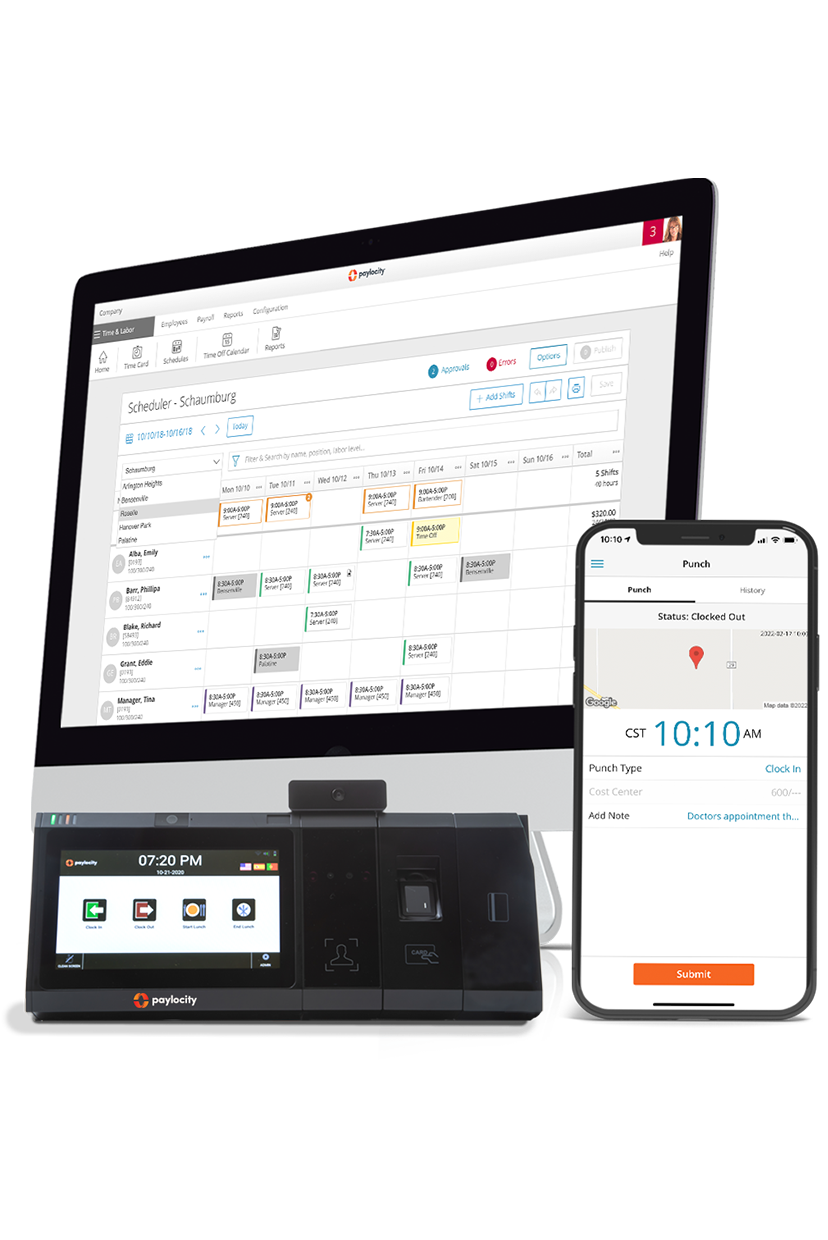
Paylocity is a unified HR, finance, and IT platform with an integrated time-and-attendance management system. It includes a wide variety of features, including time-off management, streamlined timecard approvals, and multiple clock-in options (including biometric facial and fingerprint recognition gates).
HR teams can configure system rules to comply with company policies, state laws, and federal laws. They also get access to a dashboard for real-time visibility into attendance data and in-depth reporting to monitor staffing, cost, and productivity trends.
Employees get access to a convenient mobile app with a self-service portal and notifications for shift reminders, timecard errors, missed punches, and more.
Paylocity has earned an 89% rating for ease of use and ease of doing business from G2 reviewers, as well as an 88% rating for quality of support.G2.com - Grid® Report for Time & Attendance - Summer 2026 - Paylocity
Key features:
- Fully unified time tracking and payroll engine: Timecards and attendance data are synced directly with Paylocity’s Payroll module, enabling accurate payroll runs with little to no manual touchpoints.
- AI-driven scheduling, forecasting, and labor cost budgeting: Paylocity provides AI recommendations that factor in historical trends, user data, and budget parameters. Managers can build and edit schedules, forecast future staffing needs, create schedules based on labor budgets, and easily manage compliance, while employees can view and trade shifts as needed.
- Biometric validation, location-based mobile punches, and attestations: Paylocity supports a range of flexible, secure ways to capture time—from mobile and badge punches to facial and fingerprint identification. Location-based mobile punches help ensure employees clock in and out while on-site, while biometrics help reduce time theft by verifying who is punching. Automatic attestations support compliance by prompting employees only when specific conditions are met.
- Configurable rules and reports for compliance: Build policies and rules to support compliance with local labor laws and regulations, such as mandatory breaks and meal periods, with attestation reporting built into employee time clocks. Managers and supervisors receive alerts when issues arise.
Pricing: Custom

2. BambooHR

Best for: Simple time and leave tracking for growing SMBs
BambooHR is a cloud-based HR platform designed for small businesses and mid-market companies looking for a comprehensive HR solution without the complexity of an enterprise system. The platform provides time and attendance software, as well as tools for core HR functions such as hiring and onboarding, payroll and benefits administration, and compliance tracking.
Its time-and-attendance software is only available as a paid add-on. With that said, it offers a robust set of features, including time-off management tools, a shift-scheduling dashboard, and a time-tracking system with multiple clock-in methods.
Reviewers on G2 praise BambooHR for its easy-to-use interface but note its limited features, such as effective reporting and vacation day management.G2.com - BambooHR Reviews 2026 - Pros & Cons
Key features:
- Intuitive interface for easy employee adoption: BambooHR’s interface is designed to simplify employee time management, making it clear how and where to track time and record breaks.
- Centralized PTO tracking and absence management: The platform includes a simplified dashboard for time-off management. For HR staff, it provides dashboards, calendars, and custom policy builders, while employees can view and calculate their PTO balances.
- Streamlined timesheet approvals for managers: BambooHR provides a timesheet portal that forwards notifications to managers for streamlined reviews and one-click approvals.
Pricing: CustomBambooHR.com - Pricing
3. Buddy Punch

Best for: Flexible clock-in options and buddy-punching prevention
Buddy Punch is a dedicated time and attendance tracking tool built specifically for U.S. businesses with hourly workers. Its core value proposition is simplified time tracking for those with no technical experience, and improved accountability to prevent time theft.
In addition to time and attendance tracking features, it also includes a drag-and-drop schedule builder, multiple punch-in options and add-ons, and an integrated payroll solution. Buddy Punch has earned a 98% rating for ease of use and a 97% rating for quality of support on G2.G2.com - Grid Report for Time & Attendance - Summer 2026
Still, individual reviewers point out limitations with the platform’s geofencing, scheduling, and timecard approval features.G2.com - Buddy Punch Reviews 2026 - Pros & Cons
Key features:
- Facial recognition and biometric identifiers: Buddy Punch can be configured to require biometric authentication via Face ID on iPhones and iPads to clock in and out.
- IP address locking and geofencing capabilities: Admins can set up IP address locks and geofences to prevent off-site clocking for office, in-field, and on-site employees.
- Drag-and-drop scheduling with automatic shift limitations: Managers can easily build schedules, organizing them with a variety of parameters, restrictions, and metrics to support optimization. Schedules automatically adjust to changing parameters (such as approved time off or reduced availability).
Pricing: Plans start at $4.49/user/monthBuddyPunch.com - Pricing
4. Rippling
?ts=1785180014292&$ProductTIleImage$&dpr=off)
Best for: Workflow-automated time tracking and app-lock compliance
Rippling is a cloud-based human capital management (HCM) platform that brings HR, payroll, IT, and benefits administration into a single system. It’s a noteworthy solution for companies seeking attendance solutions that prioritize control and simplicity, with automated application locking, robust clock-in controls, and workflow automations based on conditional logic.
In addition, the platform syncs time and attendance tracking directly into a payroll solution, highlights compliance risks (based on location and the corresponding updated labor laws), and enables reporting with customizable templates.
G2 reviewers gave Rippling a 96% rating for ease of use. Employee leave management is one of its highest-rated features at 95%.G2.com - Grid Report for Time & Attendance - Summer 2026 However, some individual reviewers find the platform outdated and difficult to learn.G2.com - Rippling Reviews 2026 - Pros & Cons
Our list of Rippling competitors includes several alternatives if you’re already using Rippling and looking for a new platform.
Key features:
- Automated application locking: Rippling includes “behavioral detention rules,” which can shut down the Rippling app for employees who may be attempting to clock in off-site. This also supports cybersecurity by automatically blocking unauthorized and potentially malicious logins to company accounts.
- Custom conditional logic workflows: HR admins can set up automated workflows for managers. For instance, it can send push notifications for attendance irregularities (such as missed breaks or overtime).
- Integrated job costing: Employees can track time for specific jobs, tasks, and projects, giving HR admins granular visibility into labor costs.
Pricing: CustomRippling.com - Pricing
5. ADP (Workforce Now / RUN)
?ts=1785180217503&$ProductTIleImage$&dpr=off)
Best for: Enterprise-scale workforce compliance and traditional payroll
ADP is a payroll and HR provider that offers multiple platforms. ADP Run is targeted towards small businesses (1-50 employees), while ADP Workforce Now is the primary platform for mid-sized to enterprise organizations. ADP Workforce Now is more comprehensive, but both platforms offer time and attendance tracking as an add-on module.
With ADP RUN and Workforce Now, teams get integrated scheduling, labor cost controls, and compliance tracking solutions. Time and attendance data is directly tied to payroll, and HR teams have access to comprehensive dashboards for attendance and cost control insights.
Taking ADP RUN as an example, G2 reviewers gave the platform a 92% score for regulations enforcement and a 91% rating for compliance monitoring.G2.com - Grid Report for Time & Attendance - Summer 2026 - RUN Powered by ADP With that said, some reviewers point out issues with payroll, reporting, and customer support.G2.com - ADP RUN User Reviews
If you came here to look for alternatives, check out our list of ADP competitors.
Key features:
- Compliance monitoring across jurisdictions: ADP supports adherence to federal, state, and local regulatory requirements to avoid penalties. It also helps businesses keep essential data and documents archived to stay audit-ready.
- Cost controls and theft protection: ADP’s software includes biometric verification systems, geofences, and location tracking to prevent buddy punching and off-site punch-ins.
- Reporting analytics for massive organizational labor tracking: ADP solutions let teams run customizable reports over comprehensive dashboards to track trends, patterns, and anomalies in labor costing, hours worked, and attendance records.
Pricing: CustomADP.com - Pricing
6. Paycom

Best for: Single database for comprehensive time management
Paycom is an HR and payroll software provider built on a single database that connects all modules. As such, with Paycom, time and attendance data syncs directly into payroll and scheduling modules. It offers multiple clock-in options, customizable timecard and schedule management rules, and integrated reporting.
On G2, reviewers gave Paycom a 90% rating for ease of use and an 88% rating for quality of support.G2.com - Grid Report for Time & Attendance - Summer 2026 - Paycom Still, individual reviews point to a steep learning curve, feature limitations, and an unintuitive interface.G2.com - Paycom Reviews 2026 - Pros & Cons
Key features:
- Single-app employee self-service for punches and corrections: Employees clock in and out with a mobile app. Clock-in options can be configured to employer preferences, including badge clocks, biometric gates, or simple web clocks. Employees who forget to clock in or out receive reminders to correct it.
- Integration with automated background tax compliance: The platform updates to automatically account for evolving federal, state, and local regulations.
- Employee-led payroll validation features: Paycom’s payroll assistant, Beti®, pushes reminders to both managers and employees to validate time and attendance data and make corrections where needed before initializing the payroll run.
Pricing: CustomPaycom.com - Pricing
7. Clockify

Best for: Budget-conscious companies needing project-based time tracking
Similar to Buddy Punch, Clockify is a dedicated time and attendance tracking software platform. Its entry-level plan supports core time tracking, approvals, and attendance management for small teams. Higher-tier plans unlock additional features, like scheduling and forecasting, labor cost tracking, and security controls.
Clockify has earned a 93% rating for ease of admin on G2, and a high rating for schedule management (91%).G2.com - Grid Report for Time & Attendance - Summer 2026 - Clockify However, some state that it has a poorly designed interface and doesn’t have adequate features for larger teams.G2.com - Clockify Reviews 2026 - Pros & Cons
Key features:
- Generous free plan: For those exploring the platform, Clockify offers a 1-month free plan that authorizes up to five users. It includes core features like time trackers, time sheets, and tracking integrations.
- Integrated dashboards: Clockify provides managers and HR staff with dashboards that track time and attendance at the project, team, and individual levels.
- Automatic location recording: Clockify lets managers and admins log the precise location where employees clock in, enabling them to monitor and address off-site clocking.
Pricing: Plans start for freeClockify.me - Pricing
8. UKG (Ready / Pro)

Best for: AI-driven scheduling and complex frontline labor rules
UKG offers two primary platforms: UKG Ready for small to mid-sized companies, and UKG Pro for enterprise organizations. Both include time and attendance tracking, scheduling, payroll, and HR features within a unified human capital management platform.
Available for both Pro and Ready platforms, their time and attendance software solution includes multiple clock-in options via a mobile app, time sheet management features, an absence management solution, and more.
Reviewers of UKG Ready, for instance, gave it a 91% rating for quality of support and user access.G2.com - Grid Report for Time & Attendance - Summer 2026 - UKG Ready With that being said, some point to fundamental issues, such as difficulties logging in and an unintuitive interface.G2.com - UKG Ready Reviews 2026 - Pros & Cons
Key features:
- UKG Bryte AI for automated insights: UKG Bryte AI® lets teams analyze their time and attendance data with natural language prompts to uncover compliance risks, optimize scheduling, and identify bottlenecks.
- Predictive scheduling and shift optimization: UKG solutions can automatically assign shifts based on preset rules for employee details, compliance needs, and more.
- Mobile-first timekeeping via collaboration tools: Employees can clock in via a self-service mobile app (which includes an optional facial recognition gate) and receive real-time notifications when schedules change.
Pricing: CustomPeopleManagingPeople.com - UKG Pricing Guide
9. Connecteam
?ts=1785180843949&$ProductTIleImage$&dpr=off)
Best for: Deskless and field-based teams needing GPS tracking
Conncteam is an employee management platform built specifically for firms in industries that rely heavily on in-field and deskless workforces, such as construction, retail, healthcare, and food service.
The platform packs time tracking, GPS-verified clock-ins, geofenced job sites, shift scheduling, task management, and in-app communication into a single mobile app, eliminating the need to stitch together multiple tools for a distributed team.
G2 users gave Connecteam a 94% rating for ease of doing business and a 93% rating for quality of support.G2.com - Grid Report for Time & Attendance - Summer 2026 - Connecteam However, some reviewers point out that improvements could be made with the scheduling, time tracking, and admin features, in addition to payroll exception handling.G2.com - Connecteam Reviews 2026 - Pros & Cons
Key features:
- Real-time GPS tracking and geofenced job sites: GPS tracking is enabled throughout employee shifts with an integrated map for internal tracking, client reporting, and incident response. Employers can set up geofences around individual job sites to prevent time theft and off-site clocking.
- Mobile-first shift scheduling with drag-and-drop builder: Managers can organize and share schedules with AI or an intuitive drag-and-drop interface optimized for mobile performance. The platform also includes optional automatic scheduling based on key parameters like time-off requests, availability, and fairness.
- In-app chat and digital forms: Leaders and managers can easily reach in-field employees with chat and digital forms solutions built right into the mobile app, providing a single source of truth for scheduling information, updates, and checklists.
Pricing: Plans start at $29/monthConnecteam.com - Pricing
10. Paycor
?ts=1785181049163&$ProductTIleImage$&dpr=off)
Best for: HR and labor analytics for midsize businesses
Paycor is an HCM platform with modules for HR, payroll, workforce management, and more. Its time and attendance suite falls under the workforce management module and includes time-off management, attendance rules, and automated timecard scoring.
Data from the time and attendance module syncs directly with payroll data, and teams can pull insights with AI to track overarching trends or granular metrics.
On G2, Paycor earned an 86% rating for ease of use and an 80% rating for ease of admin.G2.com - Grid Report for Time & Attendance - Summer 2026 - Paycor Some reviewers point to poor customer support and reporting issues.G2.com - Paycor Reviews 2026 - Pros & Cons
Key features:
- Unified dashboard between time tracking and payroll: Payroll and time tracking data are synced together, which helps keep payroll fair and accurate at scale.
- Automated timecard scoring and approvals: Teams can configure rules and attributes to score timecards and flag issues during approval. High-scoring timecards, as defined by the user, can be auto-approved to minimize manual touchpoints for managers.
- AI-powered insights for labor cost optimization: HR teams and admins can use dashboards with integrated AI to surface insights across time and attendance, job costing, punch-ins, and more.
Pricing: CustomPaycor.com - Pricing
Features to look for in attendance management software
When selecting an attendance software platform, you’ll want to outline your specific needs and evaluate which platforms have the features that best match them. That way, you can identify which one is most likely to drive lasting ROI.
Below are some common features across these platforms that are likely to have a substantial positive impact on your business.
Real-time payroll integrations and consolidation
When attendance and payroll data live in separate systems, HR and payroll admins are forced to deal with costly inefficiencies. Each payroll run forces teams to mass-export spreadsheets, manually reconcile discrepancies, and correct errors caused by formatting mismatches and delayed syncs.
Attendance software that feeds time and attendance data directly into a payroll engine eliminates these risks entirely. Hours worked, overtime calculations, PTO balances, and more, update in real time and flow into payroll runs automatically. The software significantly reduces manual touchpoints, as errors and risks are flagged for targeted review.
Automated compliance and labor law protection
Overtime rules, mandatory meal break regulations, and state-specific leave requirements change frequently, and non-compliance carries real financial exposure. Various federal and state-specific laws govern this compliance, and attendance software helps you track each one. This is especially critical for businesses with employees in several states.
Typically, platforms flag exceptions and risks in real time, issue automatic alerts, and route them to the appropriate team or manager for correction, making it easier for organizations to help avoid penalties.
Flexible punch-in methods and verification
Companies all have their own preferred punch-in methods based on their industry and the nature of the work their people actually do. For instance, clocking in via a web browser suits desk workers well, but it can create friction for anyone who doesn’t work at a desk.
Additionally, companies that rely on field-based workforces need convenient tools to prevent time theft and buddy punching. Modern attendance platforms support frictionless tracking and malpractice guardrails by offering badge clocks, biometric fingerprint and facial recognition, and geofencing.
Meanwhile, organizations with mixed workforces can combine punch-in methods, apply them according to team-specific needs, and consolidate all attendance data into a single system (regardless of how it was captured).
AI-powered scheduling and labor forecasting
AI scheduling and forecasting tools help HR teams plan shifts optimally based on a range of parameters, including budgets, historical demand patterns, skill requirements, and compliance requirements.
Rather than manually building optimized schedules and accurate forecasts, teams can use attendance software platforms to automate the process. Hours of complex work are condensed into minutes, and scheduling errors are much more likely to be avoided entirely or detected before they become a major issue.
Advanced employee self-service and mobile access
Platforms with an employee self-service portal, like Paylocity, give employees the autonomy to add or manage their own data (including time and attendance logs).
Instead of needing to contact an HR staff member, payroll admin, or any other specialist, employees can view their schedules, request time-off, trade shifts, and correct missing punches on their own. Paylocity also includes a mobile app, maximizing convenience for field employees.
Benefits of using attendance tracking software
Below are several of the most apparent benefits that businesses realize when using dedicated attendance software.
- Elimination of manual multi-tool sprawl: Consolidating time tracking, scheduling, and payroll into one system removes the daily headache of syncing and managing fragmented data across legacy systems.
- Drastic reduction in payroll processing errors: Automated digital timesheets feed directly into your payroll pipeline, minimizing human entry errors, calculation slip-ups, and deliberate time fraud.
- Labor compliance and audit readiness: Automated tracking of breaks, overtime thresholds, and leave accruals protects your organization from expensive compliance lawsuits and regulatory fines.
- Lowered administrative burden on managers: Automatic punch-in approvals, rule exception flags, and self-service shift swaps save leadership teams hours of weekly manual tracking.
- Greater labor cost control and visibility: Real-time tracking of actual hours worked versus scheduled budgets allows operational leaders to proactively curb overtime spend before it hurts profits.
- Empowered workforce through self-service: Letting workers check schedules, log time, and manage PTO from any personal device drives company transparency, accountability, and overall job satisfaction
Drive real workforce velocity with Paylocity
The best attendance software is the one that best meets your specific needs.
With Paylocity, you get time and attendance software built to streamline everything from compliance tracking and scheduling to payroll and reporting. Time clocks offer multiple biometric authentication options, simplify compliance management with configurable rules, and give managers and HR staff live visibility into time and attendance data.
The best part? All data in your time and attendance module is synced across a unified HR, payroll, and IT platform — no more spending hours entering or exporting data across multiple systems.
Request a free demo to see what’s possible with Paylocity’s attendance software!
Frequently asked questions
What is the difference between standalone time tracking software and a unified HR platform?
Standalone time tracking tools record employee hours and export timesheets into a separate payroll system — a manual or automated sync step that creates real failure points. Format mismatches, delayed updates, and calculation discrepancies are common byproducts of that disconnect.
A unified HR platform eliminates that boundary entirely. Time tracking, payroll, scheduling, compliance, and workforce analytics all run on the same underlying dataset, so an update in one module is immediately reflected in all the others.
How does modern attendance software protect against time theft and "buddy punching?"
Modern platforms address time theft through layered verification, including geofences that restrict clock-ins to defined geographic zones, facial recognition that confirms identity at kiosks or during mobile punch-in, and IP address restrictions that block clock-ins from outside approved networks. Photo capture creates a timestamped visual record of every punch event as an additional audit trail.
Any single mechanism significantly raises the bar for fraudulent time entry. Combining multiple methods provides coverage across different work environments — field teams, on-site workers, and office-based staff alike.
Can time and attendance software help businesses maintain labor law compliance?
Yes, and it's one of the strongest ROI arguments for dedicated attendance software. The best platforms automatically flag issues (like missed breaks or meal periods), prompt employees to attest to break completion at clock-out, apply jurisdiction-specific pay rules based on employee location, and update compliance configurations when regulations change.
For multi-state employers, automated enforcement is especially valuable. Rather than manually maintaining a matrix of state-specific rules, HR teams configure the system once and let it enforce requirements consistently across every location.
How do mobile-first attendance tools benefit deskless and frontline employees?
Deskless employees typically don't have a desktop or shared terminal in their workflow, so legacy time-tracking tools create real friction, like requiring travel to a specific punch location and limited visibility for managers. Mobile-first platforms put time tracking on the devices employees already carry, with GPS-verified clock-ins and geofencing to confirm work location.
Employees can also check schedules, request time off, and view accruals directly from the app without contacting HR. That self-service capability substantially reduces the administrative load on both sides.
About the Author
Sources
More time, less labor = a better experience
Say goodbye to manual tasks and hello to efficiency. Empower your employees with intuitive tools to manage their time—view balances, request time off, and get real-time notifications, all from one platform. Supervisors can access 100+ reports, track attendance, and approve requests in seconds. With instant insights at your fingertips, optimizing time and attendance has never been easier.
Related

The 10 Best HRIS Software for HR Managers
![The 9 Best Payroll Software for Small Businesses [2026]](https://s7d9.scene7.com/is/image/paylocity/best-payroll-software-hero?$Hero-Card$)