Employee learning on an enterprise learning management system.

9 best enterprise learning management systems

Discover the nine best enterprise learning management systems, broken down by their features, prices, use cases, and more.

Scaling training across thousands of employees, dozens of departments, and multiple locations with unique and shifting compliance requirements is operationally complex. But the right enterprise learning management system can relieve the pressure. 

Enterprise LMS platforms help you coordinate content creation, manage compliance and engagement, and track company-wide analytics, all with automation that makes large-scale learning management possible. That way, your staff can spend more time on meaningful work that extends the employee lifecycle rather than on tedious administrative tasks. 

In this article, we’ll break down nine of the best learning management systems for enterprise-scale organizations, explaining their key features, best use cases, pricing, and how users feel about their experience with each.

Best enterprise learning management systems of 2026

Platform Best for Key features Pricing
Paylocity All-in-one HR, Finance, and IT with built-in learning management
  • Over 95,000 pre-built courses 
  • Extensive workflow automations 
  • Customizable training path builder 
  • Simplified compliance and safety training 
  • Built-in analytics and reporting 
Custom
Cornerstone OnDemand Global enterprises 
  • Parameter-based learning paths 
  • Learning content creation tool 
  • Customizable reporting dashboards 
Custom
Workday Learning  AI-based learning management 
  • AI course creator 
  • Personalized AI tutoring agents 
  • Compliance tools 
Custom
SAP SuccessFactors 

Ease of use 

  • AI-driven learning, skills-based recommendations 
  • 24/7 access 
  • Automated compliance training 
Custom
Docebo  Extensive integrations 
  • Administrative automation 
  • Wide variety of integrations 
  • Strong security credentials 
Custom
Absorb LMS  User experience 
  • Intuitive course creator 
  • AI agents for learners and creators 
  • Integrated skills library 
Custom
SAP Litmos  Frontline teams
  • Course monetization tool 
  • Instructor-led training deployment 
  • AI-based content authoring 
Plans start free (for 14 days) 
360Learning International organizations 
  • Automated user management and admin tools 
  • In-depth course creation and authoring platform 
  • Easy multilingual training 
Plans start at $8/user/mo. 
Moodle Workplace Customizability
  • Structural customizability 
  • Dynamic rule creator 
  • Cross-platform migrations 
Custom

1. Paylocity

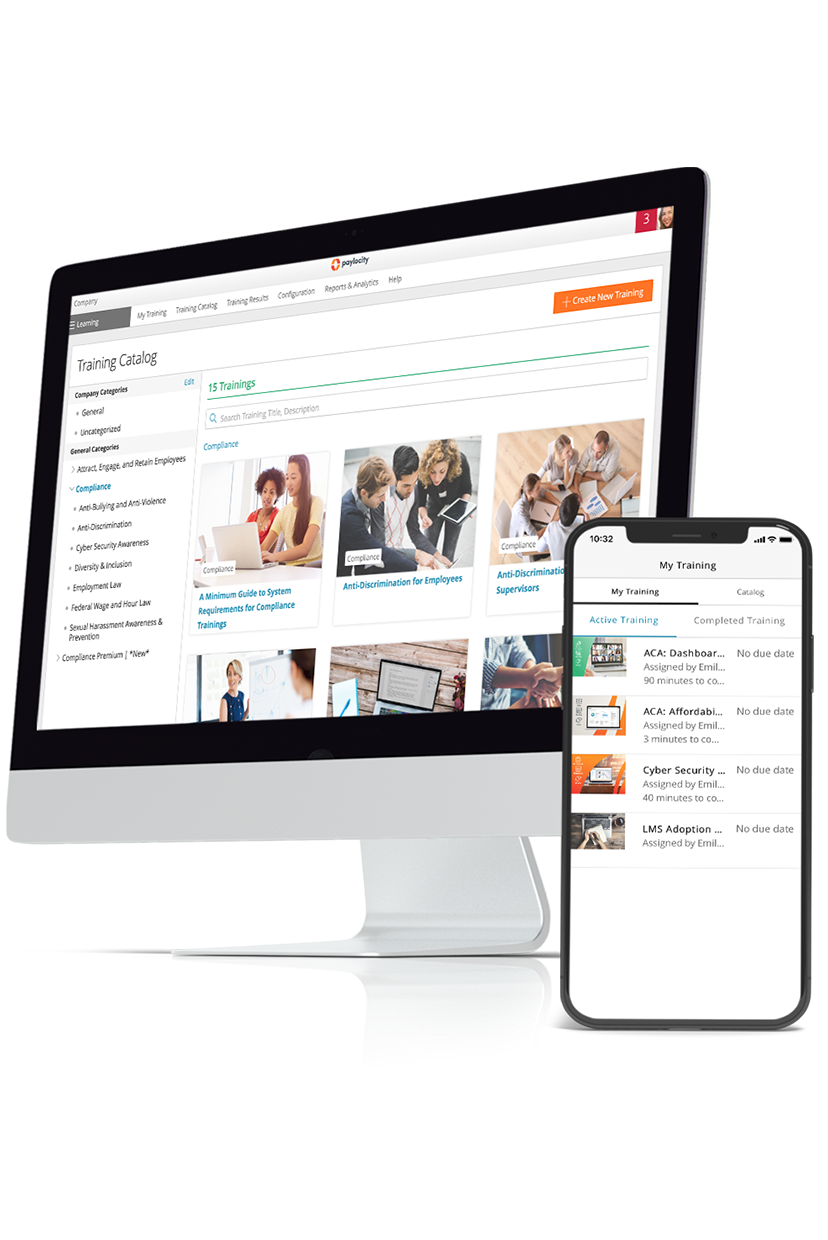
Paylocity screenshot.

Best for: All-in-one HR, Finance, and IT with built-in learning management 

Paylocity is an all-in-one platform for HR, finance, and IT management with an integrated enterprise learning management system. It’s built to simplify training, reduce vendor costs, and help you foster a culture of continuous learning. 

The platform’s LMS includes robust course authoring tools and a massive library of pre-built trainings, enabling you to create customized learning paths that drive both compliance and career development across your organization.  

Trigger-based automations for administrative workflows and real-time tracking ensure that training remains both scalable and auditable. 

With Paylocity’s all-in-one platform, you can eliminate data silos and standardize training deployment and administration in the same place as all your HR, finance, and IT workflows.  

Reviewers praise Paylocity’s features, with 90% noting that it's easy to use and 91% enjoying its content creation capabilities.G2.com – Enterprise Grid Report for Corporate Learning Management Systems | Summer 2026 | Paylocity

Key features:

  • Over 95,000 pre-built courses: Paylocity’s library includes curated course bundles separated by industry and function. You can connect Paylocity with Go1 to access 95,000+ additional pre-built training videos. 
  • Extensive workflow automations: Automate administrative L&D workflows at scale, from recordkeeping to bulk and recurring assignments and reminder notifications. 
  • Customizable training path builder: Build structured training paths to meet your company’s specific needs, integrating internally developed content, whether on-demand or live training, with pre-built videos and courses. 
  • Simplified compliance and safety training: Auto-assign up-to-date compliance training that employees can access from anywhere. Automated recordkeeping in employee records ensures completion is tracked and auditable. 
  • Built-in analytics and reporting: The platform includes real-time dashboards and reports that track key L&D metrics, including completion rates, compliance certifications, and other engagement metrics. 
  • Personalized course recommendations: AI delivers individualized course recommendations to employees based on their industry and role. Employees can also freely browse the library to take the courses they want on any device, without needing to ask HR staff for approval. 

Pricing: Custom pricing available with a free demo

2. Cornerstone OnDemand

Cornerstone OnDemand screenshot.

Best for: Global enterprises 

Cornerstone OnDemand is a human capital management platform built for large, globally distributed organizations. It includes a number of different modules, including Cornerstone LMS, an AI-powered, customizable enterprise learning management system built to streamline skills training and regulatory compliance. 

Users can easily manage employee training across their company, build personalized learning paths, and automate analytics and reporting. Reviewers of the platform praise its automated reminders and easy progress monitoring, but note that customization, creation, and reporting features can be limited or difficult to set up.Capterra.com - Cornerstone LMS Reviews 2026

Key features:

  • Parameter-based learning paths: Set up learning paths tailored to specific roles and departments, and even create personalized paths for individuals based on compliance requirements and skill gap analysis
  • Learning content creation tool: Build custom learning content with a tool that supports multimedia embedding, custom assessment creation, pre-built course layouts, and more. 
  • Customizable reporting dashboards: Leaders and managers get continuous, real-time insight into employee data, including learning engagement and course completion rates, helping companies tune their training paths to be as effective as possible. 

Pricing: Custom

3. Workday Learning

Workday Learning screenshot.

Best for: AI-based learning management 

Workday Learning is an enterprise LMS integrated directly into Workday’s broader HCM suite. It strongly emphasizes AI integration across LMS workflows, embedding everything from AI-assisted course creation for managers to personalized AI agents to assist learners.  

Workday is designed to help large companies scale learning and maintain compliance without taking on an unmanageable level of complexity. 

In platform reviews, users report that it vastly simplifies course creation and training management. However, other reviewers say the platform is a bit too simplistic, lacking the customizability needed to accommodate diverse, specific training needs.G2.com – Workday Learning User Review (1) Some also note that the platform has issues with course bookings, making scheduling a challenge.G2.com - Workday Learning User Review (2)

Key features:

  • AI course creator: In addition to collaborative editing tools, you can leverage an AI assistant to help draft and structure courses and translate them into different languages as needed. 
  • Personalized AI tutoring agents: Learners get access to an AI agent that provides personalized recommendations and answers questions as they are completing their courses. 
  • Compliance tools: Workday Learning features automated course assignment, customizable dashboards to track completion, and built-in audit trails that simplify reporting workflows and enable real-time tracking of company-wide compliance. 

Pricing: Custom

4. SAP SuccessFactors Learning

SAP SuccessFactors Learning screenshot.

Best for: Ease of use 

SAP SuccessFactors Learning is an enterprise learning system embedded into the wider SuccessFactors HCM suite. It's built to help managers deploy personalized, relevant learning experiences at scale, nurture career growth and development, and simplify regulatory compliance through automated compliance training deployment. 

Users share a range of positive experiences with the platform, noting that its integrations with HR systems and strong reporting features make it easy to track compliance and learning. However, they also share some frustrations, especially with the user interface, which some say is outdated and unintuitive.Softwarereviews.com - SAP SuccessFactors Learning Reviews

Key features:

  • AI-driven learning, skills-based recommendations: The platform uses AI to provide learners with personalized course recommendations based on their data in SAP’s Talent Intelligence Hub, which logs users’ attributes, strengths, and learning styles. 
  • 24/7 access: Learners can access their courses from any computer or mobile device. The platform also lets people download courses for offline completion, so learners can complete their training even if they’re on the go or facing connectivity issues. 
  • Automated compliance training: Deploy compliance training courses automatically across the company, highlighting required course paths on a user dashboard so people know which courses they must complete within a given timeframe. 

Pricing: CustomSAP.com - SAP SuccessFactors Learning Pricing

5. Docebo

Docebo screenshot.

Best for: Extensive integrations 

Docebo is a cloud-based corporate LMS designed with AI-powered engagement and scalability in mind. It helps automate administrative work in learning management, so leaders can focus more on deep analysis and refinement to make a tangible difference. It integrates with a massive range of third-party platforms, from CRM and HR platforms to collaborative tools. 

Reviewers note that Docebo offers an intuitive user experience and makes tasks such as course management and learner support more efficient. While some users praise the available customization options, others mention that it’s challenging to learn and lacks features such as bulk actions and robust content authoring.G2.com - Docebo Reviews 2026 - Pros & Cons

Key features:

  • Administrative automation: Docebo automates routine LMS administration tasks, including enrollments, notifications, and reporting, greatly reducing the manual workload for L&D teams managing enterprise-scale user bases. You can also select pre-built courses or create and update your own with AI assistance. 
  • Wide variety of integrations: Docebo integrates with many third-party applications, enabling teams to sync user data, deliver Docebo courses directly in other apps, boost learning engagement, and much more. 
  • Strong security credentials: Docebo is compliant with SOC 2, various ISO standards, GDPR, CCPA, EU AI ACT, FedRAMP Moderate Rev. 4, and other data security standards, ensuring enterprise-grade security right out of the box. 

Pricing: CustomDocebo.com - Pricing

6. Absorb LMS

Absorb LMS screenshot.

Best for: User experience 

Absorb LMS is an enterprise learning management system that covers a wide variety of use cases, from employee onboarding and development to customer education and partner support. It offers a wide variety of features for both learners and creators, including AI agents, automated onboarding workflows, and tools for simplified compliance management.  

Absorb also provides exclusive, expert strategic guidance to help you design training paths that maximize impact and effectiveness.

User reviews highlight Absorb’s intuitive user interface and exceptional customer support, which they describe as quick, patient, and knowledgeable. That said, some point out that the platform lacks features and customization, which creates challenges for specific tasks such as reporting,9G2.com - Absorb LMS Reviews 2026 - Pros & Cons certification tracking,10G2.com Absorb LMS User Review (1) and bulk actions.11G2.com – Absorb LMS User Review (2)

Key features:

  • Intuitive course creator: L&D leaders can create their own course paths in minutes using generative AI, refine them with intuitive collaborative editing tools, and integrate accessibility tools throughout to maximize inclusivity. 
  • AI agents for learners and creators: With Absorb Aura, users can access over 17 AI agents,12AbsorbLMS.com - Absorb Aura including a learning support agent, a course discovery agent, and an administrative assistant agent. 
  • Integrated skills library: Absorb LMS helps companies deliver clear, skills-based career development paths through personally tailored training paths directly aligned with users’ stated goals. Organizations can verifiably fill skill gaps, and users get a clear understanding of what they need to do to advance their careers.

Pricing: Custom13AbsorbLMS.com - Pricing

7. Litmos

Litmos screenshot.

Best for: Frontline teams 

Litmos is a learning management platform ideal for companies that employ large numbers of frontline, deskless staff. AI is embedded throughout the platform, providing L&D teams with admin workflow automations, generative reporting, and assisted content authoring.  

Organizations can edit the UI to include their own branding and color schemes, create custom roles and permissions to align with their structure, build personalized analytics dashboards, and more. 

The platform includes a 14-day free trial that gives you access to baseline features and a full tour of premium features. But you’ll need to upgrade your subscription for full access. Litmos reviewers say it's easy to use and praise its knowledgeable, responsive customer support. However, many point to issues with reporting, which creates complications and delays for companies trying to track compliance and other key metrics.G2.com - Ltmos Reviews 2026 – Pros & Cons

Key features:

  • Course monetization tool: Litmos includes a built-in e-commerce platform and an integration with Shopify, which you can use to monetize your courses and sell them to customers and partners. 
  • Instructor-led training deployment: Host webinars and live instructor-led training sessions through the same platform as all your other standard training content, with simplified registration, scheduling automation, and integrations with other video hosting platforms. 
  • AI-based content authoring: AI tool that assists with course creation, translation, and branding with no design skills required.  

Pricing: CustomLitmos - Pricing

8. 360Learning

360Learning screenshot.

Best for: International organizations 

360Learning positions itself as an AI-powered learning management system that helps L&D teams automate and streamline busy work such as user management, course authoring, tracking, and reporting. For companies with an international workforce, it also enables translation across all parts of the platform, not just within course content. 

Reviewers highlight that 360Learning makes course creation and admin work much easier, and praise how it enables interactive and collaborative learning.  

Some users point to feature limitations and restrictive customization that make it difficult to accommodate specific scenarios.G2.com – 360 Learning Reviews 2026 They also note that the platform comes with a steep learning curve, even with strong customer support.G2.com - 360Learning Reviews 2026 - Pros & Cons

Key features:

  • Automated user management and admin tools: 360Learning is designed to simplify all aspects of user management and administrative work. For instance, you can automate user provisioning and sync, automate enrollment and reminders, and track compliance with automated reporting tools.  
  • In-depth course creation and authoring platform: The platform includes a range of manual and collaborative tools for course creation and editing. It also provides AI assistants that help create courses via prompting or by uploading pre-existing documents. 
  • Easy multilingual training: 360Learning offers one of the best suites for international L&D management, with automated translation across courses, forum messages, and company glossaries, as well as language-specific analytics to refine the experience for all learners. 

Pricing: Plans start at $8/user/month360Learning.com - Pricing

9. Moodle Workplace

 Moodle Workplace.

Best for: Customizability

Moodle Workplace is an enterprise learning management software solution with multi-tenancy that lets you provide individual divisions of your company (like departments, teams, or franchises) with their own, separate, internally administered LMS platforms. This setup is ideal for highly diversified or distributed enterprises with training needs that vary heavily by division.

The platform also includes a standard suite of LMS features, including course builders, reporting automation, and compliance certification tracking. User reviews generally praise the platform’s ease of use and extensive customizability, but some mention that it can have a steep learning curve.G2.com - Moodle Reviews 2026 - Pros & Cons

Key features:

  • Structural customizability: In addition to multi-tenancy, Moodle Workplace also lets you customize roles, permissions, and reporting lines according to your specific organizational structure. 
  • Dynamic rule creator: Moodle Workplace lets you create condition-based triggers for processes like enrollments and messages so you can run administrative work on autopilot. 
  • Cross-platform migrations: The platform includes a dedicated migration tool that lets you export aspects of your LMS instance to a different platform. 

Pricing: Custom 

Critical features of enterprise learning management systems

While every enterprise learning management system offers unique capabilities, it's helpful to have a list of prerequisites to assess whether a specific platform meets baseline standards.  

Below are several basic features that each enterprise LMS needs to have to yield enough benefits to justify the expense: 

  • Pre-built courses: A substantial pre-built course library accelerates deployment by providing leaders with ready-to-assign training on common topics such as compliance, safety, DEIA, and professional development. 
  • Course builder and manager: Pre-built catalogs typically can’t fully cover an organization's specific processes, products, or culture, which is why course authoring capabilities are critical. Your platform of choice should feature a robust course builder that enables L&D teams to create, update, and publish custom training without relying on external vendors. 
  • Administrative workflow automation: At enterprise scale, manual enrollment management, reminder campaigns, and reporting become unsustainable. Automation capabilities, such as trigger-based enrollments, automatic deadline reminders, and AI-generated reports, enable small teams to manage learning across an entire global organization. 
  • Compliance tracking: Platforms that track certifications and monitor for regulatory risks help protect enterprises by eliminating compliance gaps and automating the deployment of required, recurring courses. 
  • Reporting and analytics: Enterprise LMS platforms should feature dashboards that update data in real time, covering critical L&D metrics, from course completion to assessment performance. And with intuitive reporting tools that curate data from those dashboards to tell a coherent story, leaders can understand what they need to do to optimize their investment in organization-wide training. 
  • Integration ecosystem: Your platform of choice should integrate smoothly with your app ecosystem to accommodate your existing workflows. As an enterprise organization, you need learning management solutions that adapt to your workflows, not the other way around. 
  • Enterprise-grade security and compliance: Any platform that handles employee data at scale must include robust access controls, multi-factor authentication, audit logs, and verifiable compliance with data security regulations and standards. This is critical for keeping data secure and avoiding compliance risks. 
  • Mobile app: Platforms with well-designed mobile apps typically drive higher completion rates among employees who can't or don't primarily work at a desk or with a computer. Generally, the more options people have to access their training, the more likely they are to engage with it. 

Benefits of using an enterprise learning management system

Investing in an enterprise LMS platform can have numerous benefits, including: 

  • Cost savings: Replacing in-person and instructor-led training sessions with scalable digital courses can reduce per-learner expenses over time. In addition, consolidating your entire learning experience onto a single platform can help you realize savings by reducing cumulative subscription expenses. 
  • Streamlined compliance: Automated assignment, tracking, and reporting for compliance-required training reduces the administrative burden on L&D teams and helps organizations maintain documentation for audits and regulatory reviews. 
  • Reduced manual work: Automation handles enrollment triggers, deadline reminders, reporting, and other tasks that would normally require manual input, freeing time for higher-value work at scale. 
  • Improved employee experience: Well-designed learning management platforms feature proven pre-built courses and in-depth tools to build engaging courses from scratch. They also provide employees with clear visibility into their progression, easy access to relevant content, and agentic assistance for learning comprehension, each of which can support employee retention. 

How to choose an enterprise LMS

Choosing an enterprise learning platform requires a detailed approach, as the decision will affect HR and L&D operations, shape the employee experience, and define the look of your training programs for years to come. Here are some steps you can take to vet each platform on your shortlist: 

  1. Evaluate budget fit: Some enterprise learning management systems publicize their pricing, but others require you to request a quote for custom pricing. Gather quotes from each vendor on your list and evaluate which ones are in scope and which ones might be too expensive. 
  2. Request a free trial or demo if available: Most LMS platforms offer a free demo, free trial, or limited-time free plan so you can try out their features at no cost. Take advantage of each one you can find to test the specific workflows and features your staff will use daily. 
  3. Validate features: Create a list of features you need and use that to inform in-depth evaluations. Cross-reference everything each platform offers against your list of requirements, and identify the closest fit to meet your organization’s needs. 
  4. Verify integrations: Confirm that the LMS connects to your existing platforms, including HRIS, payroll systems, collaboration tools, and more. With Paylocity, you get an all-in-one solution that natively connects your LMS with HR, finance, and IT data, as well as a massive library of third-party integrations for any outstanding needs. 
  5. Validate security: Enterprises face complex, often international legal requirements for data security. Ensure your platform of choice complies with international regulations and standards (such as GDPR and CCPA), and that it offers robust internal controls to manage security and prevent breaches. 
  6. Identify automation capabilities and scalability: For enterprise-scale organizations, scalability is everything. Check to make sure your platform of choice includes widespread automation features that can realize efficiency gains across thousands of employees. 

Enhance your training with Paylocity’s enterprise learning management system

The right enterprise learning management system can turn training from an administratively difficult compliance requirement to a genuine driver of employee development and organizational performance.  

Paylocity’s integrated LMS is designed for organizations that want to manage learning in the same all-in-one platform where they manage HR, finance, and IT. It comes with a robust content library, configurable training paths, built-in dashboards and reporting, and automation capabilities that make meaningful training at scale practical. 

Request a free demo to learn more about Paylocity’s LMS and how it serves your specific needs.

About the Author

Paylocity Editorial Team Paylocity Editorial Team Paylocity

The Paylocity Editorial Team consists of HR, finance, and workforce experts dedicated to helping organizations navigate today’s rapidly evolving workplace. Our contributors translate real client results and industry trends into clear, actionable guidance across HCM, finance, and workforce strategy.

Meet the Authors

Enterprise learning management system FAQ

What is an enterprise learning management system?

An enterprise learning management system is a software solution that helps L&D teams create, deliver, manage, and track employee training across a large organization. They are built to handle enterprise-level complexity and the problems that naturally arise from deploying training across such a large population of employees. 

What are the types of enterprise LMS?

Not all enterprise learning management systems are the same. Some operate as standalone software while others are directly integrated into a wider platform. For instance, Litmos is a standalone LMS platform, while Paylocity is an all-in-one HR, finance, and IT solution that also includes a built-in enterprise LMS. 

Sources

25-0601000403-headcount-planning-full-width

Ditch manual spreadsheets

Streamline headcount plans and eliminate fragmented conversations and spreadsheets without worrying about who can see what data. Keep things moving with automated notifications and approval milestones triggered based on your team's needs.

Learn more