
10 of the best travel and expense management software options
It's the end of the month, and someone in finance is squinting at a stack of crumpled receipts, trying to match a rideshare charge to the right client trip, while an employee down the hall asks again when their reimbursement from last month's conference will show up.
Multiply that across every department, and it's easy to see why expense reports pile up faster than anyone can close the books.
Travel and expense management software helps fix this by connecting receipt capture and approval workflows directly to payroll, so trips get booked and expenses get paid back without the back and forth.
Below, we break down 10 of the best travel and expense management software options on the market and how to find the best fit for your team.
Best travel and expense software of 2026
Before diving into the details, here's a quick side-by-side of how these travel and expense management platforms stack up on strengths, features, and pricing.
| Platform | Best for | Key features | Pricing |
|---|---|---|---|
| Paylocity | All-in-one expense management, payroll, and HR |
|
Custom |
| SAP Concur | Large global enterprises with complex compliance and ERP needs |
|
Custom |
| Navan | Mid-size to enterprise teams wanting travel and expense in one workflow |
|
|
| Expensify |
Small to mid-size teams prioritizing fast, automated reimbursement |
|
|
| Ramp | SMBs and mid-market teams managing spend with corporate cards |
|
|
| Brex | Startups and growth-stage companies managing global spend |
|
|
| Emburse Spend | Enterprises with complex, multi-tiered approval workflows |
|
|
| Zoho Expense | Small businesses in the Zoho ecosystem |
|
|
| Perk | Travel-heavy companies wanting a booking-first platform |
|
|
| Coupa | Large enterprises needing full spend management across procurement and AP |
|
Custom |
1. Paylocity

Best for: All-in-one expense management, payroll, and HR
Paylocity is built for teams that don't want expense management living in its own silo.
Rather than bolting a standalone T&E tool onto your HR and payroll systems, Paylocity keeps expense tracking, approvals, and payroll in one platform, so managers and finance teams are always working from the same data. It's ideal for growing companies that want fewer logins and less manual reconciliation in place of another point solution to manage.
On G2, where Paylocity holds a 4.4 out of 5 rating across more than 5,000 reviews, users often mention how much time they save having HR, payroll, and expense tracking under one login instead of juggling separate systems.
Reviewers also consistently point to the platform's ease of use and responsive customer support as reasons they'd recommend it.
Key features:
- Integrated expense and payroll processing: Approved expenses flow straight into payroll without a manual handoff, so reimbursements go out with regular pay runs instead of sitting in a separate queue.
- Mobile receipt capture and expense submission from the Paylocity app: Employees can snap a photo of a receipt and submit an expense from their phone right after a purchase, which cuts down on lost paper receipts and end-of-month scrambling.
- Configurable approval workflows and spend policy enforcement: Admins can set up multi-step approvals and spending rules by role, department, or dollar amount, so out-of-policy expenses get flagged before they're reimbursed.
- General ledger (GL) mapping and cost allocation by department or cost center: Accounting automation maps entries to the right general ledger codes and allocates spend across departments or cost centers automatically, saving finance teams from reclassifying transactions by hand.
- On demand payment: Employees can access earned wages or approved reimbursements ahead of the standard pay cycle, which helps cover out-of-pocket travel costs without waiting on a full pay period.
Pricing: Custom

2. SAP Concur

Best for: Large global enterprises with complex compliance and ERP needs
SAP Concur is built for large, complex organizations, especially those already running SAP, Oracle, or NetSuite. Its strength is depth, from multi-currency and multi-entity support to compliance controls suited for global teams and layered approval chains.
Reviewers often point to Concur's expense management automation, including receipt capture and built-in policy checks, as a real time-saver for expense processing. Some note that the platform can feel complex for new users, with certain workflows requiring more steps than expected for a simple submission.
Even so, many still highlight the mobile app and its integration with existing finance systems as reasons it holds up well for large teams.
Key features:
- Integrated travel, expense, and invoicing: Trip booking, expense reporting, and invoice processing live in one workflow, so finance teams aren't stitching together separate systems for each stage of a business trip.
- Broad ERP integrations (SAP, Oracle, NetSuite): Concur connects directly with major ERP systems, syncing expense and travel data into existing financial reporting without manual exports.
- Multi-currency and multi-entity support: The platform supports multiple currencies and legal entities in one account, which matters for companies operating across countries or business units.
Pricing: CustomConcur.com - Pricing
3. Navan

Best for: Mid-size to enterprise teams wanting business travel and expense in one workflow
Navan combines travel booking, expense management, and corporate cards into a single platform, so employees book a flight and get reimbursed without switching tools. That combination makes it a strong pick for mid-size and enterprise teams that travel frequently and want policy compliance built into the booking flow itself.
Reporting on the admin side could be more flexible, and mileage entries take a little getting used to, according to a handful of reviewers on G2. Most, though, call out how intuitive the booking and expense flow feels, plus the real-time policy guidance that flags issues before a trip is booked rather than after.
Even reviewers who like the platform admit that the reporting gap is the one thing holding it back from a perfect score.
Key features:
- Native travel booking with policy compliance: Employees can book flights, hotels, and rental cars directly in Navan. Compliant options are surfaced before checkout, so approvals rarely need back-and-forth after the fact.
- Corporate cards with real-time tracking: Navan's cards sync spend the moment a purchase happens, giving finance real-time visibility instead of waiting on a monthly statement, and can also work alongside existing bank-issued cards through Navan Connect.
- AI-powered receipt matching: Navan automatically matches receipts to the right transaction and trip. It flags anomalies, including AI-generated receipts, that basic OCR tools would otherwise miss.
Pricing:
- $0/month for Business Travel (up to 300 employees)
- $15/month per user for Business Expense after the first 5 free users
- Custom enterprise pricingNavan.com - Pricing
4. Expensify

Best for: Small to mid-size teams prioritizing fast, automated reimbursement
Speed is the whole pitch with Expensify. Snap a photo of a receipt, and SmartScan automatically pulls the merchant, date, and amount instead of asking someone to type it in by hand. Quick, low-effort expense reporting makes it a natural fit for small and mid-size teams that want reimbursements to move fast without a lot of manual review.
Reviewers on G2 often mention how much time SmartScan saves compared to manual entry, especially for teams handling a high volume of receipts. A common complaint is that the scanner doesn't always pull dates correctly, and some describe the mobile app's navigation as unintuitive, with certain features easy to miss.
Even so, many say the speed of reimbursement once a report is submitted keeps them choosing Expensify over other tools they've tried.
Key features:
- SmartScan OCR receipt capture: SmartScan reads a photo of a receipt and pulls the merchant, date, amount, and currency automatically, converting foreign purchases to the user's home currency without added steps.
- Automated expense report creation: Teams can group expenses into a report automatically as they're captured, so employees can review and submit instead of building a report from scratch.
- QuickBooks, Xero, and NetSuite integrations: Expensify syncs in two ways with major accounting platforms, so coded expenses land in the right accounts without manual export and import.
Pricing:
- $5/month per user for Collect
- $9/month per user for Control (pricing shifts depending on whether the Expensify Card is used for payments)Expensify.com - Pricing
5. Ramp

Best for: SMBs and mid-market teams managing spend with corporate cards
For companies that want spend control built into the corporate card itself, Ramp pairs cards with automatic transaction coding and reconciliation. Expenses get categorized and matched to receipts as purchases happen, instead of piling up for review at month's end.
Because the core platform is free to use, it tends to attract SMB and mid-market finance teams that want that level of automation without paying a software fee on top of card fees.
On G2, users often highlight how much manual reconciliation Ramp removes, since receipts and transactions match up automatically as purchases are made. Some mention that customer support can be slow to respond by phone or chat, and that building custom reports takes some digging through settings. However, most say the day-to-day experience of managing cards and spend feels noticeably easier than before.
Key features:
- Automated expense reporting tied to card transactions: Ramp automatically reconciles receipts with the matching card transaction as purchases happen, using OCR to pull the data and code it to the right category without manual entry.
- AI spend insights: Ramp's AI reviews transactions in real time, flagging anomalies like duplicate charges and surfacing spending patterns finance teams can use to tighten policy over time.
- Free plan available: Ramp's core card and expense management platform is free to use, with unlimited users and cards included, even on the free tier.
Pricing:
- $0/month for the core Ramp plan (unlimited users and cards)
- $15/month per user for Plus with advanced controls and priority support
- Custom enterprise pricingRamp.com - Pricing
6. Brex

Best for: Startups and growth-stage companies managing global spend
Among the options here, Brex leans hardest into global spend control. Finance teams can monitor card limits and transactions in real time, by team, individual, or subsidiary, and set spend limits and reimbursements across more than 100 currencies.Brex.com - Global expense management for multinational companies That appeals most to startups and growth-stage companies scaling into new countries or hiring across borders.
In user reviews on G2, a few users mention that booking travel directly in Brex can be slower than expected when searching for specific flights or hotels. Most, though, point to how easy the platform is to onboard with, as well as the automatic receipt matching that cuts down on manual entry.
Even fans of the global card support and mobile app admit that travel search is the one area still catching up to the rest of the platform.
Key features:
- Corporate cards with real-time controls: Finance teams can set and adjust spend limits by team, individual, or subsidiary in real time, keeping budgets in check without waiting for a monthly statement to catch overspending.
- Global reimbursements in multiple currencies: Brex can send reimbursements directly to employees in their local currency and country, without charging foreign transaction fees.
- Travel, expenses, and cards in one platform: Brex combines travel booking, expense tracking, and card issuing in a single platform, with embedded policies that flag out-of-policy spend before it happens.
Pricing:
- $0/month for Essentials (cards, expense management, and bill pay for up to two entities)
- $12/month per user for Premium
- Custom enterprise pricingBrex.com - Pricing
7. Emburse Spend

Best for: Enterprises with complex, multi-tiered approval workflows
Large enterprises with layered sign-off chains are the sweet spot for Emburse Spend. The platform lets admins build approval workflows around their organization's existing structure instead of forcing every request through one generic path. Its invoice and expense management tools also run in the same system, so both sides of spend stay connected.
In G2 feedback, users often highlight how much manual entry the platform removes once it's connected to company cards. Some mention that currency rates and expense categorization aren't always accurate, and that approval routing can run into occasional glitches. But many still consider the platform a clear step up from handling expenses manually.
Key features:
- Highly configurable approval workflows: Admins can build multi-step approval routing and business rules that match their organization's existing structure, rather than working within one fixed workflow.
- Global reimbursement in 100+ currencies:Emburse.com - Emburse Professional Global Payment Solutions Emburse can process direct-to-bank reimbursements in more than 100 currencies through a single global payment provider, while also helping manage local tax requirements like VAT and GST.
- Invoice and expense in one platform: Invoice and expense management run in the same system, so finance teams can capture, match, and approve invoices alongside employee expense reports instead of switching tools.
Pricing:
- $8/month per user for the Basic plan
- $12/month per user for the Plus plan (both capped at 100 employees, 15-user minimum billing)Emburse.com - Pricing
8. Zoho Expense

Best for: Small businesses in the Zoho ecosystem
Zoho Expense is one piece of the broader Zoho suite, and it shows in how closely it ties into Zoho Books, Zoho Projects, and the rest of the Zoho ecosystem. For small businesses already running on Zoho apps, expense tracking slots into tools they're currently using instead of adding a separate system to manage. It's a lighter-weight option than most on this list, built more for simplicity and cost than deep enterprise controls.
Zoho Expense has a strong reputation among G2 reviewers, particularly for how easily it integrates with a larger Zoho setup for teams already using Zoho Books. The trade-offs are that OCR sometimes struggles with handwritten or faded receipts, and a few first-time users find the interface confusing.
None of that seems to outweigh the price and day-to-day ease of use that keep smaller teams recommending it.
Key features:
- Automated GPS mileage tracking: Employees can log mileage through GPS, odometer entries, or map-based distance calculations in the mobile app, so reimbursements don't rely on manual estimates.
- OCR receipt scanning: Zoho's AI-powered OCR reads receipts in more than 15 languages and pulls line-item data automatically, cutting down on manual entry.Zoho.com - Receipt Tracking Software - Receipt Management
- Multi-currency and per diem management: Zoho Expense auto-fetches live exchange rates for foreign-currency expenses and automatically applies per diem rates by country and location.
Pricing:
- $0/month for the Free plan (up to 3 users)
- $3/month per user for Standard
- $5/month per user for Premium
- Custom enterprise pricing (annual billing rates, monthly billing runs higher)Zoho.com - Pricing
9. Perk

Best for: Travel-heavy companies wanting a booking-first platform
Perk is built for travel first, with expense and invoice tools layered on top, rather than the other way around. Companies use it mainly for its booking engine, then lean on the built-in expense and reporting tools to keep everything in one place instead of stitching together a separate travel agency and expense app.
Some Perk travelers on G2 report limited hotel options or confusing flight availability, and a smaller group flags pricing as steep once teams add booking fees to the platform cost. Even with those complaints, ease of booking, quick setup, and responsive support are what keep reviewers coming back.
Key features:
- Extensive global travel inventory: Perk's travel platform pulls from global distribution system (GDS) sources like Amadeus, online travel agencies (OTAs) like Booking.com and Expedia, and Airbnb, giving travelers more options than a typical single-source booking tool.
- Flexible cancellation (now FlexiTravel): FlexiTravel lets travelers cancel almost any flight, hotel, car, or train booking for an 80% refund, without the change fees or lost prepayments typical of standard fares.
- Automated VAT reclaim: Perk's VAT recovery tool automatically collects VAT-compliant invoices from bookings, helping companies recover VAT on travel spend without manual paperwork (currently available in the UK, Spain, and Germany).
Pricing:
- $0/month for the Starter plan (unlimited users, plus 5% per booking)
- $99/month for Premium (plus 3% per booking, adds advanced reporting, SSO, and budget tracking)
- $299/month for Pro (plus 3% per booking, adds unlimited policies and custom reporting)
- Custom enterprise pricing availablePerk.com - Pricing
10. Coupa

Best for: Large enterprises needing full spend management across procurement and AP
Coupa's pitch is that point solutions are pointless. The company positions itself as a single platform built to replace the patchwork of specialized tools that most large enterprises pull together for spend management. It covers the full purchasing lifecycle from the initial request through supplier payment, which is why companies that get the most out of Coupa tend to be large, multi-department organizations with real transaction volume.
Coupa scores 4.2 out of 5 on G2 from more than 550 reviews. Reviewers consistently point to the visibility it gives finance teams over spend, along with automation like three-way invoice matching that cuts manual AP work, though a comparable number describe a steep learning curve and reporting that takes real effort to customize.
For large enterprises with transaction volume that justifies it, that trade-off tends to be worth making.
Key features:
- Unified expenses, procurement + invoicing: Coupa consolidates purchasing and invoicing into one platform, so spend across departments gets tracked in a single system instead of several disconnected tools.
- AI-powered spend visibility: Coupa AI draws on data from a network of more than 10 million buyers and suppliers to surface savings opportunities and flag risk automatically, without manual review.
- Deep ERP integrations: The platform connects to more than a dozen major ERP systems, so purchasing and spend data sync with existing accounting infrastructure instead of requiring a separate reconciliation step.
Pricing: Custom
Features to look for in travel and expense management software
Before comparing tools, it helps to know which travel and expense capabilities actually save time (versus the ones that just look good on a features page).
Here's what separates a genuinely useful T&E platform from a basic expense app.
Automated receipt capture and OCR
Look for a mobile app that lets employees snap a photo of a receipt and skip the manual data entry entirely. Good OCR pulls the merchant name and amount on its own, then suggests a category, so nobody has to remember which expense code to pick.
The best systems also catch the date automatically, which matters more than it might seem when someone's filing a month of travel receipts at once.
Policy enforcement and approval workflows
The best travel and expense management platforms catch policy violations before money gets spent, flagging an over-budget hotel or a flight that breaks travel policy right at the point of booking. They're a step up from tools that only report violations after the fact, once the expense report is already sitting in someone's inbox.
Approval workflows should also be flexible enough to route differently based on someone's role or how much they're spending, which is one of the many areas Paylocity's configurable approval workflows handle well.
Payroll integration
When expense reimbursements flow directly into payroll, employees get paid back faster, and finance teams skip a manual step that's easy to get wrong.
This matters most for on-demand or off-cycle reimbursements, where waiting for the next payroll run isn't ideal. All-in-one systems like Paylocity handle this natively, since expense and payroll already live in the same system.
GL mapping and labor cost allocation
GL mapping starts to matter once a company has more than a handful of departments or cost centers, since someone eventually has to figure out where travel and expense dollars actually went.
Look for a platform that can automatically tag expenses to the right department, project, or cost center, rather than leaving finance to sort them out after the fact. Automatic labor cost allocation saves real time during the month-end close.
Simplify travel and expense management with Paylocity
Choosing the right travel and expense management software comes down to matching the platform's features to how your team works and travels, whether that's tighter policy enforcement or a payroll connection that saves everyone from a manual reimbursement process. The right platform turns something that used to eat up hours every month into a process that mostly runs itself.
If you're tired of chasing receipts and reconciling reimbursements by hand, Paylocity's expense management tools connect directly to payroll, so approved expenses get paid out without a separate process.
Request a demo and see how it fits your team's actual travel and spend patterns.
Frequently asked questions
What is travel and expense software?
Travel and expense software is a platform that helps companies manage employee travel bookings, expense reports, and reimbursements in one place.
Instead of manually tracking receipts, approvals, and mileage across spreadsheets and email, employees submit expenses through the app, and finance teams review, approve, and reimburse them from the same system.
The best platforms also connect to payroll and accounting, so expense data doesn't have to get re-entered somewhere else.
What's the difference between a reimbursement-based and corporate card-based T&E model?
In a reimbursement-based model, employees pay for travel and expenses out of pocket and are reimbursed after submitting an expense report.
A corporate card model has employees spend directly on a company-issued card, so the business covers the cost upfront instead of waiting on an employee to file a claim.
Most companies end up using some mix of both, since corporate cards work well for predictable travel costs while reimbursement still covers smaller, one-off expenses.
How does T&E software integrate with payroll?
When T&E software connects to payroll, approved reimbursements are automatically added to an employee's next paycheck, eliminating the need for a separate check or transfer. That also means expense data flows into the same system used for tax withholding and reporting, so finance teams aren't reconciling two sets of records.
Platforms like Paylocity that integrate payroll and expense management into a single system make this a native feature rather than something bolted on via an integration.
What’s the best travel and expense software for small businesses?
For small businesses, Paylocity and Expensify are the easiest starting points, since both keep expense tracking simple with minimal setup, and Paylocity has the added benefit of tying reimbursements directly to payroll. Ramp is a solid option, too, if a free plan is the priority.
If travel booking is the bigger need, Perk offers a strong global inventory without the complexity of an enterprise tool.
About the Author

Sources
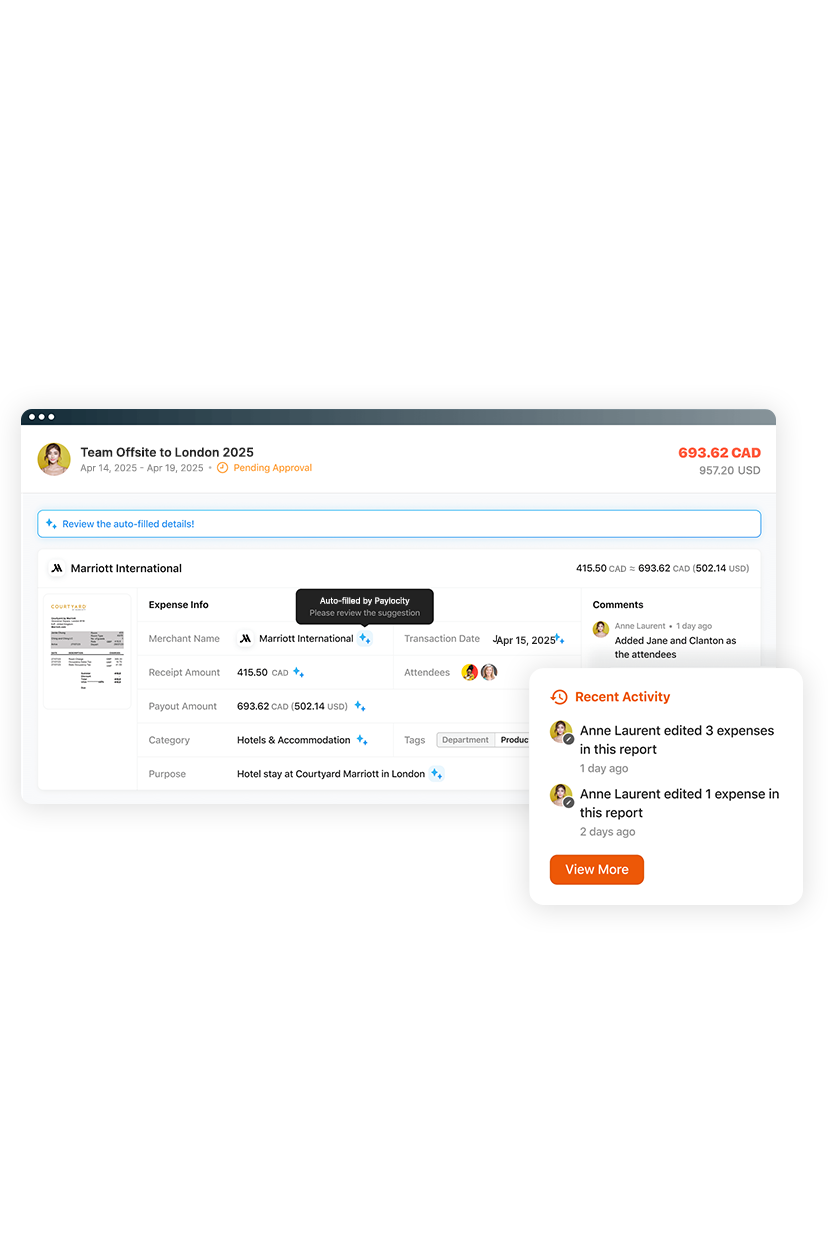
Seamless and adaptable Expense Management
Manual expense reporting wastes time and frustrates employees and finance teams. Paylocity for Finance automates the entire process with AI-powered, touchless workflows. Simply snap a receipt and get reimbursed fast — no spreadsheets, no delays. Finance gets real-time visibility, accurate coding, and a faster month-end close.
Related
![The 9 Best Payroll Software for Small Businesses [2026]](https://s7d9.scene7.com/is/image/paylocity/best-payroll-software-hero?$Hero-Card$)
The 9 Best Payroll Software for Small Businesses [2026]
